Texture bending in skp - how to ?
-
hello,
i just make experiments with textures in skp.does anybody know a way to bend a texture TOGETHER WITH the form ?
simple example:
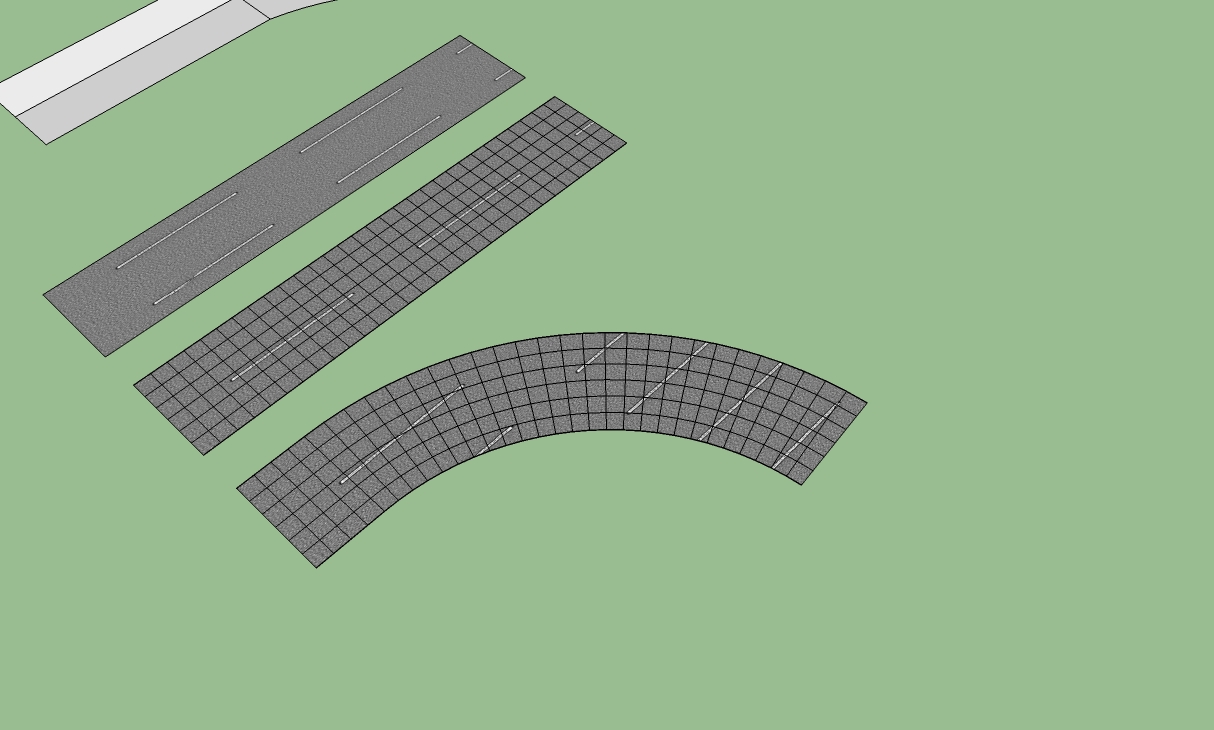
- street with texture
- street wirh texture and projected mesh
- bended by FREDO SCALE
here the texture keeps its direction in all single squares / triangles.
any idea, how to bend the particular texture-squares automatically (to become a curved road in this example)?
thanx for all ideas!
stan
-
Quadface tools by Thomthom ?
-
Or UVToolkit (RememberUV-RestoreUV) . http://sketchucation.com/forums/viewtopic.php?p=155759#p155759
-
-
hi and thanx to all,
with quadface tools ,after a day of trial and error ,
i can now manipulate some textures and bring the result from skp via collada into my vis-software .
interesting: every piece of the texture gets an own index in the colour-name in the collada file. obviously then the right uv-setting can be transported for each polygon.
thanx again for the help.
stan
-
Hi Stan,
You will probably need to ttriangualte those faces. Please, have a look at this tutorial:
http://sketchucation.com/resources/tutorials/36-intermediate/26-texturing-an-arch-2and especially the "Note" at the end...
-
hi gai, nice to meet you again, and thanx for the tip, i have learnt a lot. i think, i slowly come to the point.
regards to hungary!
stan





Hello! It looks like you're interested in this conversation, but you don't have an account yet.
Getting fed up of having to scroll through the same posts each visit? When you register for an account, you'll always come back to exactly where you were before, and choose to be notified of new replies (either via email, or push notification). You'll also be able to save bookmarks and upvote posts to show your appreciation to other community members.
With your input, this post could be even better 💗
Register Login


Advertisement