[Plugin] Layers Panel 1.2.1
-
matt > Your files work just fine for me. It seems you have a similar issue than JQL who also sent me a file that works fine on my machine. Did you guys recently installed a new plugin?
What happens if you disable all the other plugins? (Rename your plugins folder to something like "Plugins2", and create a new "Plugins" folder with only LP in it)
-
@jiminy-billy-bob said:
What happens if you disable all the other plugins? (Rename your plugins folder to something like "Plugins2", and create a new "Plugins" folder with only LP in it)
 hmmmmm. I've been going through and doing a clean network install of plugins and testing them 1 by 1 to make sure they work well in 2014 (with the new move to Ruby 2). I'll get to disabling all the other plugins and testing Layers Panel solo. I'll let you know!
Thanks!
-
Ok, no luck. Even removing all plugins, and installing only to the default plugins directory, same behavior. Everything works until I try to create a Layer Panel group, then most of the UI elements break. Any thoughts on what I can do to help track down what my computer is doing to this thing?
-
Nothing in the ruby console?
Did you try running the plugin from your local machine, instead of the network? -
@jiminy-billy-bob said:
Nothing in the ruby console?
Did you try running the plugin from your local machine, instead of the network?I'm not great with understanding the ruby console yet, but I had it open, and it showed no output.
Yes, I tried it by removing everything aside from the default extensions that ship with SketchUp, and installing JBB_LP to the default plugins. Still no luck. It's weird, I cannot figure out what's going on with it. Everything works fine until the Group button is used, then bam, dead.
-
What happens in a new file?
Did you try in SU2013 or SU8?Also, what is your version of Internet Explorer?
Frankly, this is a mystery to me

-
New file gets the same behavior, even from the SketchUp standard templates that ship with it. Trying it on a different version is next up. I will probably have to test it on SU Make, Pro 2014 is the only one I have.
IE version: 11.0.9600.17041
I'm going to test it on a couple other workstations to see if they get the same issue. I'm totally perplexed as well. It doesn't through up any errors or info in the console, beats the hell out of me. I'll give you an update whenever can. Maybe I'll have to reformat my system and try again.
-
@matt.gordon320 said:
I will probably have to test it on SU Make, Pro 2014 is the only one I have.
You can download older versions here: http://www.sketchup.com/download/all
@matt.gordon320 said:
Maybe I'll have to reformat my system and try again.
Before doing so, make sure to test on other workstations.
I'll myself try to include a debug console inside Layers Panel dialog, so that you can see what's breaking.
What is the language of your sketchup install?
-
@jiminy-billy-bob said:
I'll myself try to include a debug console inside Layers Panel dialog, so that you can see what's breaking.
What is the language of your sketchup install?
What is the proper way to debug? I'm actually really curious, looking forward to nailing down the issue, I'm learning Ruby 2 to write my own plugins, so the more I can learn about the process. So I should keep the console open while testing this? Are there any options or anything I need to tick first prior to testing it?
I'm running just the standard US English version. It'd be nice to have it be some unicode character that's causing the issue, at least that'd be an easier starting point than this mystery.
-
Just got this when importing a model from the 3D Warehouse from the Component Browser:
Error; #<NoMethodError; undefined method `execute_script' for nil;NilClass>
C;/Users/Jim/Dropbox/Plugins/jbb_layers_panel/rb/observers.rb;60;in `onChangeEntity'
C;/Users/Jim/Dropbox/Plugins/jbb_layers_panel/rb/observers.rb;109;in `commit_operation'
C;/Users/Jim/Dropbox/Plugins/jbb_layers_panel/rb/observers.rb;109;in `block in onLayerAdded'
Version 1.1.0
Windows 8
SketchUp 2014 Pro -
@matt.gordon320 said:
What is the proper way to debug? I'm actually really curious, looking forward to nailing down the issue, I'm learning Ruby 2 to write my own plugins, so the more I can learn about the process. So I should keep the console open while testing this? Are there any options or anything I need to tick first prior to testing it?
I'm kind of a ruby newbie myself, so I'm not sure what the "proper" way is. One sure thing, though, is that I always have the ruby console opened when debugging my plugin. But it just gives you the ruby-related errors.
In this case, it seems to be a javascript-related error. Usually I debug this by neutralizing whole bunches of code and see what's breaking. But as I can't come to your house and debug on your machine ( ), I need to implement a console inside the webdialog that would output js errors. I know thomthom and maybe others use firebug lite, I'll try to make it work.
@matt.gordon320 said:
I'm running just the standard US English version. It'd be nice to have it be some unicode character that's causing the issue, at least that'd be an easier starting point than this mystery.
Yeah... But it doesn't seem to be the case, as your file works fine on my PC, and I'm also running SU english.
@jim said:
Just got this when importing a model from the 3D Warehouse from the Component Browser:
Could you give me a link to that model?
-
@function said:
sometimes when i try and undo an operation it does not work and looking at EDIT -> UNDO - it will say UNDO Properties as if I changed a property instead of the modeling operation I am trying to undo... is this coming from Layers Panel?
This happens to me quite often. It is undoubtedly coincidence, but when I disable Layers Panel I don't have UNDO problems.
Pity because LP is such an outstanding tool. -
@jql said:
I can't create new layer groups
@matt.gordon320 said:
most of the UI isn't responding
@jim said:
Just got this when importing a model from the 3D Warehouse
Ok guys, I found the issue. I'll release a fixed version ASAP.
In the meantime, you can replace the two files attached in the folder
C:\Users\_USERNAME_\AppData\Roaming\SketchUp\SketchUp 2014\SketchUp\Plugins\jbb_layers_panel\rb
-
Very cool! I was actually just finding the time to install the Firebug version you sent, when I read this. Let me know if you still want me to test anything out, as I'd be happy to!
-
If this works for you, there is no need

-
@jiminy-billy-bob said:
@jql said:
I can't create new layer groups
@matt.gordon320 said:
most of the UI isn't responding
@jim said:
Just got this when importing a model from the 3D Warehouse
Ok guys, I found the issue. I'll release a fixed version ASAP.
In the meantime, you can replace the two files attached in the folder
C:\Users\_USERNAME_\AppData\Roaming\SketchUp\SketchUp 2014\SketchUp\Plugins\jbb_layers_panel\rbGreat one Jiminy do you think this also has something to do with what happened to my groups?
Thanks,
JQL
-
I don't think so, but I don't know where it could come from.
So, maybe... -
@jiminy-billy-bob said:
Does it happen in every file? Even a brand new one?
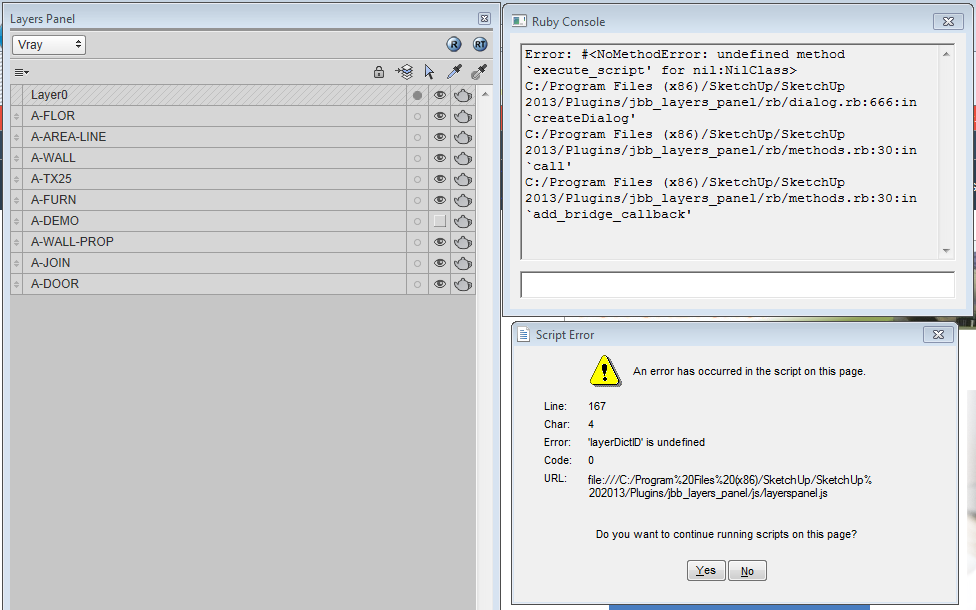
Yup, even with brand new files. I'm also having problems creating layer groups and new layers...they either simply won't create or when they are created they can't be renamed, and nothing can be added to them, visibility controls won't work etc.
Sometimes I lose all of the layer group structures I've created previously as well. This happens when I open more than one session of sketchup side by side...
Error message when I try to create new layer groups attached.
Cheers
Joel
-
@ivreich said:
@jiminy-billy-bob said:
Does it happen in every file? Even a brand new one?
Sometimes I lose all of the layer group structures I've created previously as well. This happens when I open more than one session of sketchup side by side...
Side by side you say?... I'll double check on that as I'm permanently doing it too!
With the new files I can create groups again though.
-
This is getting better and better! many thanks!!
small hick-up here. Is that the Layer Status does not work occasionally. I can still click it, but it won't update the layers I want to see.
Running on SU2014 on Mac





Advertisement