Raster to Vector or Sketchup importing SVG
-
thomthom
When I get a PDF I can convert to a dxf, I use the import to make models after making sure the scale is correct.
If I can't convert to dxf, I make a screen grab and import that into Sketchup. However, the images have wide fuzzy lines that get worst as I scale up the screen grab. So I was hoping that a vector conversion would have thinner lines and clearer lines, making it easier to measure and have a little less error.
My screen grabs are very selective, I don't try to get the whole drawing. I usually only grab a selected part.
I don't expect to have a clean conversion from images to vector, however, if I can get thinner and clearer lines and lines that don't enlarge when I scale the drawing I will be able to make a better model. I am under no illusion that a raster to vector conversion is going to solve the problem with scanned images, however, I was hoping to get better results.
Ken
-
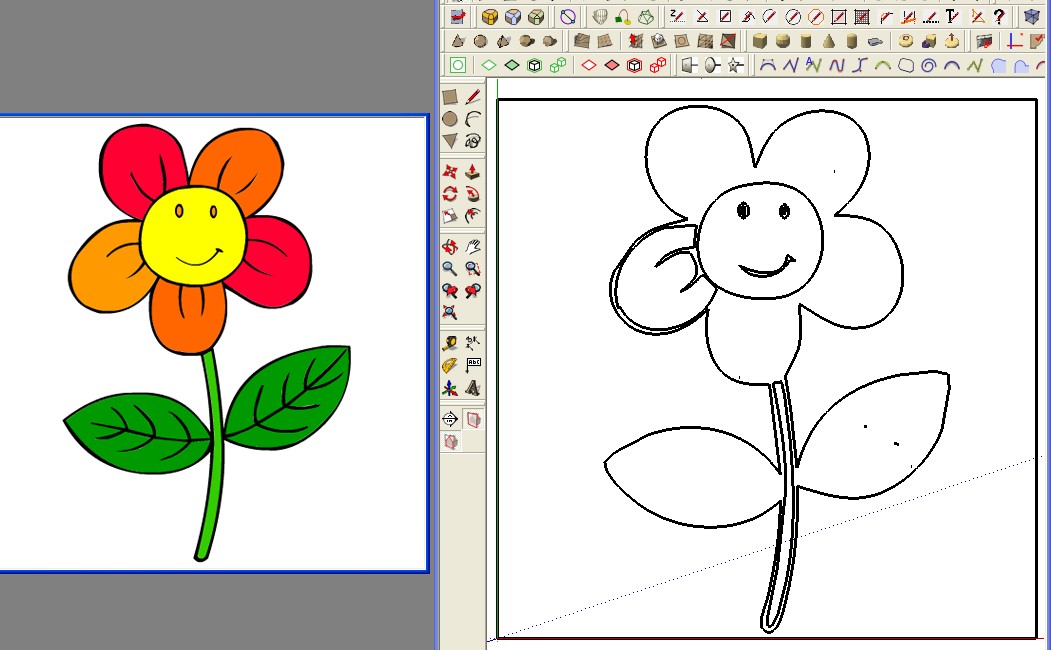
I test this free one one line http://www.autotracer.org
regulates 2 colors, 10, 10
Save as DXF
Import in Sketchup 6 free
3047 edgesNo problem I have the contours



-
Thanks thomthom and Pilou
I tried the online, and it did just what I wanted. Made the line into vectors such that scaling up they didn't get fuzzy.
Also found WIN TOPO, free which also does the job. So now I will be able to carry on with these scanned ACAD files.
Thanks again.
Ken
-
I've still yet to get any good results with the ones I've tried... I have a raster to vector thread somewhere around here.
-
mark
-
here are some threads I've made and the responses.
-
Krisidious
Thank you for your reply and you finding the old threads.
I have found four ways to do what I need.
- WIN TOPO -Free
- http://www.autotracer.org suggested by Pilou
- Inkscape - I have found that Inkscape does a good job of converting PDF to DXF files.
- RealDraw Pro - I have found that RealDraw Pro does a good job of tracing a bmp file.
All four of these solutions do an OK job. Nothing to brag about. However, I have found if I do a raster to vector conversion, and input this file and the image file in the same Sketchup file, and scale both, I get a good presentation on how to model the part. I don't try to vectorize a complete drawing just a sub set of parts. So now, I am content.
I make a group of the vector file, add a plane of transparent yellow over the file and redraw over the lines. By using a transparent yellow plane over the vector file I can see the lines I have drawn.
With a vector file I can get Sketchup to snap to ends of lines or crossing. With an image file, that does not happen.
Thanks to all that have replied.
Ken
-
Maybe you can use too the new Toposhaper by Fredo 6 for optimize the result (line broken etc...
-
Pilou
I will take a look at that plugin. However, I redraw the parts and now that I have a way to make a vector file, I have the lines I need to use the Sketchup snapping to line ends or centers.
I just wanted the vector to get snapping to work, as it didn't work on an image.
Thanks, I will take a look and see it the plugin make the vector file easier to use.
Ken
-
Scan2Cad, http://www.scan2cad.com/ has been around for a long time, but its current release Release 8.3 is not cheap. It might suit some peoples needs though, & there is a free trial. It recognises and can edit text in images and supports batch processing. Its probably one of the best available bits of software for complex raster conversions out there. It's a few years (10 maybe) since I used it but I remember it as a highly competent program. As far as I remember AutoCAD Map had raster to vector functions built in, so our office switched to that on cost grounds.




Hello! It looks like you're interested in this conversation, but you don't have an account yet.
Getting fed up of having to scroll through the same posts each visit? When you register for an account, you'll always come back to exactly where you were before, and choose to be notified of new replies (either via email, or push notification). You'll also be able to save bookmarks and upvote posts to show your appreciation to other community members.
With your input, this post could be even better 💗
Register Login


Advertisement