Post-its in SketchUp screen (DCExamples.skp)
-
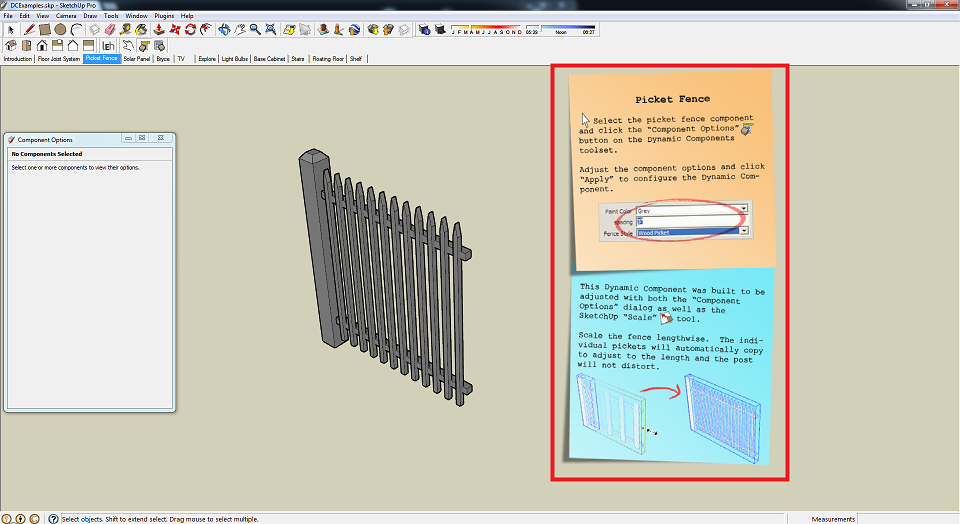
Hello. I was learning dynamic components today and downloaded DCExamples.skp on de SketchUp website. My attention didn't go to the dynamic components when I opened the file but to the post-it like dialogs which appear on the screen. See image in attachment.
I was just wondering if anyone knows how they are made? They must be part of the SKP-file. I've been looking for a while to make UI's that appear in the SketchUp window instead of in it's own window like webdialogs and default dialogs...
-
Probably added as Style Watermarks...
Or could be Images made into face-me components?
-
Do you have the link to that "DCExamples.skp" file ??
-
I found the file and TIG is right...
Unique Watermark for each Scene -
draw2d and Chunky_png could accomplish the same result with some dynamic options.



Hello! It looks like you're interested in this conversation, but you don't have an account yet.
Getting fed up of having to scroll through the same posts each visit? When you register for an account, you'll always come back to exactly where you were before, and choose to be notified of new replies (either via email, or push notification). You'll also be able to save bookmarks and upvote posts to show your appreciation to other community members.
With your input, this post could be even better 💗
Register Login


Advertisement