sketchucation logo sketchucation
    • Login
    Oops, your profile's looking a bit empty! To help us tailor your experience, please fill in key details like your SketchUp version, skill level, operating system, and more. Update and save your info on your profile page today!
    ⚠️ Important | Libfredo 15.6b introduces important bugfixes for Fredo's Extensions Update

    [REQ] Click Copy Rotation-Released

    Scheduled Pinned Locked Moved Plugins
    12 Posts 3 Posters 553 Views 3 Watching
    Loading More Posts
    • Oldest to Newest
    • Newest to Oldest
    • Most Votes
    Reply
    • Reply as topic
    Log in to reply
    This topic has been deleted. Only users with topic management privileges can see it.
    • sdmitchS Offline
      sdmitch
      last edited by

      Do you want the copy to be inserted at and rotated around the picked point?

      Nothing is worthless, it can always be used as a bad example.

      http://sdmitch.blogspot.com/

      1 Reply Last reply Reply Quote 0
      • J Offline
        Jim
        last edited by

        Sounds like this: http://forums.sketchucation.com/viewtopic.php?t=11143

        Hi

        1 Reply Last reply Reply Quote 0
        • pilouP Offline
          pilou
          last edited by

          @unknownuser said:

          Sounds like this

          Not exactly πŸ˜„

          @unknownuser said:

          Do you want the copy to be inserted at and rotated around the picked point?

          Yes like this
          Select an object
          Call plug / Initialisation of the plug
          First click on the object is the position of the insertion object
          Degre asked
          Then the plug can run

          Inserted at the mouseclick point position + rotation degre asked

          So if the rotation asked was 10 Β° at the beginning of the call plug
          and if it's the 5th click since the running of the plug, (first click don't count of course)
          object must be rotated by 50Β°
          6 objects must drawn from the beginning, an original
          and 5 copy anywhere on the screen where the mouse was clicked

          Frenchy Pilou
          Is beautiful that please without concept!
          My Little site :)

          1 Reply Last reply Reply Quote 0
          • sdmitchS Offline
            sdmitch
            last edited by

            @unknownuser said:

            Works like a charm! πŸ‘
            Just 2 little things
            Ctl + Z exit and dont erase the last drawn object << Esc key
            The helper text appears before the Snap point << ??? You want to pick the Component/Group first then get the "Rotate by:" prompt?

            Very cool for make random tilling controled! β˜€

            Nothing is worthless, it can always be used as a bad example.

            http://sdmitch.blogspot.com/

            1 Reply Last reply Reply Quote 0
            • pilouP Offline
              pilou
              last edited by

              Bravo! β˜€
              Works like a charm! πŸ‘
              Just 2 little things πŸ˜„
              Ctl + Z exit and dont erase the last drawn object
              The helper text appears before the Snap point (and snap point genarally don't appears)
              but not really a problem because Helper text is always working!

              Very cool for make random tilling controled! β˜€

              Frenchy Pilou
              Is beautiful that please without concept!
              My Little site :)

              1 Reply Last reply Reply Quote 0
              • sdmitchS Offline
                sdmitch
                last edited by

                Not sure why but I don't have that problem.

                Nothing is worthless, it can always be used as a bad example.

                http://sdmitch.blogspot.com/

                1 Reply Last reply Reply Quote 0
                • pilouP Offline
                  pilou
                  last edited by

                  All works fine, it's just the snap point who is not visible!
                  Helper text appears but not the snap point!
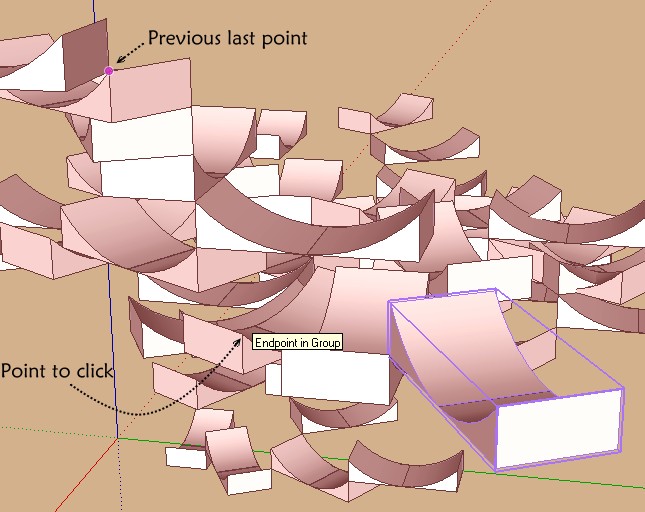
                  test.jpg

                  That makes the same for the selection of the first point of insertion!
                  That is not really a problem, that is just curious πŸ˜„

                  Frenchy Pilou
                  Is beautiful that please without concept!
                  My Little site :)

                  1 Reply Last reply Reply Quote 0
                  • pilouP Offline
                    pilou
                    last edited by

                    I was on V7
                    I will try on a v8 version πŸ˜„
                    Thanks again for the effort! πŸ‘

                    For the "take back" (erase the last object error )
                    I can just exit, kill the last drawn object, and remake a start! πŸ˜‰

                    Frenchy Pilou
                    Is beautiful that please without concept!
                    My Little site :)

                    1 Reply Last reply Reply Quote 0
                    • sdmitchS Offline
                      sdmitch
                      last edited by

                      post deleted.

                      Nothing is worthless, it can always be used as a bad example.

                      http://sdmitch.blogspot.com/

                      1 Reply Last reply Reply Quote 0
                      • pilouP Offline
                        pilou
                        last edited by

                        Sam makes it! 😎

                        You will can find it on his blog in no time! β˜€
                        Very cool blog, each Plug has a tuto video!
                        Select an object Group or Component
                        Select a rotation's degree (can be made on the fly during the clicks)
                        Select a point of reference on the object
                        Click anywhere you want, the object will be copy and increment rotated!
                        You can use Key BackSpace for erased previus objects

                        A cool one! πŸ‘

                        copyrotate.jpg

                        Frenchy Pilou
                        Is beautiful that please without concept!
                        My Little site :)

                        1 Reply Last reply Reply Quote 0
                        • pilouP Offline
                          pilou
                          last edited by

                          Edit : you can find it here on the fabulous Blog of SDmitch! πŸ‘
                          Released! 😎
                          Copy Rotate

                          Frenchy Pilou
                          Is beautiful that please without concept!
                          My Little site :)

                          1 Reply Last reply Reply Quote 0
                          • 1 / 1
                          • First post
                            Last post
                          Buy SketchPlus
                          Buy SUbD
                          Buy WrapR
                          Buy eBook
                          Buy Modelur
                          Buy Vertex Tools
                          Buy SketchCuisine
                          Buy FormFonts

                          Advertisement