Installation -Curviloft-
-
Hallo zusammen, ich habe mir das Plugin "Curviloft" heruntergeladen und die Datei "CURVILOFT_Dir_12" unter /Plugins... gespeichert. Wenn ich SU. öffne finde ich allerdings dazu keinen Hinweis auf dieses Programm. Wie kann ich denn jetzt das Programm im SU. sichtbar / verfügbar machen?
Grüße Michael -
Preferences > Extensions > activate
View > Toolbars > activateEinstellungen> Erweiterungen> aktivieren
Ansicht> Symbolleisten> aktivieren -
verstehe ich nicht. was soll ich unter: Einstellungen> Erweiterungen> aktivieren??? Da ist alles aktiviert aber da steht nichts von "Curviloft"!!!???
-
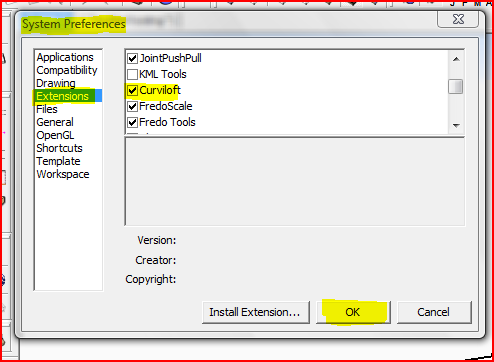 If you don't see this [in German!] then it's not installed properly.
Screenshot of your Plugins folder etc ?Wenn Sie nicht sehen, diese [in deutscher Sprache!] Dann ist es nicht richtig installiert.
Screenshot von Ihrem Plugins-Ordner etc? -
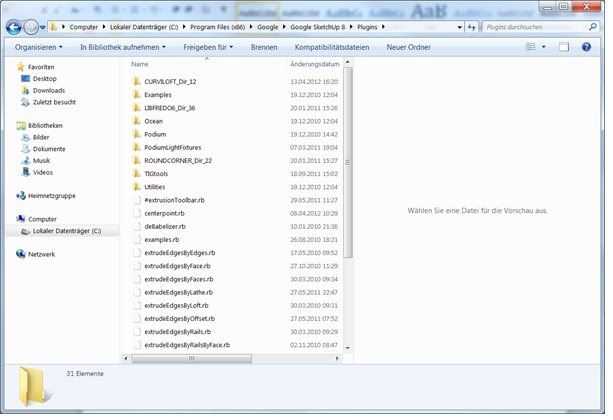
im Anhang findest du den Screenshot von der Plugin- Datei.
-
You have a very old version of the Lib folder [Sie haben eine sehr alte Version der Lib-Ordner.].

Get the current Lib that is required by most of Fredo's tools [Holen Sie sich den aktuellen Lib, die von den meisten von Fredo-Tools erforderlich ist]
The download link is on the CurviLoft download page too - it does tell you that you need the latest Lib... [Der Download-Link ist auf der Download-Seite zu CurviLoft - es tut Ihnen sagen, dass Sie die neueste Lib müssen ...] -
OK, jetzt funktioniert es. Danke TIG


Hello! It looks like you're interested in this conversation, but you don't have an account yet.
Getting fed up of having to scroll through the same posts each visit? When you register for an account, you'll always come back to exactly where you were before, and choose to be notified of new replies (either via email, or push notification). You'll also be able to save bookmarks and upvote posts to show your appreciation to other community members.
With your input, this post could be even better 💗
Register Login


Advertisement