sketchucation logo sketchucation
    • Login
    Oops, your profile's looking a bit empty! To help us tailor your experience, please fill in key details like your SketchUp version, skill level, operating system, and more. Update and save your info on your profile page today!
    Mac User? | Join the Rayscaper Beta for Mac Learn More

    [Plugin] FullScreen v5.1.3 (25 April 2024)

    Scheduled Pinned Locked Moved Plugins
    285 Posts 79 Posters 463.1k Views 80 Watching
    Loading More Posts
    • Oldest to Newest
    • Newest to Oldest
    • Most Votes
    Reply
    • Reply as topic
    Log in to reply
    This topic has been deleted. Only users with topic management privileges can see it.
    • J
      joerg
      last edited by

      Hi Anton,

      thanks once again for your very helpfull extension!
      I have a problem when the menu bar is hidden. Shortcuts are working, but one shortcut freezes the following shortcuts: Functions/Interact (I`m using your extension in presentations with dynamic components).
      Same problem on WIN10 and WIN11 Pro with SU2021Pro.

      Thanks for your help!
      Joerg

      1 Reply Last reply
      Reply Quote 0
      • A
        Apollo Tuan
        last edited by

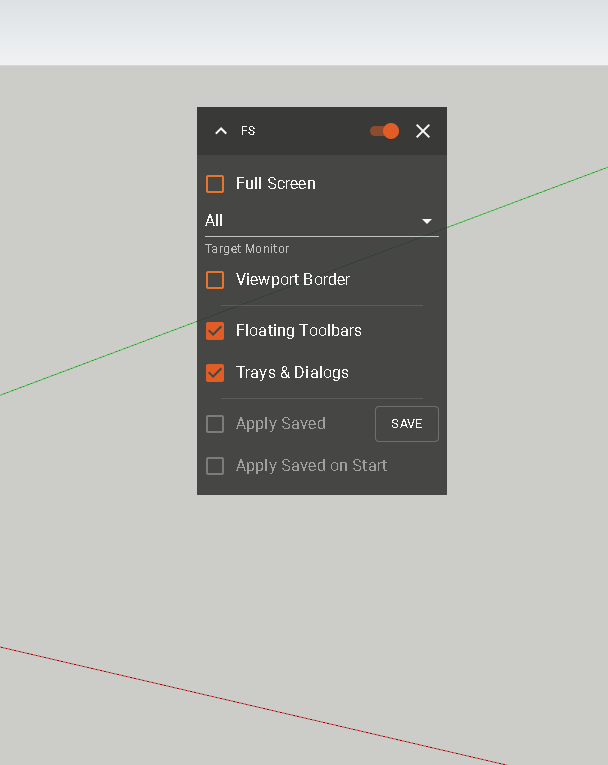
        After I installed it, I found it was not complete and only showed some of the features

        ams.png

        1 Reply Last reply
        Reply Quote 0
        • shake1S
          shake1
          last edited by

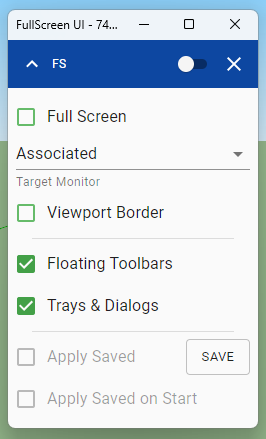
          Anton, please adapt for 2023. This is the head of all plugins.

          FullScreen 2023 bug.png

          1 Reply Last reply
          Reply Quote 0
          • S
            sarkarshomit
            last edited by

            So the plugin is still awaiting update for Sketchup 2023?
            I use this plugin a lot in Skup2021, but completely migrating to SU23, is not getting possible due to incompatible FS plugin

            1 Reply Last reply
            Reply Quote 0
            • A
              Anton_S
              last edited by

              Hello everyone! This should work with SU2023. The incomplete UI is because SU2023 has undergone a major internal framework change and I no longer have the capability to manipulate some of the elements. Things like full-screen, should still work though. Let me know if otherwise.

              S 1 Reply Last reply
              Reply Quote 0
              • kimgaK
                kimga
                last edited by

                @anton_s said:

                Hello everyone! This should work with SU2023. The incomplete UI is because SU2023 has undergone a major internal framework change and I no longer have the capability to manipulate some of the elements. Things like full-screen, should still work though. Let me know if otherwise.

                HI Anton,

                I just installed the plugin. I have never used it, so not sure how it meant to work. I was looking for a way to fullscreen the working window to see the V-ray safe screen, unfortunately, I didn't manage this with your extension used with SketchUp 2023 running on Windows 11.

                Good day!

                1 Reply Last reply
                Reply Quote 0
                • S
                  sarkarshomit @Anton_S
                  last edited by sarkarshomit

                  @Anton_S No sir, its still not working with Su2023 on win10.
                  I so wish if u could give the plugin its much required overhaul.
                  When i press the fullscreen button check box, it does go in fullscreen, but it does not hide floating and docked toolbars, which i really use a lot for taking screenshots of my works.

                  1 Reply Last reply
                  Reply Quote 0
                  • L
                    laughoutloud99
                    last edited by

                    This plugin cannot load correctly in the su2024.
                    We used it to keep clean UI for years.
                    Please request a fix for it.
                    Thank you to anyone who can help.

                    1 Reply Last reply
                    Reply Quote 0
                    • shake1S
                      shake1
                      last edited by

                      The greatest value for me is to show/hide the toolbar or tray in one click.
                      The last time this worked was in SU 2022. This functionality is really missing.

                      1 Reply Last reply
                      Reply Quote 0
                      • A
                        Anton_S
                        last edited by

                        Hi all, the plugin is now updated to work with the latest version of SU2023 and SU2024. Please note that the features in SU2023 and later are limited because SketchUp changed to a new, Qt-based framework, and I have not found a way to hack it.

                        D 1 Reply Last reply
                        Reply Quote 0
                        • D
                          Design_Dong @Anton_S
                          last edited by

                          @Anton_S

                          @Anton_S said in [Plugin] FullScreen v5.1.3 (25 April 2024):

                          Hi all, the plugin is now updated to work with the latest version of SU2023 and SU2024. Please note that the features in SU2023 and later are limited because SketchUp changed to a new, Qt-based framework, and I have not found a way to hack it.

                          hope you can fix all functions in 2024

                          1 Reply Last reply
                          Reply Quote 0
                          • J
                            joydeep70
                            last edited by

                            Fix it as early as possible. Study hard. God bless you.

                            1 Reply Last reply
                            Reply Quote 0

                            Hello! It looks like you're interested in this conversation, but you don't have an account yet.

                            Getting fed up of having to scroll through the same posts each visit? When you register for an account, you'll always come back to exactly where you were before, and choose to be notified of new replies (either via email, or push notification). You'll also be able to save bookmarks and upvote posts to show your appreciation to other community members.

                            With your input, this post could be even better πŸ’—

                            Register Login
                            • 1
                            • 2
                            • 10
                            • 11
                            • 12
                            • 13
                            • 14
                            • 15
                            • 12 / 15
                            • First post
                              Last post
                            Buy SketchPlus
                            Buy SUbD
                            Buy WrapR
                            Buy eBook
                            Buy Modelur
                            Buy Vertex Tools
                            Buy SketchCuisine
                            Buy FormFonts

                            Advertisement