sketchucation logo sketchucation
    • Login
    Oops, your profile's looking a bit empty! To help us tailor your experience, please fill in key details like your SketchUp version, skill level, operating system, and more. Update and save your info on your profile page today!
    ⚠️ Update | Sketchucation Tools 5.0.8 released with licensing improvements and bugfixes Download

    [Plugin] FredoTools - v4.5c - 24 Jun 24


    Scheduled Pinned Locked Moved Plugins
    463 Posts 123 Posters 836.6k Views 121 Watching
    Loading More Posts
    • Oldest to Newest
    • Newest to Oldest
    • Most Votes
    Reply
    • Reply as topic
    Log in to reply
    This topic has been deleted. Only users with topic management privileges can see it.
    • fredo6F
      fredo6
      last edited by

      guanjin,

      This may be related to the Chinese translation. Do you get the error if you switch to English?
      Also, could you check if there is no error displayed in the Ruby console

      Fredo

      1 Reply Last reply
      Reply Quote 0
      • guanjinG
        guanjin
        last edited by

        @fredo6 said:

        guanjin,

        This may be related to the Chinese translation. Do you get the error if you switch to English?
        Also, could you check if there is no error displayed in the Ruby console

        Fredo

        Also, like switching to English,The same problem。

        After activation texture tool display properly activated, see the movie.
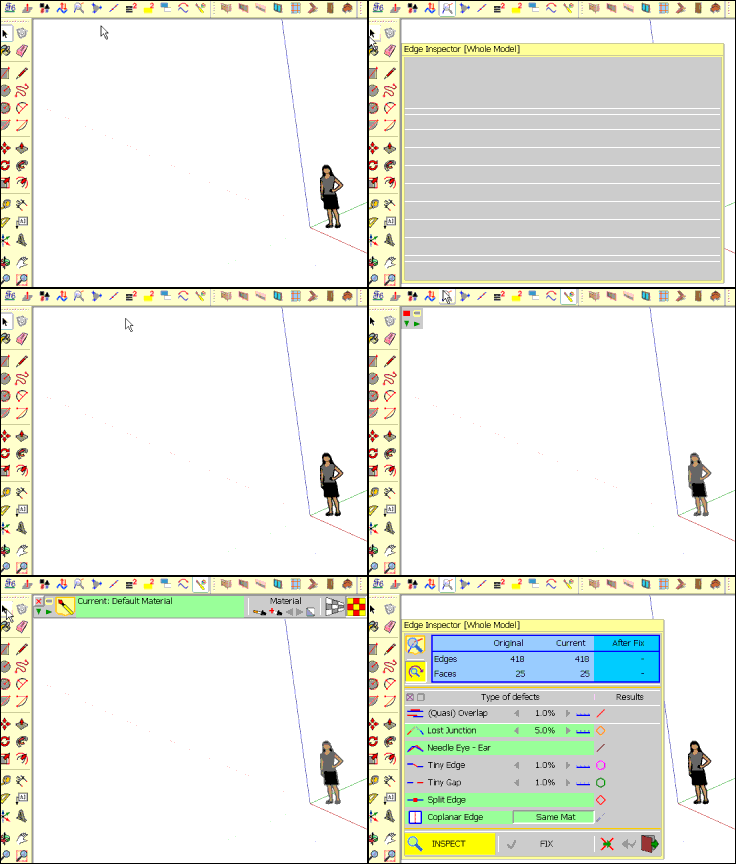
        wenti9999999999999999999999999999.gif

        I come from China, is to learn

        1 Reply Last reply
        Reply Quote 0
        • Fcharly24hF
          Fcharly24h
          last edited by

          On SU 2014 Make the tool bar don't ok for:
          Fredo tools
          curvizard

          Thanks.

          Fcharly24h
          Mon site: Fcharly24h.perso.sfr.fr

          1 Reply Last reply
          Reply Quote 0
          • cottyC
            cotty
            last edited by

            @unknownuser said:

            On SU 2014 Make the tool bar don't ok for:
            Fredo tools
            curvizard

            Thanks.

            Why not?

            my SketchUp gallery

            1 Reply Last reply
            Reply Quote 0
            • B
              babak
              last edited by

              @cotty said:

              @unknownuser said:

              On SU 2014 Make the tool bar don't ok for:
              Fredo tools
              curvizard

              Thanks.

              Why not?

              I think what Fcharly24H means is that the tool palette doesn't appear everytime you click on Fredo's toolbars icons with sketchup 2014.

              For me it happens very often with thrupaint. When I click on the icon, it only triggers sketchup native paint bucket and if I zoom in and out while clicking on and off the tool palette might appears but not necessary.

              I haven't noticed any problem with other tools though.

              Thank you Fredo06 for your plugins ! 😛

              1 Reply Last reply
              Reply Quote 0
              • Fcharly24hF
                Fcharly24h
                last edited by

                I don't know!
                I no problem in verification update, no problem with other plugin of Fredo6

                in C:\Users\Fcharly24h\AppData\Roaming\SketchUp\SketchUp 2014\SketchUp\Plugins
                I have:
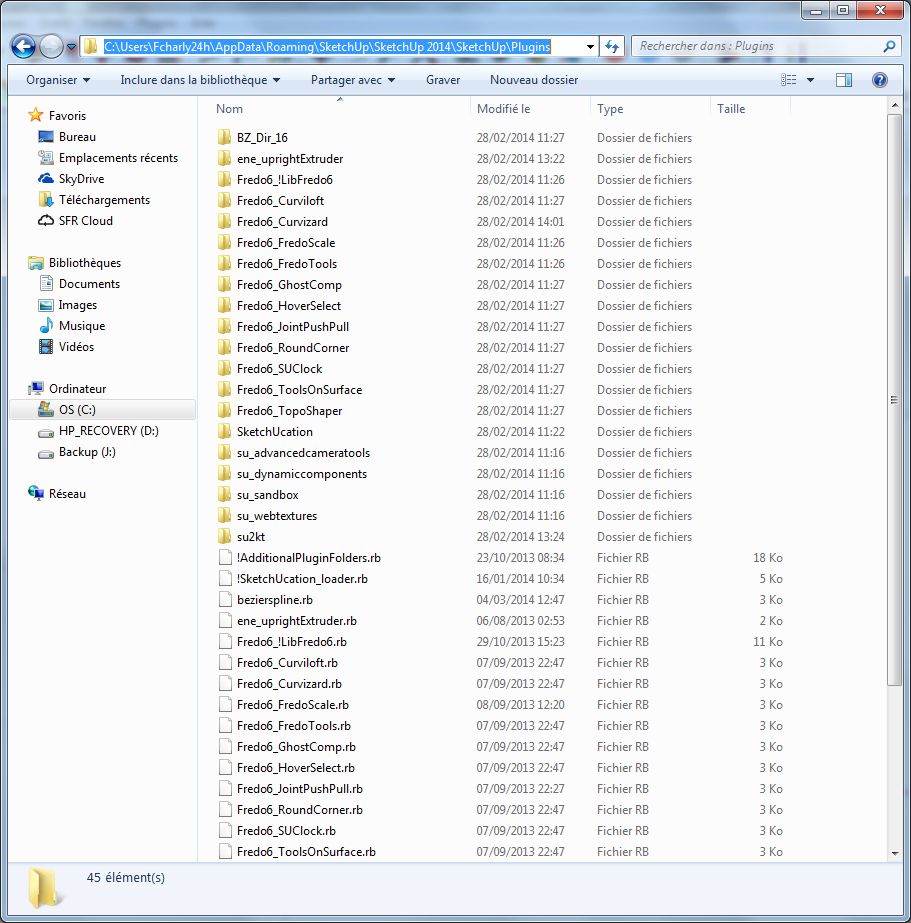
                new location plugin in Su 2014 Make
                Icon tool bar ok

                in SU make 2014 no icon bar for:
                Fredo tools
                curvizard

                in SU make 2013 ok
                Icon tool bar Su Make 2013 ok

                Fcharly24h
                Mon site: Fcharly24h.perso.sfr.fr

                1 Reply Last reply
                Reply Quote 0
                • D
                  dedmin
                  last edited by

                  Object disappears when hitting Esc two times while using ThruPaint
                  SU 2014 Pro, Win 7 64bit SP1 Ultimate

                  Video_2014-03-26_132637.wmv

                  1 Reply Last reply
                  Reply Quote 0
                  • fredo6F
                    fredo6
                    last edited by

                    @dedmin said:

                    Object disappears when hitting Esc two times while using ThruPaint
                    SU 2014 Pro, Win 7 64bit SP1 Ultimate

                    [attachment=0:3relfv60]<!-- ia0 -->Video_2014-03-26_132637.wmv<!-- ia0 -->[/attachment:3relfv60]

                    Escape performs an Undo. So this may be related to making sure it does not go to far back in the Undo stack. I'll check this problem.

                    Fredo

                    1 Reply Last reply
                    Reply Quote 0
                    • D
                      dedmin
                      last edited by

                      See the video.
                      Video_2014-03-26_151418.wmv

                      1 Reply Last reply
                      Reply Quote 0
                      • fredo6F
                        fredo6
                        last edited by

                        That's a consequence of enabling 'Auto-Exit' when there is a pre-selection (which is not the default).

                        Maybe I will use this fast-mode only for Make Curve and Explode Curve, and ignore it for other Tools.

                        Fredo

                        1 Reply Last reply
                        Reply Quote 0
                        • fredo6F
                          fredo6
                          last edited by

                          There must be a bug somewhere, but in general, painting boxes correctly in continuity on all its faces is very tricky.

                          Trying with your model, I noticed the flipping and I'll have a look at it.

                          What I suggest is that you just paint the last face directly, instead of extending it from adjacent faces.

                          Fredo

                          1 Reply Last reply
                          Reply Quote 0
                          • fredo6F
                            fredo6
                            last edited by

                            NEW RELEASE: FredoTools v1.8c - 17 Apr 14

                            FredoTools 1.8c is a release for MoveAlong v1.0.

                            See main post of this thread for Download.

                            Fredo

                            1 Reply Last reply
                            Reply Quote 0
                            • KrisidiousK
                              Krisidious
                              last edited by

                              You soooo rock...

                              By: Kristoff Rand
                              Home DesignerUnique House Plans

                              1 Reply Last reply
                              Reply Quote 0
                              • B
                                Ben Ritter
                                last edited by

                                Thank you again.😄

                                1 Reply Last reply
                                Reply Quote 0
                                • fredo6F
                                  fredo6
                                  last edited by

                                  NEW RELEASE: FredoTools v1.8e - 20 Apr 14

                                  FredoTools 1.8d is a release fixing a problem in MoveAlong v1.0.

                                  The issue was about moving a selection containing a huge number of entities, as signaled by rv1974.

                                  See main post of this thread for Download.

                                  Fredo

                                  1 Reply Last reply
                                  Reply Quote 0
                                  • OxerO
                                    Oxer
                                    last edited by

                                    Thanks for the new version and new tool Move Along 👍

                                    I have made a new Spanish Language (Spain) file to include the new tool.

                                    Spanish Language (Spain)

                                    "The result is the end what is important is the process" by Oxer
                                    http://www.oxervision.blogspot.com/

                                    1 Reply Last reply
                                    Reply Quote 0
                                    • fredo6F
                                      fredo6
                                      last edited by

                                      Oxer,

                                      Thanks. I will integrate in the next release.

                                      Also, for info, all the tooltips for inferences in MoveAlong are actually defined in LibFredo6, not in FredoTools. This is why they won't appear in Spanish.

                                      Fredo

                                      1 Reply Last reply
                                      Reply Quote 0
                                      • OxerO
                                        Oxer
                                        last edited by

                                        Thanks for the info Fredo. I have made the new Spanish Language (Spain) file to LibFredo6, do you want that i upload it here or in LibFredo6 topic?

                                        "The result is the end what is important is the process" by Oxer
                                        http://www.oxervision.blogspot.com/

                                        1 Reply Last reply
                                        Reply Quote 0
                                        • fredo6F
                                          fredo6
                                          last edited by

                                          Oxer,

                                          Better in the LibFredo6 thread.

                                          Fredo

                                          1 Reply Last reply
                                          Reply Quote 0
                                          • OxerO
                                            Oxer
                                            last edited by

                                            Ok.

                                            "The result is the end what is important is the process" by Oxer
                                            http://www.oxervision.blogspot.com/

                                            1 Reply Last reply
                                            Reply Quote 0

                                            Hello! It looks like you're interested in this conversation, but you don't have an account yet.

                                            Getting fed up of having to scroll through the same posts each visit? When you register for an account, you'll always come back to exactly where you were before, and choose to be notified of new replies (either via email, or push notification). You'll also be able to save bookmarks and upvote posts to show your appreciation to other community members.

                                            With your input, this post could be even better 💗

                                            Register Login
                                            • 1
                                            • 2
                                            • 9
                                            • 10
                                            • 11
                                            • 12
                                            • 13
                                            • 23
                                            • 24
                                            • 11 / 24
                                            • First post
                                              Last post
                                            Buy SketchPlus
                                            Buy SUbD
                                            Buy WrapR
                                            Buy eBook
                                            Buy Modelur
                                            Buy Vertex Tools
                                            Buy SketchCuisine
                                            Buy FormFonts

                                            Advertisement