sketchucation logo sketchucation
    • Login
    Oops, your profile's looking a bit empty! To help us tailor your experience, please fill in key details like your SketchUp version, skill level, operating system, and more. Update and save your info on your profile page today!
    ⚠️ Update | Sketchucation Tools 5.0.8 released with licensing improvements and bugfixes Download

    Light Arcs

    Scheduled Pinned Locked Moved Gallery
    18 Posts 10 Posters 1.8k Views 10 Watching
    Loading More Posts
    • Oldest to Newest
    • Newest to Oldest
    • Most Votes
    Reply
    • Reply as topic
    Log in to reply
    This topic has been deleted. Only users with topic management privileges can see it.
    • boofredlayB
      boofredlay
      last edited by

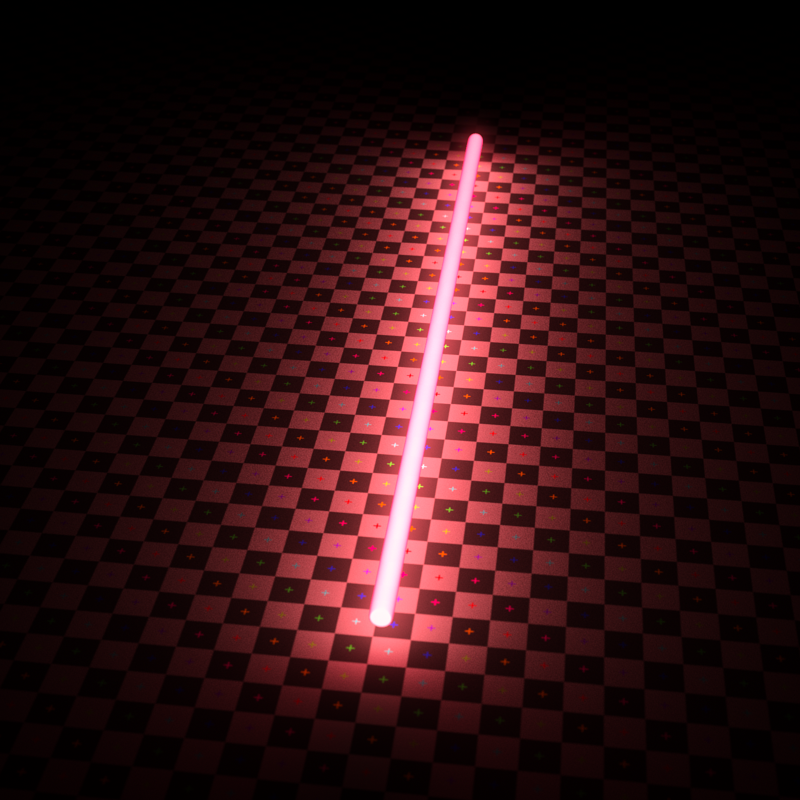
      Is someone getting ready for Christmas? πŸ˜†

      http://www.coroflot.com/boofredlay

      1 Reply Last reply
      Reply Quote 0
      • Rich O BrienR
        Rich O Brien Moderator
        last edited by

        @unknownuser said:

        Is someone getting ready for Christmas? πŸ˜†

        Yeah, she'll have me jumping thru hoops so I'll need those steel balls πŸ˜‰

        Download the free D'oh Book for SketchUp πŸ“–

        1 Reply Last reply
        Reply Quote 0
        • E
          Ecuadorian
          last edited by

          Looks nice, Rich.

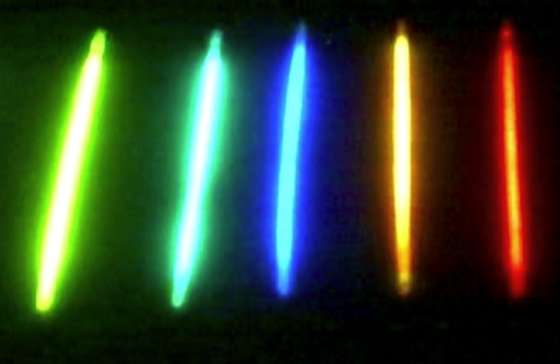
          In reality, the center of each tube would be so overexposed that it would tend to look white, as it is not a surface that glows, but a volume:
          Make-your-glow-sticks-SUPER-Bright.jpg
          Looks like a "render this" challenge...

          -Miguel Lescano
          Subscribe to my house plans YouTube channel! (30K+ subs)

          1 Reply Last reply
          Reply Quote 0
          • N
            notareal
            last edited by

            @ecuadorian said:

            Looks nice, Rich.

            In reality, the center of each tube would be so overexposed that it would tend to look white, as it is not a surface that glows, but a volume:
            [attachment=2:3j8ihn9v]<!-- ia2 -->Make-your-glow-sticks-SUPER-Bright.jpg<!-- ia2 -->[/attachment:3j8ihn9v]
            Looks like a "render this" challenge...

            Like this?


            GlowStick.png


            NeonGlow.mat.pack.zip

            Welcome to try Thea Render, Thea support | kerkythea.net -team member

            1 Reply Last reply
            Reply Quote 0
            • Rich O BrienR
              Rich O Brien Moderator
              last edited by

              Very interesting material. I must admit emitters, fresnel etc are still something I need to invest time in understanding.
              Here, I think the emitter values are too low... πŸ˜’

              http://k.minus.com/joMMMRLfRDb2w.jpg

              Download the free D'oh Book for SketchUp πŸ“–

              1 Reply Last reply
              Reply Quote 0
              • N
                notareal
                last edited by

                You can also play with darkroom burn value... set larger value and highlights will "burn" towards white (same that happens with low dynamic range cameras).

                Welcome to try Thea Render, Thea support | kerkythea.net -team member

                1 Reply Last reply
                Reply Quote 0
                • soloS
                  solo
                  last edited by

                  Having fun? πŸ’š

                  Try playing with the radial glare in Thea's post render settings, it will give a soft glow effect.

                  http://www.solos-art.com

                  If you see a toilet in your dreams do not use it.

                  1 Reply Last reply
                  Reply Quote 0
                  • Rich O BrienR
                    Rich O Brien Moderator
                    last edited by

                    Wish I could but I closed Thea after rendering and I don't save .scn πŸ˜’

                    I love to know what some of the deeper options do but for now I lurk in their forums hoping to snag the odd nugget of advice.

                    Download the free D'oh Book for SketchUp πŸ“–

                    1 Reply Last reply
                    Reply Quote 0
                    • Chris FullmerC
                      Chris Fullmer
                      last edited by

                      Rich's images to me look like a "correct" exposure for the glowing arcs. The white centers only occurs when an image is over-exposed for the light source. Often this is desirable for night shooting where you want to correctly expose the scene. Doing so often over exposes the light source, thus making them look white.

                      So to me they look right. Perfectly exposed for the light emitter, not the scene around them. And maybe they are mild emitters, like a glow stick, instead of a neon bulb.

                      Have fun playing with it Rich. I love Thea, wish I got to use it more.

                      Lately you've been tan, suspicious for the winter.
                      All my Plugins I've written

                      1 Reply Last reply
                      Reply Quote 0
                      • Rich O BrienR
                        Rich O Brien Moderator
                        last edited by

                        Thanks Chris. Though the scene itself is pretty pointless it's Notareal's material that has helped me learn much more about Thea and emitters.

                        I could play with Thea all day if I had a better rig. This was an overnight render on my dual core laptop.. πŸ˜’

                        Now to see what Sigma is for πŸ˜•

                        Download the free D'oh Book for SketchUp πŸ“–

                        1 Reply Last reply
                        Reply Quote 0
                        • N
                          notareal
                          last edited by

                          @solo said:

                          Having fun? πŸ’š

                          Try playing with the radial glare in Thea's post render settings, it will give a soft glow effect.

                          Radial glare is indeed nice if you don't over do it. As it's been a post render effect on Thea, you can easily do multiple versions of image at the darkroom > history
                          Watch http://www.youtube.com/watch?v=jHskJbz1k2o&t=2m8s

                          Welcome to try Thea Render, Thea support | kerkythea.net -team member

                          1 Reply Last reply
                          Reply Quote 0
                          • irwanwrI
                            irwanwr
                            last edited by

                            is the material would also work for Kerkythea?

                            1 Reply Last reply
                            Reply Quote 0
                            • N
                              notareal
                              last edited by

                              @irwanwr said:

                              is the material would also work for Kerkythea?

                              Thea can only convert KT scenes when opening one (materials converted by some heuristic). Material systems are too different, so that all Thea features could be implemented in KT.
                              Anyhow, you can still create similar material in KT, you need to use Fresnel ramp procedural as a emitter color. Use bit saturated color as reflectance 0 than reflectance 90.

                              Welcome to try Thea Render, Thea support | kerkythea.net -team member

                              1 Reply Last reply
                              Reply Quote 0
                              • irwanwrI
                                irwanwr
                                last edited by

                                thank you for the info. i have to learn more about that material things in kerkythea.

                                1 Reply Last reply
                                Reply Quote 0
                                • iichiversiiI
                                  iichiversii
                                  last edited by

                                  Nice, this has given me an idea, an animated lightsaber, i could rip the ears off a Gundark, lol

                                  Bring on the Rain...

                                  1 Reply Last reply
                                  Reply Quote 0

                                  Hello! It looks like you're interested in this conversation, but you don't have an account yet.

                                  Getting fed up of having to scroll through the same posts each visit? When you register for an account, you'll always come back to exactly where you were before, and choose to be notified of new replies (either via email, or push notification). You'll also be able to save bookmarks and upvote posts to show your appreciation to other community members.

                                  With your input, this post could be even better πŸ’—

                                  Register Login
                                  • 1 / 1
                                  • First post
                                    Last post
                                  Buy SketchPlus
                                  Buy SUbD
                                  Buy WrapR
                                  Buy eBook
                                  Buy Modelur
                                  Buy Vertex Tools
                                  Buy SketchCuisine
                                  Buy FormFonts

                                  Advertisement