sketchucation logo sketchucation
    • 登入
    Oops, your profile's looking a bit empty! To help us tailor your experience, please fill in key details like your SketchUp version, skill level, operating system, and more. Update and save your info on your profile page today!
    🔌 Smart Spline | Fluid way to handle splines for furniture design and complex structures. Download

    [Plugin] Stair Maker

    已排程 已置頂 已鎖定 已移動 Plugins
    110 貼文 37 Posters 117.0k 瀏覽 37 Watching
    正在載入更多貼文
    • 從舊到新
    • 從新到舊
    • 最多點贊
    回覆
    • 在新貼文中回覆
    登入後回覆
    此主題已被刪除。只有擁有主題管理權限的使用者可以查看。
    • sdmitchS 離線
      sdmitch
      最後由 編輯

      @atelierpaar said:

      Well, I dont get to type in any value.
      the plugin quits right after the first Dialog box

      That doesn't answer my question. If you could enter a number say 1234 mm as meters, would it be 1.234 or 1,234?

      p.s.

      Please check messages.

      Nothing is worthless, it can always be used as a bad example.

      http://sdmitch.blogspot.com/

      1 條回覆 最後回覆 回覆 引用 0
      • F 離線
        filipebonito
        最後由 編輯

        hello,

        i have the same problem, when i open the plugin, i see the dialogue to chose the stair type, but after that get no options...

        i use "," in numbers, lile "12,50"

        here is the ruby console:

        "Error: #<ArgumentError: Cannot convert "4.921259842519685" to Length>
        C:/Users/admin/AppData/Roaming/SketchUp/SketchUp 2015/SketchUp/Plugins/Stair Maker.rb:267:in to_l' C:/Users/admin/AppData/Roaming/SketchUp/SketchUp 2015/SketchUp/Plugins/Stair Maker.rb:267:in get_defaults'
        C:/Users/admin/AppData/Roaming/SketchUp/SketchUp 2015/SketchUp/Plugins/Stair Maker.rb:77:in reset' C:/Users/admin/AppData/Roaming/SketchUp/SketchUp 2015/SketchUp/Plugins/Stair Maker.rb:68:in initialize'
        C:/Users/admin/AppData/Roaming/SketchUp/SketchUp 2015/SketchUp/Plugins/Stair Maker.rb:25:in new' C:/Users/admin/AppData/Roaming/SketchUp/SketchUp 2015/SketchUp/Plugins/Stair Maker.rb:25:in block in <top (required)>'
        SketchUp:1:in `call'"

        what can i do?
        thanks
        filipe bonito

        1 條回覆 最後回覆 回覆 引用 0
        • sdmitchS 離線
          sdmitch
          最後由 編輯

          I have sent by Personal Message a version that should work for you.

          Nothing is worthless, it can always be used as a bad example.

          http://sdmitch.blogspot.com/

          1 條回覆 最後回覆 回覆 引用 0
          • R 離線
            rabas
            最後由 編輯

            Could i have , please, the comma version?

            1 條回覆 最後回覆 回覆 引用 0
            • sdmitchS 離線
              sdmitch
              最後由 編輯

              @rabas said:

              Could i have , please, the comma version?

              I have updated the plugin at the Plugin Store to work with comma or period. Delete the existing Stair Maker.txt file.

              Nothing is worthless, it can always be used as a bad example.

              http://sdmitch.blogspot.com/

              1 條回覆 最後回覆 回覆 引用 0
              • M 離線
                MattBram
                最後由 編輯

                Hi,

                I meet the same result as Filipe does in the console, and the same result in Sketchup, i.e. nothing appears after having completed the tables.

                I tried using either "." and "," with the plugin download today, and I also tried working in inches as well as in mm without need of using decimals nor fraction.

                What have I been doing wrong?

                Thanks,

                Matt

                1 條回覆 最後回覆 回覆 引用 0
                • sdmitchS 離線
                  sdmitch
                  最後由 編輯

                  Deleting the existing StairMaker.txt file and allow the plugin to recreate it.

                  Nothing is worthless, it can always be used as a bad example.

                  http://sdmitch.blogspot.com/

                  1 條回覆 最後回覆 回覆 引用 0
                  • J 離線
                    johnwmcc
                    最後由 編輯

                    Thanks, SD Mitch, for this very useful plugin.

                    Just installed this on iMac El Capitan. The input box dialogue is truncating the field names.
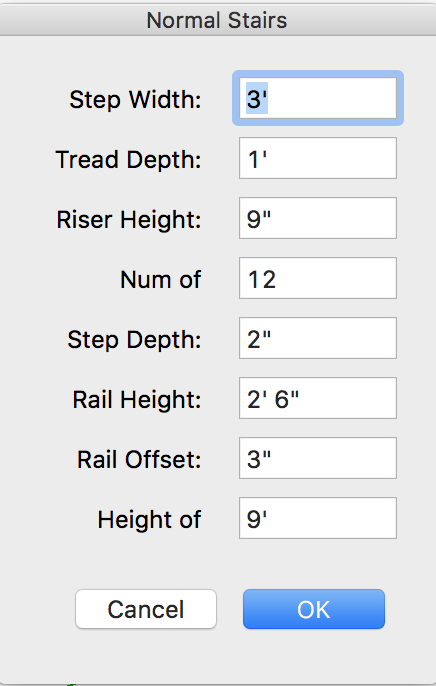
                    InputBox truncates field names.png
                    This is a known bug in InputBox on Mac, and can be fixed by adding extra spaces in the Prompts line of the call to inputBox.
                    prompts=["Step Width: ","Tread Depth: ","Riser Height: ","Num of Steps: ","Step Depth:","Rail Height:", "Rail Offset:","Height of Stairs:"]

                    The text above displays only one extra space added but in reality there are several - HTML is collapsing multiple spaces into one.

                    Result
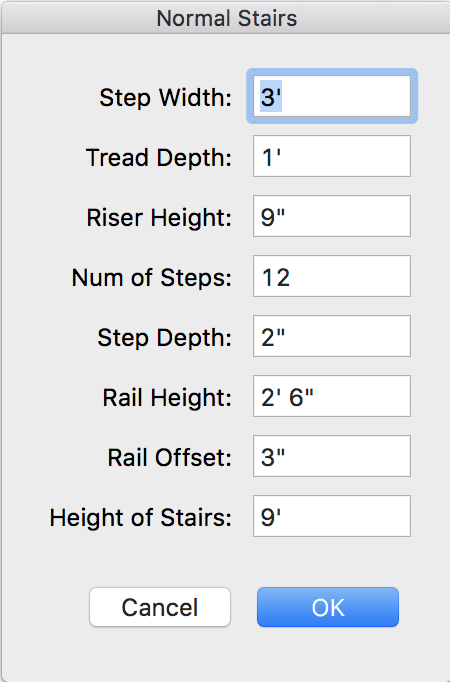
                    InputBox fixed.png

                    I've incorporated this change into my own copy. Could it be fixed for any future plugin updates?

                    1 條回覆 最後回覆 回覆 引用 0
                    • sdmitchS 離線
                      sdmitch
                      最後由 編輯

                      Since I don't have or have access to a Mac, there is no way for me to address this problem.

                      Nothing is worthless, it can always be used as a bad example.

                      http://sdmitch.blogspot.com/

                      1 條回覆 最後回覆 回覆 引用 0
                      • S 離線
                        Silentip
                        最後由 編輯

                        Hello. I'm trying to launch the Stair Maker plugin in SketchUp 2017. I get this error

                        Error: #<NameError: uninitialized class variable @@ss_height in SDM::Stair_Maker>
                        C:/Users/Silent_ip/AppData/Roaming/SketchUp/SketchUp 2017/SketchUp/Plugins/StairMaker/StairMaker.rb:287:in put_defaults' C:/Users/Silent_ip/AppData/Roaming/SketchUp/SketchUp 2017/SketchUp/Plugins/StairMaker/StairMaker.rb:84:in reset'
                        C:/Users/Silent_ip/AppData/Roaming/SketchUp/SketchUp 2017/SketchUp/Plugins/StairMaker/StairMaker.rb:54:in initialize' C:/Users/Silent_ip/AppData/Roaming/SketchUp/SketchUp 2017/SketchUp/Plugins/StairMaker/StairMaker.rb:9:in new'
                        C:/Users/Silent_ip/AppData/Roaming/SketchUp/SketchUp 2017/SketchUp/Plugins/StairMaker/StairMaker.rb:9:in block in <top (required)>' SketchUp:1:in call'


                        Code

                        1 條回覆 最後回覆 回覆 引用 0
                        • 1
                        • 2
                        • 3
                        • 4
                        • 5
                        • 6
                        • 6 / 6
                        • 第一個貼文
                          最後的貼文
                        Buy SketchPlus
                        Buy SUbD
                        Buy WrapR
                        Buy eBook
                        Buy Modelur
                        Buy Vertex Tools
                        Buy SketchCuisine
                        Buy FormFonts

                        Advertisement
