Transparency in textures
-
In SU7 I used png images to get transparency in textures, so that the visible part looks like an object with shadows etc. Now in SU8 the "invisible" part is visible. I use Kerkythea to render. Can you help me?
-
Is this a Kerkythea problem or SU problem (i.e. the clipping does not work in Kerky or the transparency in SU)?
-
I don't know. When I export from SU7 to Kerkythea, it's all OK. When I export from SU8 the same file, with same textures, transparent part is visible i.e. solid, black or white.
-
But does it look transparent in SU?
If yes, this question should be asked here:
http://www.kerkythea.net/phpBB2/viewforum.php?f=10What happens when you check the Clip mapping > Texture in the material editor in Kerky? It will use the image transparency then.
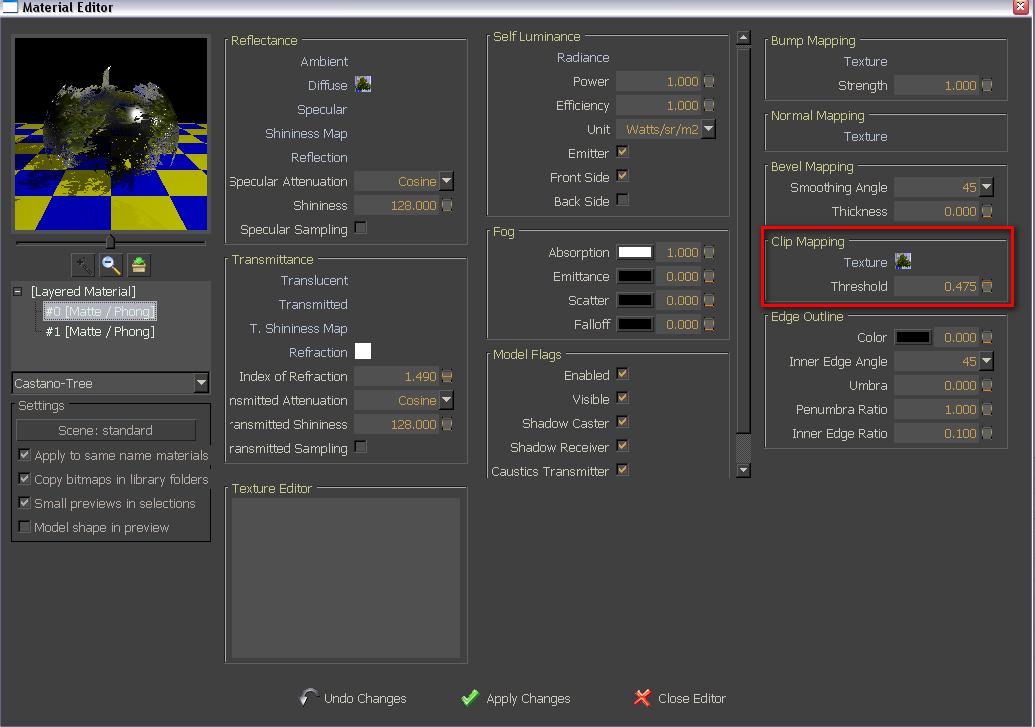
-
Thank you for the suggestion, Gaieus. I didn't remeber that I can modify Clip mapping. It's strange that in the file exported from SU7 I have the pic in the field Texture with Threshold 0.5 and in the file exported from SU8 there is no pic. When I put pic, I have to give a lower value for Threshold (0.1) to see correctly rendered image...
 Ok, but at least it works... Thanks!

Hello! It looks like you're interested in this conversation, but you don't have an account yet.
Getting fed up of having to scroll through the same posts each visit? When you register for an account, you'll always come back to exactly where you were before, and choose to be notified of new replies (either via email, or push notification). You'll also be able to save bookmarks and upvote posts to show your appreciation to other community members.
With your input, this post could be even better 💗
Register Login


Advertisement