sketchucation logo sketchucation
    • 登入
    Oops, your profile's looking a bit empty! To help us tailor your experience, please fill in key details like your SketchUp version, skill level, operating system, and more. Update and save your info on your profile page today!
    🔌 Smart Spline | Fluid way to handle splines for furniture design and complex structures. Download

    [Plugin] Estimates (extended)

    已排程 已置頂 已鎖定 已移動 Plugins
    50 貼文 23 Posters 52.6k 瀏覽 23 Watching
    正在載入更多貼文
    • 從舊到新
    • 從新到舊
    • 最多點贊
    回覆
    • 在新貼文中回覆
    登入後回覆
    此主題已被刪除。只有擁有主題管理權限的使用者可以查看。
    • Didier BurD 離線
      Didier Bur
      最後由 編輯

      Hi,
      Here is a small extension to one of the example Ruby script that comes with SketchUp:
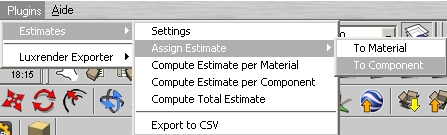
      Some basic settings added,
      Assign prices to materials and components,
      Output either to dialog boxes or CSV file.
      English and french languages supported, but easily 'translatable'.
      See readme for install instructions.
      options.jpg


      attributes_ext.zip

      DB

      1 條回覆 最後回覆 回覆 引用 0
      • EarthMoverE 離線
        EarthMover
        最後由 編輯

        This is great. Thanks Didier! 👍

        3D Artist at Clearstory 3D Imaging
        Guide Tool at Winning With Sketchup
        Content Creator at Skapeup

        1 條回覆 最後回覆 回覆 引用 0
        • sadyoS 離線
          sadyo
          最後由 編輯

          The plugin is not working properly 😒 , the result of the "compute estimate" is always 0.00, I already following the plugin usage 😐

          perhaps you could provide us the example of how to using this nice plugin.

          Thanks

          I'm using Win7 Home Premium 64bit & SketchUp Pro 8.0.8411

          1 條回覆 最後回覆 回覆 引用 0
          • Didier BurD 離線
            Didier Bur
            最後由 編輯

            @unknownuser said:

            the result of the "compute estimate" is always 0.00
            😲

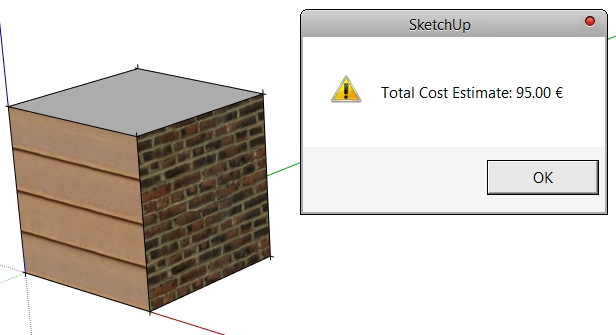
            Maybe you didn't assign a cost to the default material and tested the script on "non-painted" faces ?
            1.jpg

            DB

            1 條回覆 最後回覆 回覆 引用 0
            • sadyoS 離線
              sadyo
              最後由 編輯

              @didier bur said:

              @unknownuser said:

              the result of the "compute estimate" is always 0.00
              😲

              Maybe you didn't assign a cost to the default material and tested the script on "non-painted" faces ?

              [attachment=0:1yjqif92]<!-- ia0 -->1.jpg<!-- ia0 -->[/attachment:1yjqif92]

              But Mr. Didier, I Allready did assign a cost to the default material and didn't tested the script on "non-painted" faces.
              Mmmm... if you don't mind, would you please to give us the screenshot of how you Assign prices to your materials and components, pleeeease... 😒

              1 條回覆 最後回覆 回覆 引用 0
              • Didier BurD 離線
                Didier Bur
                最後由 編輯

                Hi,
                Here is a quick screencapture video: choose settings, assign 2 costs for 2 materials, and calculate total estimate by material;
                Hope this helps,


                2.zip

                DB

                1 條回覆 最後回覆 回覆 引用 0
                • sadyoS 離線
                  sadyo
                  最後由 編輯

                  @didier bur said:

                  Hi,
                  Here is a quick screencapture video: choose settings, assign 2 costs for 2 materials, and calculate total estimate by material;
                  Hope this helps,

                  Thanks Mr. Didier, now it worked well

                  1 條回覆 最後回覆 回覆 引用 0
                  • mariochaM 離線
                    mariocha
                    最後由 編輯

                    Hum... I wonder, considering the folder they are in, will a re-install or update of SU replace those files with the standard non-customized ones ?

                    %(#008000)[Mario C.
                    Every rule has exceptions, but some.]

                    1 條回覆 最後回覆 回覆 引用 0
                    • Didier BurD 離線
                      Didier Bur
                      最後由 編輯

                      @unknownuser said:

                      will a re-install or update of SU replace those files

                      yes, I think so. Make a backup first 😉

                      DB

                      1 條回覆 最後回覆 回覆 引用 0
                      • fionmacoolF 離線
                        fionmacool
                        最後由 編輯

                        Hi All, I'm desperately looking for cost plugin. I am hoping this one will work but when I load this on my Mac I get the following message:

                        Error Loading File attributes.rb undefined method `GetString' for nil:NilClass

                        Any idea what this is about? I really appreciate you creating this plugin. I am hoping to show it to others as a great tool for SU.

                        Thanks.

                        Zere are still some architectes zat do not know ow to use ze SketchUp..... Zis is unbelievable....

                        1 條回覆 最後回覆 回覆 引用 0
                        • Didier BurD 離線
                          Didier Bur
                          最後由 編輯

                          Hi,
                          Did you install the '.strings' files in your resources/en-US folder (as said in the readme.txt) ?

                          DB

                          1 條回覆 最後回覆 回覆 引用 0
                          • fionmacoolF 離線
                            fionmacool
                            最後由 編輯

                            Yes thanks for that. i didnt read the readme file as usual. anyway, having struggled with this problem I now realise that there are no plugins that will provide material quantities for groups or components. (Please correct me if i'm wrong in this.)

                            Thanks for your help and your useful plugin.

                            Zere are still some architectes zat do not know ow to use ze SketchUp..... Zis is unbelievable....

                            1 條回覆 最後回覆 回覆 引用 0
                            • Rich O BrienR 離線
                              Rich O Brien Moderator
                              最後由 編輯

                              @unknownuser said:

                              desperately looking for cost plugin

                              Al Hart's Space Design

                              favicon

                              (www.renderplus.com)

                              Download the free D'oh Book for SketchUp 📖

                              1 條回覆 最後回覆 回覆 引用 0
                              • P 離線
                                Pink
                                最後由 編輯

                                How can I add another currencies because I don't use DOLLAR,EURO,SEK.
                                currencies={"Euro"=>"€","Dollar"=>"$","SEK"=>"SEK","BAHT"=>"BAHT"}
                                I save as to replace the attributes.rb , but it cannot be display in the sketchup.

                                1 條回覆 最後回覆 回覆 引用 0
                                • Didier BurD 離線
                                  Didier Bur
                                  最後由 編輯

                                  Hi,
                                  Go to line 26 and add your currency to the list that appears in the dialog box:

                                  curList=["Euro","Dollar","SEK","BAHT"].join("|")
                                  

                                  Regards,

                                  DB

                                  1 條回覆 最後回覆 回覆 引用 0
                                  • G 離線
                                    gia_ginanjar
                                    最後由 編輯

                                    how about change the unit to square meters? because in indonesia we use square meters unit, thanks in advance

                                    1 條回覆 最後回覆 回覆 引用 0
                                    • Didier BurD 離線
                                      Didier Bur
                                      最後由 編輯

                                      Hi,
                                      I don't understand the question. No foolish feet/inches unit here in France too 🤣 .
                                      The script uses the unit you set in your model and outputs areas converting internal inches to your current unit. So whatever unit you use, no problem...

                                      DB

                                      1 條回覆 最後回覆 回覆 引用 0
                                      • R 離線
                                        rmagoncillo49179
                                        最後由 編輯

                                        hi i have a question, the estimate cost for component always shows the "susan" word.and i can't get it to work for component costing can you help me on this. thanks.

                                        1 條回覆 最後回覆 回覆 引用 0
                                        • GaieusG 離線
                                          Gaieus
                                          最後由 編輯

                                          Susan is the 2D figurine who is inserted into some of the templates

                                          http://www.sketchucation.hu/wp-content/uploads/2010/09/Susan.jpg

                                          Now to get rid of her, delete the figurine in a new, empty file, go to Window > Model info > Statistics and Purge everything. Then save your file as a template under the file menu and set SU to make this your default template (there is a checkbox at the bottom left for it in the save as template dialog)

                                          Gai...

                                          1 條回覆 最後回覆 回覆 引用 0
                                          • T 離線
                                            thaigringo
                                            最後由 編輯

                                            Great plugin.
                                            How can I change the default currency that loads when I create a new Model. I have added Baht (I am in Thailand) but when I load a new model the default currency is SEK and I would like it to be Baht.

                                            Thanks
                                            Fred

                                            1 條回覆 最後回覆 回覆 引用 0
                                            • 1
                                            • 2
                                            • 3
                                            • 1 / 3
                                            • 第一個貼文
                                              最後的貼文
                                            Buy SketchPlus
                                            Buy SUbD
                                            Buy WrapR
                                            Buy eBook
                                            Buy Modelur
                                            Buy Vertex Tools
                                            Buy SketchCuisine
                                            Buy FormFonts

                                            Advertisement