[Plugin]$ Keyframe Animation
-
does it matter if it's a group or component? Just a thought.
-
@andybot said:
does it matter if it's a group or component? Just a thought.
It shouldn't matter. Groups and components are treated the same.
@emerald15 said:
Sorry, I must be still missing something.
If you have the model I attached, this might clear things up a bit. Select the parent group, so that it is highlighted. Then step through the animation a scene at a time. That will reveal how the parent (highlighted) group is moving. And then it will be more clear how the individual doors are moving inside the parent group.
-
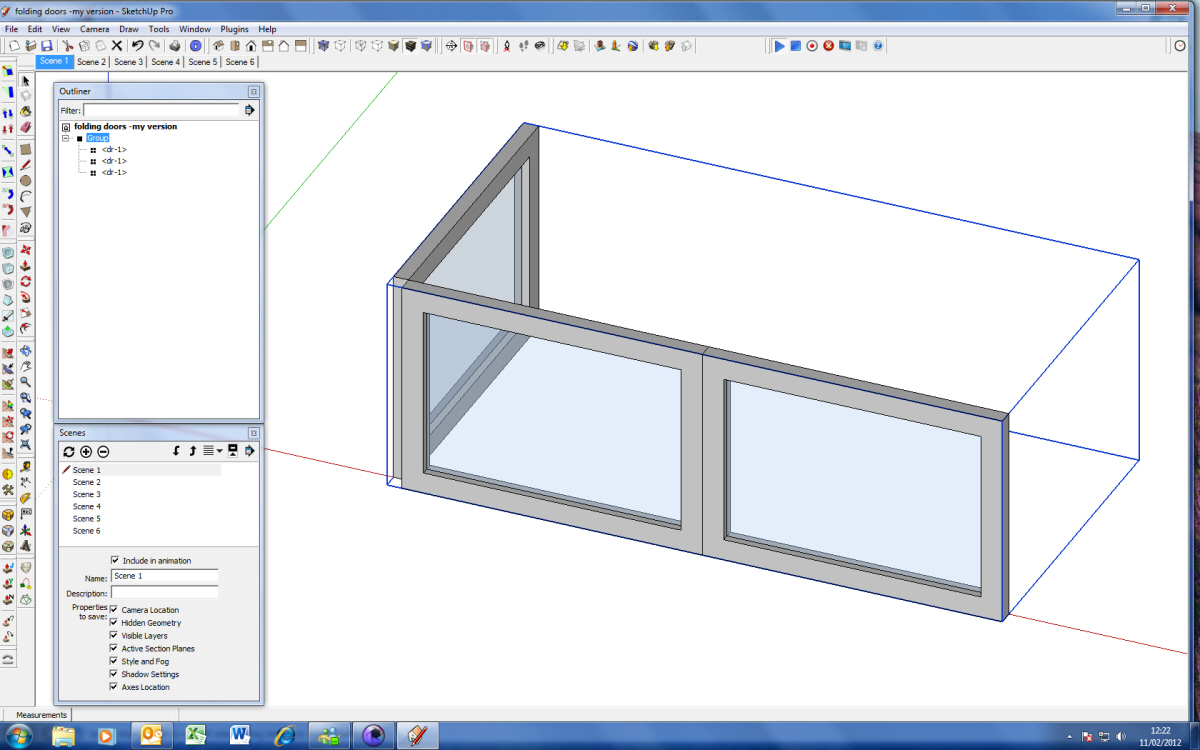
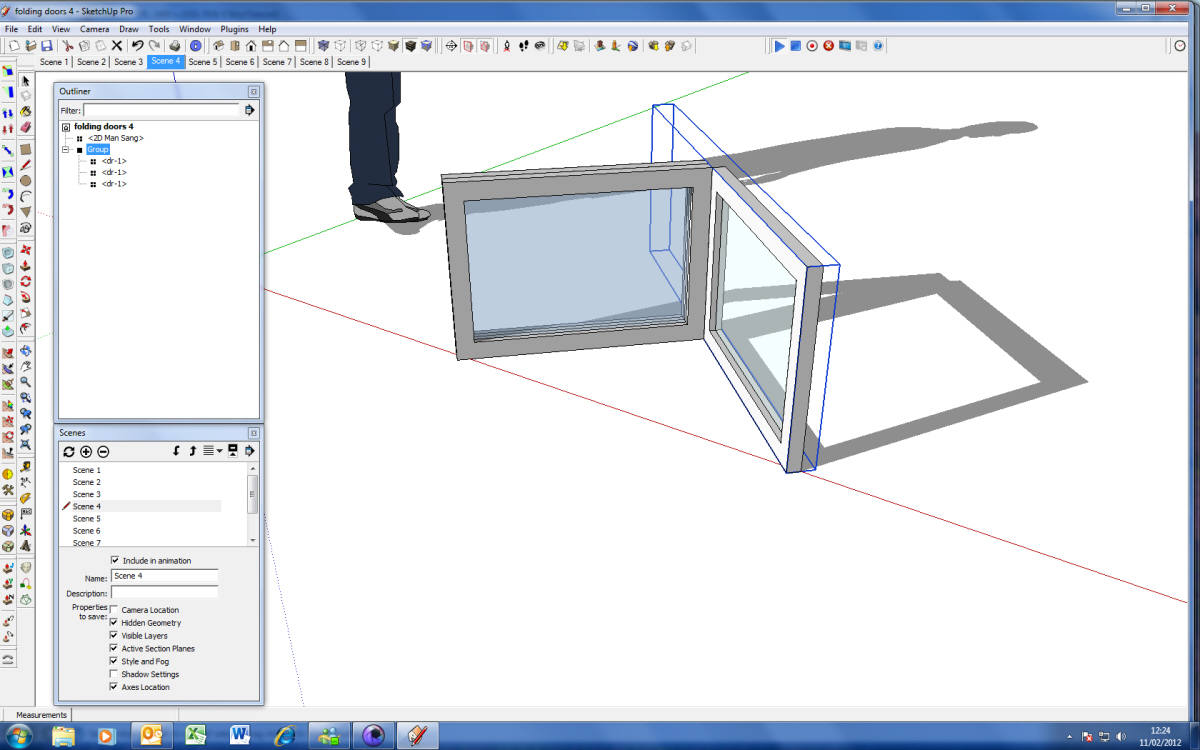
Yes, I have already done this - I went through your animation frame by frame. I know this is something to do with how I move each individual panel. I've attached a screen grap of another of my attempts, with the parent group highlighted. How this compares to your version (screen grap also attached) is that your parent group box stays the same shape as it starts in scene one, even when you have rotated one of the subgroups within it, while mine changes shape to fit the formation as my panels are rotated.
The way I am moving the subgroups is to select them in Outliner, (triple click on subgroup) rotate subgroup, then right click outside the parent group to close it. I'm guessing this is where I might be going wrong as the box then changes shape?
-
Well, I didn't use Outliner, so my workflow was a little different. Here is what I did:
- Rotate the parent group.
- Click the record button to save the position data for the parent group.
- Double click on the parent group to edit it.
- Rotate the doors (subcomponents).
- Click the record button to save the position data of the subcomponents.
- Close the parent group.
- Repeat steps 1-6 for the next scene.
One thing that might not be very intuitive, especially if you are using Outliner, is that the parent group has to be open (in edit mode) to record the subcomponents. Normally, when you click the record button, it records the position data for all of the top-level groups and components in the model. But, it doesn't record the subgroups/subcomponents. To record the subcomponents, you have to open the parent first, and then click the record button.
If that is not the problem, then my next question would be, does the parent group move correctly? If it does, then the problem is just with the subcomponents.
I am not sure why the bounding box does not enclose all the subcomponents in my model. I guess SketchUp doesn't resize it automatically. I may need to write some code to resize the bounding box when there are animated subcomponents.

-
I'VE GOT IT!!!

I was setting up the rotation of the subgroups before the parent group, not vice versa.By the way - I didn't use Outliner either 'til this challenge - I just thought I should try it & it seemed easier to pick out the subgroups.
re: the box - mine behaves differently too now (not quite the same as yours)... but, hey... does this matter?
Thanks so much for the help... I've been tearing my hair out!

-
Hi folks,
Version 1.7 is available on the download page. Nothing glamorous, but it has some useful improvements to the interface and workflow.
There is a scrollable Web dialog to adjust the transition time and delay time for all the scenes. It is accessible from a button on the toolbar. Best of all, it replaces the SketchUp input box, which could be a nuisance because it ran off the screen if you had more than 20 scenes.

There are some other dialogs for reporting your license ownership details, and free trial status.
I received a few requests for the ability to record the position data of specific objects, without affecting any other objects. So, that has been implemented as an alternative workflow if you need to precisely control what is recorded.
There are more details in the release notes. Oh, and starting with this version, you can get a new free trial, even if you had one before.
Thanks
-
This is great, fantastic

-
I'm enjoying your plugin, you've obviously put some serious work into development.
I was wondering if you have a solution to the problem of rotation axes moving during an animation if they are part of a second rotation?
My example of this is on an excavator's boom - the first part of the boom rotates seamlessly but if I rotate the second part of the boom (called the stick) at the same time as rotating the first part - the rotation axes is not interpolated properly (regardless of how/where I set the group's origin/axis)
Here is an attempt to show the problem in a GIF

Note how the second portion of the boom doesn't stay synchronized with its pin nor stay aligned with it's ram mounting on the top - any suggestions?
-
Not sure if this helps, but it sounds similar to my problem with a folding door sequence (earlier in this thread) - you might find an answer in there.
-
Hey thanks Emerald - the discussion regarding the folding door really helped.
For anyone else struggling with this:
- Record position for the first piece (the parent component)
- Open the parent component and moved the nested component to its required position
- Record that position
- Close the parent component
The capacity for keyframe animation to relate its coordinate systems to a parent component system rather than the coordinate system of the model as a whole makes this plugin significantly more powerful than other animation tools I've used
-
I've never had this happen before now - I was using Keyframe Animation so I suspect it is somehow causing the issue.
I saved a 16 scene animation. It saved fine and I went to "save a copy as". Sketchup crashed and I got a bugsplat. Then the file itself disappeared - I'm left with 13 empty .SKB files in the windows folder.
Two days worth of animating work is gone - somehow the files themselves got messed up when sketchup crashed.
Two questions:
- How is this even possible
- How do I get my work back?
-
I've now been through it all - the file is totally gone.
The only thing I can recover is a version of it from three days ago....The 13 .SKB files are empty files all presenting the modelling space in various orientations.
I'm running this in SU8 but I also have the free version of SU2013 installed on my machine. I'm running windows 7 on an i7 laptop.
If anyone is interested to try and trouble shoot this then let me know and I can give you more details.
- I'm totally stunned that this is even possible
-
Sorry about your problems Ashscott. I did a trial with Keyframe Animation not long ago and was getting bugsplats also. Just figured it was a problem with another plugin and left it at that. I'd be curious as to what you find out about your problem.
-
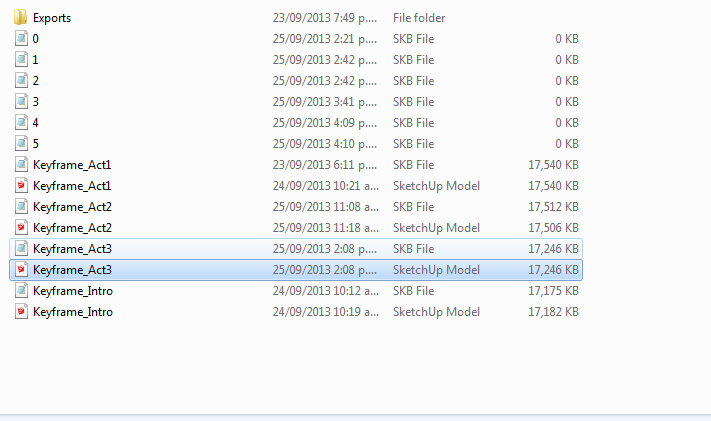
I just managed to replicate the problem - I hit control+S after a stint of modelling and the file did not save (there was no notification of this). When I look at the directory that the original file was saved in (Called "Keyframe_Act3.skp) a bunch of empty .skb files have shown up - see attached image:
-
aaand we just had a bugsplat during an attempt to save the aforementioned file - all unsaved work lost again
-
Have made five different sketchup files with Keyframe Animation since the crash mentioned above happened - but it just happened again. No matter what I tried I couldn't recover it.
I've paid for this plugin and would be happy even if you guys just ATTEMPTED to help, but no response here or by email is kinda frustrating.
-
For the record, apart from this issue, I think Keyframe is a great piece of software in and of itself.
Am looking forward to working out the issue with the support people and will let you all know what the result is.
It sounds like my problem is isolated and no one else is reporting the same issue so don't let this discourage you from making the most of a good piece of software.
-
@unknownuser said:
I've paid for this plugin and would be happy even if you guys just ATTEMPTED to help, but no response here or by email is kinda frustrating.
I also have tried to get assistance and also got no reply, looks like the author has absconded.
I have found a significant bug, which I really need fixed. -
Nothing related to what I have described above?
-
Still no answer, and now no compatibility with SU 2014. this is ridiculous, until the author starts responding I'd suggest not purchasing if you are contemplating.






Advertisement