[Plugin] DrawHelix14
-
Well, Jim:
I don't know why but I keep getting the HTML file, even on this work computer. Same browser, though--Firefox. I will keep trying. -
@mitcorb said:
Well, Jim:
I don't know why but I keep getting the HTML file, even on this work computer. Same browser, though--Firefox. I will keep trying.I tried downloading the rb file today and got this in the file.
<!DOCTYPE html PUBLIC "-//W3C//DTD XHTML 1.0 Transitional//EN" "http://www.w3.org/TR/xhtml1/DTD/xhtml1-transitional.dtd"> <html xmlns="http://www.w3.org/1999/xhtml"> <head> <meta http-equiv="X-UA-Compatible" content="chrome=1" /> <title xmlns="http://www.google.com/ns/jotspot">Download Attachment</title> <style xmlns="http://www.google.com/ns/jotspot"> html, body { padding; 0; margin; 0; } body { font-family; Arial, Verdana, sans-serif; font-size; 12px; background-color; #fff; background-image; none; direction; ltr; } .sites-clear;after { content; "."; display; block; height; 0; clear; both; visibility; hidden; } #sites-header { background-color; #fff; border-bottom; 1px solid #b0bdcc; height; 1%; padding; 5px 5px 0 0; margin-bottom; 10px; } .sites-account { float; right; font-size; 12px; padding; 4px 8px 5px; } .sites-account a { color; #4e7dbf; /* onebarLinkColor */ } .sites-content-wrapper { min-height; 150px; margin; 0 5px; _height; 150px !important; padding; 5px; } h2 { margin; 5px 0 10px; font-size; 22px; } p { margin-top; 0px; } .sites-subfooter { font-size; 11px; padding; 5px 0 5px; text-align; center; } .sites-subfooter p { margin; 0; padding; 5px; } .sites-subfooter p span { font-size; 10px; } #sites-logo { margin-bottom; 15px; } </style> </head> <body xmlns="http://www.google.com/ns/jotspot"> <div id="sites-status" class="sites-status" style="display;none;"> <div id="sites-notice" class="sites-notice"> </div> </div> <div class="sites-content-wrapper"> <img xmlns="http://www.w3.org/1999/xhtml" src="http://www.gstatic.com/sites/p/544341/system/app/images/logo/logo.gif" id="sites-logo" alt="Google Sites Logo" /> <h2>Download Attachment</h2> <p xmlns="http://www.w3.org/1999/xhtml"> Click <a href="/site/jimfoltz/sketchup/my-sketchup-plugins/drawhelix/drawhelix14.rb?attredirects=0">here</a> to download your attachment. </p> </div> </body> </html> -
@unknownuser said:
I've tried using a resulting helix as a path for follow me.
I get an error box indicating "This does not appear to be a valid path."
I've tried exploding the curve and using Weld on it. That didn't change anything. Same error.Any suggestions, or maybe it's just not intended for this application?
Jay
Jay, I can't say I've seen that with helices I drawn with version 1.3 but I have seen the message on occasion. In most cases, Follow Me runs anyway. Can you get it to go even with the message?
-
Plugin muito útil e fácil de usar. Bom trabalho!

-
I had a couple problems downloading this and I think it is just the *.rb extension in Firefox first - it tries to download it as a Firefox RB file so they appraently use that extension. When I tried Chrome using the forum link http://sites.google.com/site/jimfoltz/sketchup/my-sketchup-plugins/drawhelix/drawhelix14.rb I got a 'no such file found.' When I tried to paste the url I came to a 'Page Not Found' page but it gave me a https link to 'similar files' and this link finally worked https://sites.google.com/site/jimfoltz/sketchup/my-sketchup-plugins/drawhelix/drawhelix14.rb
Anyway just what I needed.

-
Did you try (right click and save as) as it says next to the download link.
-
Yes with Firefox if I saved as 'Firefox RB" or choose "ALL Files" and saved as rb it it generated what looked like HTML errors and I changed the extension and looked at the contents and indeed it was an xhtml page.
With Chrome it kept generating "No file" errors with right-click save as but as I said the https:// link did work - the original was an http:// link.
Not sure if it is something peculiar to my setup but that's what happens.
Correction: If I click on the link rather than 'Save As" and go to the page I can then download the file correctly. So maybe the problem I am having is with this site. I use OpenDNS at home and work and also have some AV and NoScript plugin. Perhaps one of them is to blame?
-
I like it!
-
I have tried everything I can to download the drawhelix14.rb plugin, but when I right click to save the file, all that shows up in my menu to choose from is: "Save Link AS." Is there somewhere else I can go to get this plugin? Thanks!
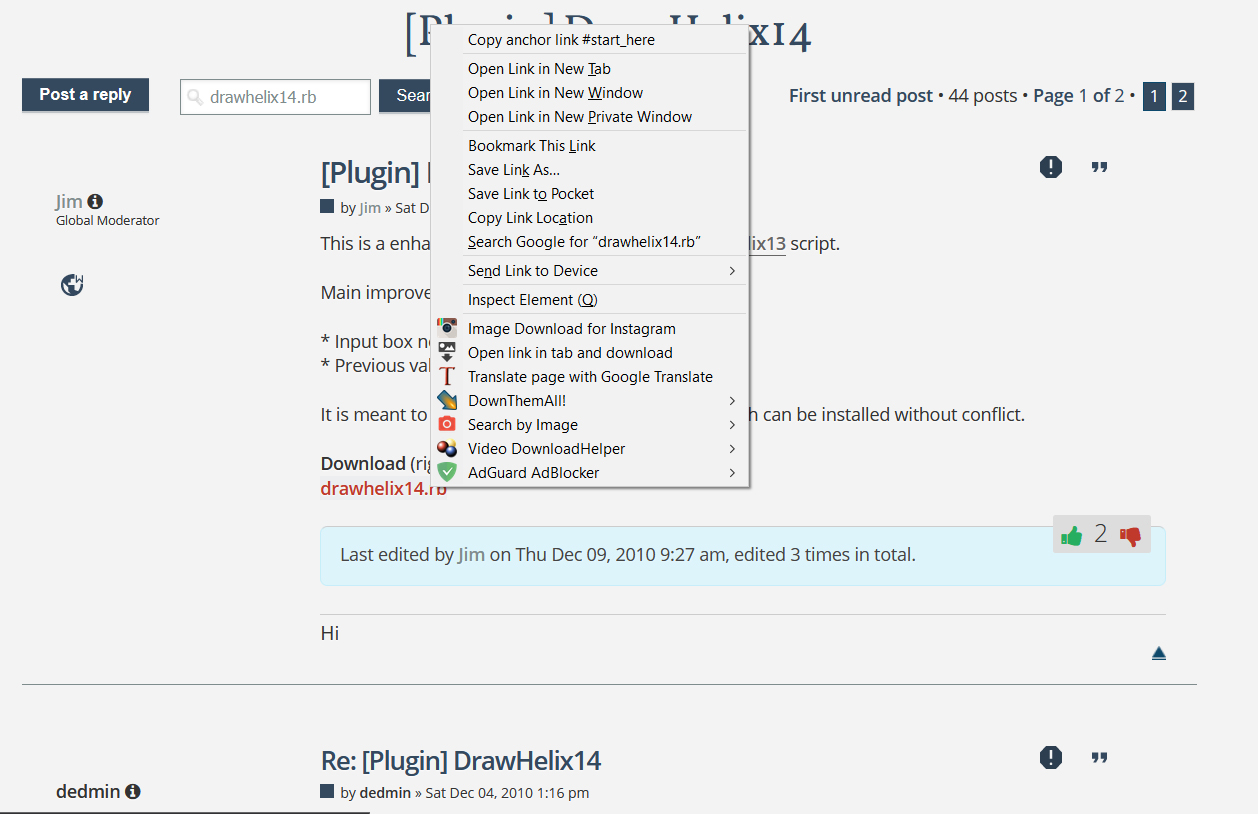
-
Jim has withdrawn his plugins and extensions. If you want to be able to draw helices, you could use Curve Maker's Helix tool. Look in the PluginStore at the top right of the forum page.





Advertisement