Dynamic Wall Component
-
I want to make this component lock to one of 4 different widths, and about 10 heights between 300mm and 2700mm, using the scale tool.
Is there a way to make a text box come up when u scale to make sure its locking to the length you want?
and can you limit the inputs in the attributes text box?
-
I think you could use
NEAREST(testVal, v1, v2, v3, v4), which picks a value from the list [v1, v2, v3, v4, ...] that is nearest totestVal.http://sketchup.google.com/support/bin/answer.py?answer=115749
-
thanks for the help,
but i cant work out what testVal is.
I want it to snap to either 370, 450, 820, or 900. but it always snaps to the value that is closest to the testval value.
any ideas? do i make testval some sort of x variable? -
Hi Sam,
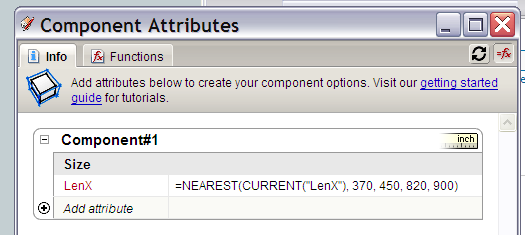
If you want the component to scale along the X axis... then add the LenX attribute and enter this formula.
LenX: =NEAREST(CURRENT("LenX"), 370, 450, 820, 900)
-
Thanks Jim,
I think im nearly there. it will snap to all the widths now, but to get it to snap to the 900 of 820 one you have to scale out to about 3000 or 4000 units. if you scale the component to approx 900 it will snap back to 450.... not sure why it would be doing this. -
The value of LenX which is returned is in inches, even when the model is in centimetres. So you need to compare with LenX * 2.54 e.g.:
=NEAREST(CURRENT("LenX")*2.54,350,450,820,900)
Hello! It looks like you're interested in this conversation, but you don't have an account yet.
Getting fed up of having to scroll through the same posts each visit? When you register for an account, you'll always come back to exactly where you were before, and choose to be notified of new replies (either via email, or push notification). You'll also be able to save bookmarks and upvote posts to show your appreciation to other community members.
With your input, this post could be even better 💗
Register Login


Advertisement