• Login
sketchucation logo sketchucation
  • Login
Oops, your profile's looking a bit empty! To help us tailor your experience, please fill in key details like your SketchUp version, skill level, operating system, and more. Update and save your info on your profile page today!
⚠️ Important | Libfredo 15.6b introduces important bugfixes for Fredo's Extensions Update

Intercept UI::Command.new ?

Scheduled Pinned Locked Moved Developers' Forum
7 Posts 4 Posters 360 Views 4 Watching
Loading More Posts
  • Oldest to Newest
  • Newest to Oldest
  • Most Votes
Reply
  • Reply as topic
Log in to reply
This topic has been deleted. Only users with topic management privileges can see it.
  • T Offline
    thomthom
    last edited by 31 Oct 2010, 14:45

    Is there a way to intercept UI.Command.new so that one can catch the menu_name argument passed to the new method ?

    Thomas Thomassen — SketchUp Monkey & Coding addict
    List of my plugins and link to the CookieWare fund

    1 Reply Last reply Reply Quote 0
    • T Offline
      thomthom
      last edited by 31 Oct 2010, 17:39

      never mind - think I got it working now... I think...

      Thomas Thomassen — SketchUp Monkey & Coding addict
      List of my plugins and link to the CookieWare fund

      1 Reply Last reply Reply Quote 0
      • T Offline
        thomthom
        last edited by 31 Oct 2010, 17:47

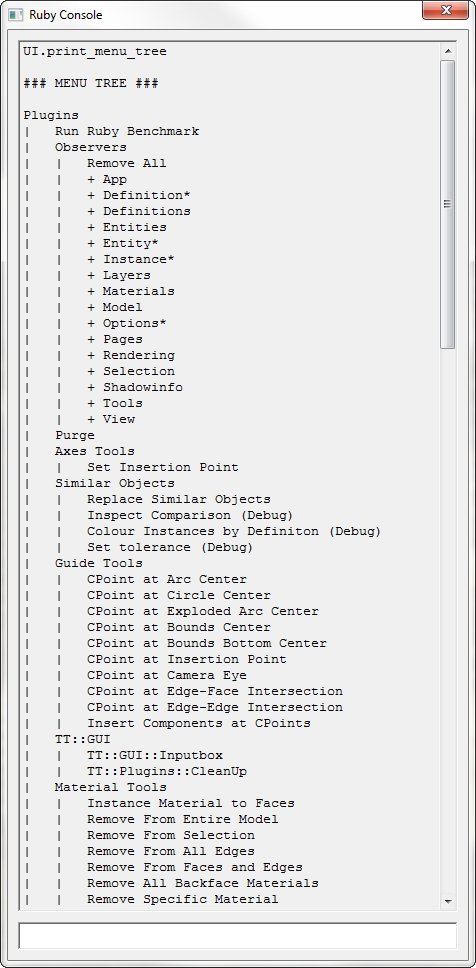
        Eeeexcellent!

        UI_print_menu_tree.png

        Thomas Thomassen — SketchUp Monkey & Coding addict
        List of my plugins and link to the CookieWare fund

        1 Reply Last reply Reply Quote 0
        • A Offline
          AlexMozg
          last edited by 31 Oct 2010, 17:53

          @thomthom said:

          Is there a way to intercept UI.Command.new so that one can catch the menu_name argument passed to the new method ?

          It is possible so:

          module Object;;UI
          	class Command
          		class << self
          			alias ;newORIG ;new
          			private ;newORIG
          		end
          		def self.new(m_name, &cmd_block)
          			p m_name #some code...
          			self.__send__(;newORIG, m_name, &cmd_block)
          		end#def
          	end
          end#module
          
          
          1 Reply Last reply Reply Quote 0
          • C Offline
            Chris Fullmer
            last edited by 31 Oct 2010, 20:48

            Thom, this looks very intersting. Are you going to post some working code or a plugin here soon?

            Lately you've been tan, suspicious for the winter.
            All my Plugins I've written

            1 Reply Last reply Reply Quote 0
            • T Offline
              thomthom
              last edited by 31 Oct 2010, 21:48

              Need some more coding.
              I've intercepted all the menus created and added getter methods. With this I should be able to override the menu and toolbar structures. It's all going to take a lot of UI development, but what I'm thinking is:

              Being able to:

              • Override menu & toolbar text, tooltips, statusbar text
              • Override menu location (user defined menu structure)
              • Custom toolbars of any Ruby toolbar buttons (Though there can be issues here with plugins trying to hide/show their own toolbars)
              • Mute menus and toolbar buttons
              • Automatic menu sorting or custom arrangement (need to find a good solution for this)

              Regarding automatic menu sorting or custom arrangement there are some issues:
              Idea 1 - pre-populate the menus and hook up the commands when the plugins loads. Issue here is if a plugin is removed there'll be dead menu items. (Purge menu command?)

              Idea 2 - Find a way to work out when SU has loaded all plugins upon SU startup - populate menus when they are done.

              Thomas Thomassen — SketchUp Monkey & Coding addict
              List of my plugins and link to the CookieWare fund

              1 Reply Last reply Reply Quote 0
              • P Offline
                Pixero
                last edited by 1 Nov 2010, 12:00

                Very interesting. Awaiting your TT_toolbarTool... 😉

                1 Reply Last reply Reply Quote 0
                • 1 / 1
                1 / 1
                • First post
                  1/7
                  Last post
                Buy SketchPlus
                Buy SUbD
                Buy WrapR
                Buy eBook
                Buy Modelur
                Buy Vertex Tools
                Buy SketchCuisine
                Buy FormFonts

                Advertisement