sketchucation logo sketchucation
    • Login
    Oops, your profile's looking a bit empty! To help us tailor your experience, please fill in key details like your SketchUp version, skill level, operating system, and more. Update and save your info on your profile page today!
    Mac User? | Join the Rayscaper Beta for Mac Learn More

    [Plugin][$] Vertex Tools

    Scheduled Pinned Locked Moved Plugins
    667 Posts 92 Posters 655.9k Views 92 Watching
    Loading More Posts
    • Oldest to Newest
    • Newest to Oldest
    • Most Votes
    Reply
    • Reply as topic
    Log in to reply
    This topic has been deleted. Only users with topic management privileges can see it.
    • E
      Einstein
      last edited by

      Hi!
      Got a question.
      If I select some vertices using soft selection, it will also affect geometry that's not connected to selected vertices (see screenshot). Can I change this behavior so that soft selection will only affect connected vertices?

      You'd say "do grouping your geometry" but that's not the solution in my case.
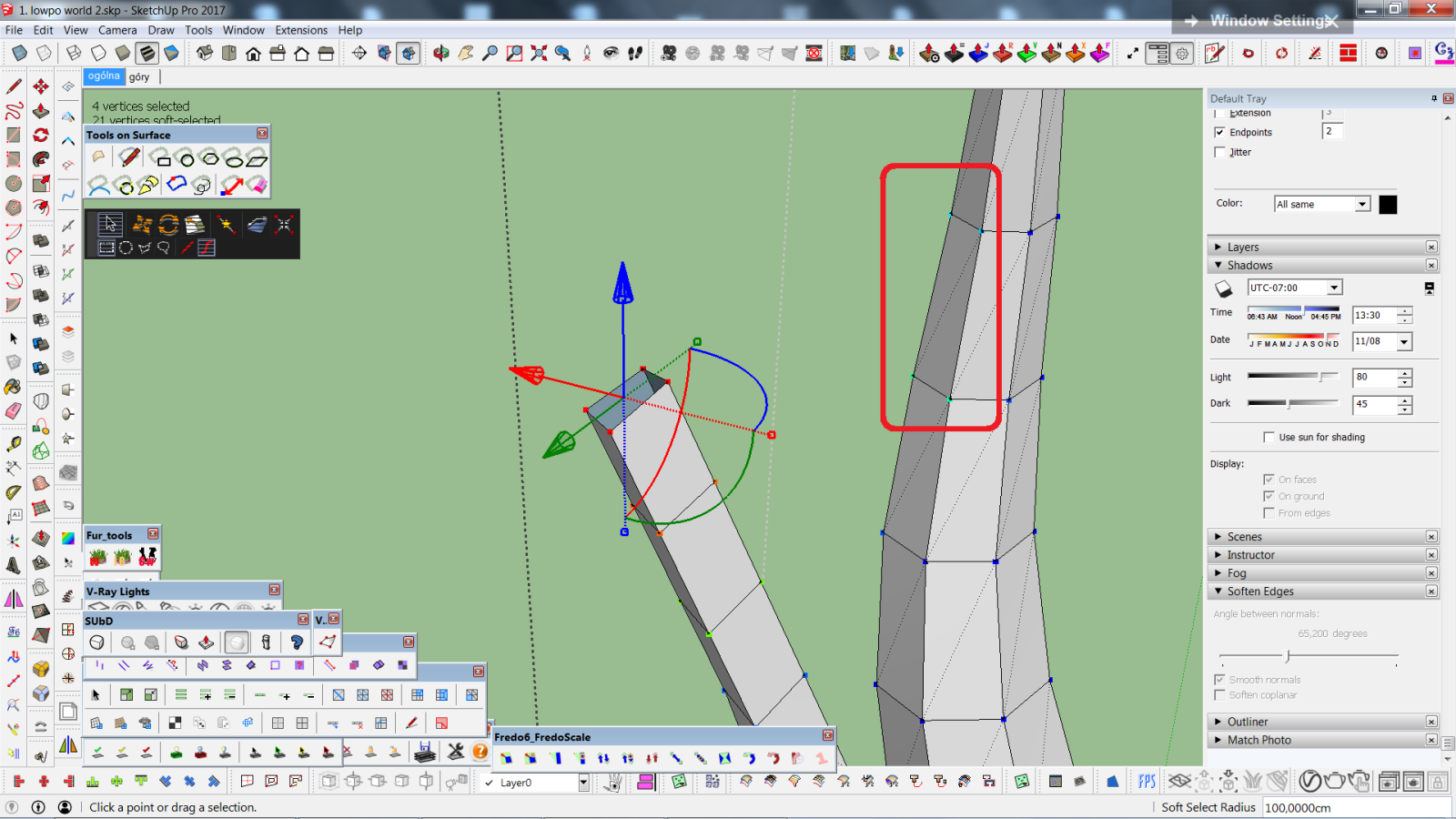

      czy da się, żeby smoothSel działał tylko na połączone vertexy.png

      1 Reply Last reply
      Reply Quote 0
      • E
        Einstein
        last edited by

        Hi!
        I'd have a suggestion for a small feature development.
        When doing soft selection we have two options of falloff - linear and cosine. What if we had more options, e.g. "pinchy" fallof shape, as illustrated below, on the left?

        I can see such idea was already posted years ago but I dared to bring it anyways, cuz it would be a fantastic improvement of already very good tool!
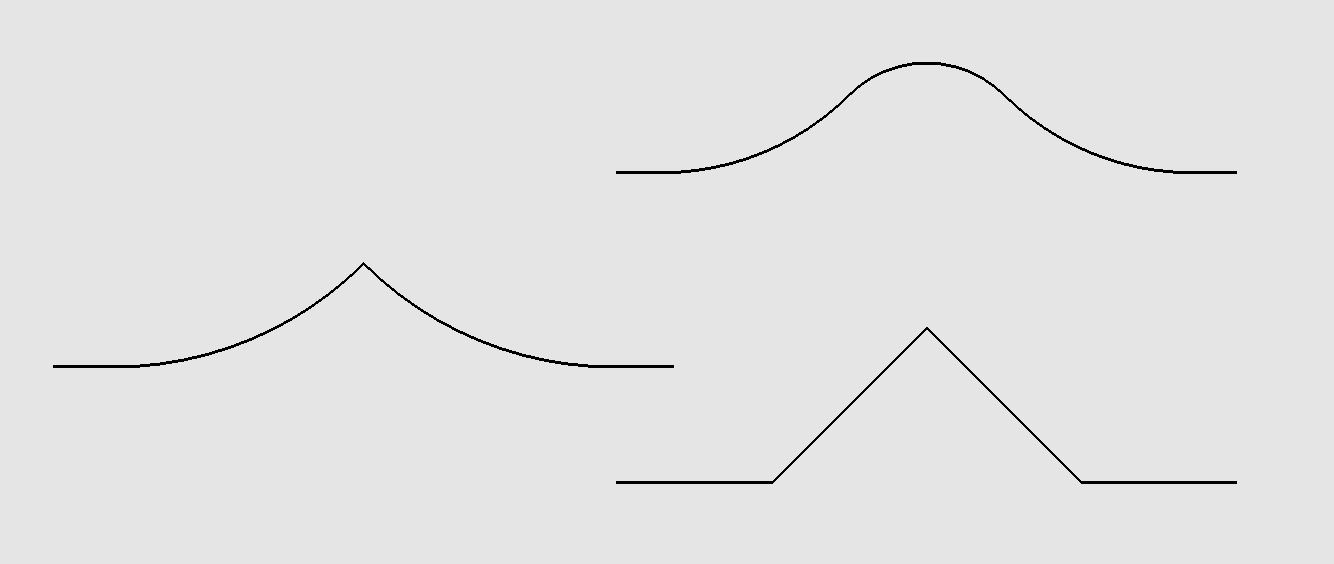

        pinchy falloff - pomysł na vertex tools.png

        1 Reply Last reply
        Reply Quote 0
        • thomthomT
          thomthom
          last edited by

          @einstein said:

          Hi!
          Got a question.
          If I select some vertices using soft selection, it will also affect geometry that's not connected to selected vertices (see screenshot). Can I change this behavior so that soft selection will only affect connected vertices?

          You'd say "do grouping your geometry" but that's not the solution in my case.

          Currently soft selection is computed by spatial distance only. I have it on my list to add a "by connected distance" option.

          Thomas Thomassen — SketchUp Monkey & Coding addict
          List of my plugins and link to the CookieWare fund

          1 Reply Last reply
          Reply Quote 0
          • thomthomT
            thomthom
            last edited by

            @einstein said:

            Hi!
            I'd have a suggestion for a small feature development.
            When doing soft selection we have two options of falloff - linear and cosine. What if we had more options, e.g. "pinchy" fallof shape, as illustrated below, on the left?

            I can see such idea was already posted years ago but I dared to bring it anyways, cuz it would be a fantastic improvement of already very good tool!

            Yes, that is also on the list. something like a pinch and bubble parameter like 3dsmax offer.

            Thomas Thomassen — SketchUp Monkey & Coding addict
            List of my plugins and link to the CookieWare fund

            1 Reply Last reply
            Reply Quote 0
            • R
              rv1974
              last edited by

              I hope target weld is in that list as well

              1 Reply Last reply
              Reply Quote 0
              • thomthomT
                thomthom
                last edited by

                @rv1974 said:

                I hope target weld is in that list as well

                TargetWeld.gif

                This ol' thing? 😛

                Thomas Thomassen — SketchUp Monkey & Coding addict
                List of my plugins and link to the CookieWare fund

                1 Reply Last reply
                Reply Quote 0
                • R
                  rv1974
                  last edited by

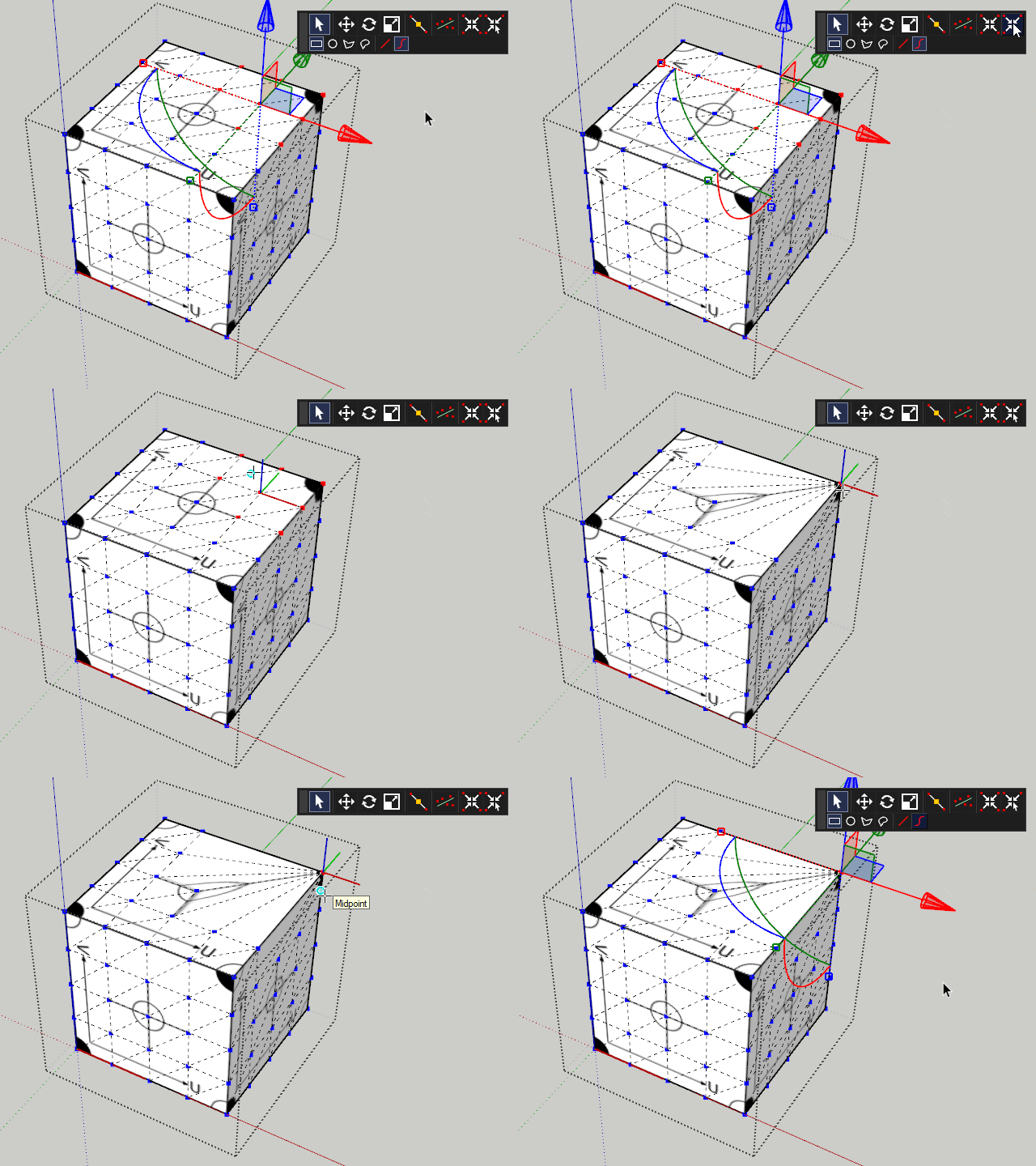
                  Oops.. I meant welding based distance threshhold

                  1 Reply Last reply
                  Reply Quote 0
                  • thomthomT
                    thomthom
                    last edited by

                    Like this?

                    2019-01-09_21h09_37.png

                    Thomas Thomassen — SketchUp Monkey & Coding addict
                    List of my plugins and link to the CookieWare fund

                    1 Reply Last reply
                    Reply Quote 0
                    • R
                      rv1974
                      last edited by

                      Wow morning full of surprises.
                      Many thanks!
                      The only thing left to be clarified is when v2019 will be out 😄

                      1 Reply Last reply
                      Reply Quote 0
                      • thomthomT
                        thomthom
                        last edited by

                        @rv1974 said:

                        The only thing left to be clarified is when v2019 will be out 😄

                        Good question. I'll make a post when I know myself. 😉

                        Thomas Thomassen — SketchUp Monkey & Coding addict
                        List of my plugins and link to the CookieWare fund

                        1 Reply Last reply
                        Reply Quote 0
                        • thomthomT
                          thomthom
                          last edited by

                          @rv1974 said:

                          Wow morning full of surprises.

                          Btw, Merge Close Vertices is already included in v1: https://evilsoftwareempire.com/vertex-tools/manual/tools#merge_close_vertices

                          Thomas Thomassen — SketchUp Monkey & Coding addict
                          List of my plugins and link to the CookieWare fund

                          1 Reply Last reply
                          Reply Quote 0
                          • R
                            rv1974
                            last edited by

                            @thomthom said:

                            @rv1974 said:

                            The only thing left to be clarified is when v2019 will be out 😄

                            Good question. I'll make a post when I know myself. 😉

                            If you sit by the river long enough, you will see ̶t̶h̶e̶ ̶b̶o̶d̶y̶ ̶o̶f̶ ̶y̶o̶u̶r̶ ̶e̶n̶e̶m̶y̶ ̶f̶l̶o̶a̶t̶ ̶b̶y̶ thomthom's post about v2019

                            1 Reply Last reply
                            Reply Quote 0
                            • pbacotP
                              pbacot
                              last edited by

                              Know thyself.

                              MacOSX MojaveSketchUp Pro v19 Twilight v2 Thea v3 PowerCADD

                              1 Reply Last reply
                              Reply Quote 0
                              • E
                                Einstein
                                last edited by

                                Hi!
                                I'd have another suggestion of upgrade. "Make Planar" tool would be more useful if we could specify the plane for selected vertices to be flattened to. For example, set the plane with two vectors, like TIG's Mirror does.

                                1 Reply Last reply
                                Reply Quote 0
                                • BoxB
                                  Box
                                  last edited by

                                  @einstein said:

                                  Hi!
                                  I'd have another suggestion of upgrade. "Make Planar" tool would be more useful if we could specify the plane for selected vertices to be flattened to. For example, set the plane with two vectors, like TIG's Mirror does.

                                  Adjust the Gismo to the direction you want then Make Planer.

                                  1 Reply Last reply
                                  Reply Quote 0
                                  • thomthomT
                                    thomthom
                                    last edited by

                                    @einstein said:

                                    Hi!
                                    I'd have another suggestion of upgrade. "Make Planar" tool would be more useful if we could specify the plane for selected vertices to be flattened to. For example, set the plane with two vectors, like TIG's Mirror does.

                                    You can also scale to zero for the same effect in the model axis planes.

                                    Thomas Thomassen — SketchUp Monkey & Coding addict
                                    List of my plugins and link to the CookieWare fund

                                    1 Reply Last reply
                                    Reply Quote 0
                                    • E
                                      Einstein
                                      last edited by

                                      Wow, scaling to 0 😲 It is a game-changer I wished SketchUp had for a long time. And only now I realised FredoScale can do it as well.
                                      Curious how many more surprises are hidden in these little buttons 😄

                                      1 Reply Last reply
                                      Reply Quote 0
                                      • BoxB
                                        Box
                                        last edited by

                                        One of the most frustrating things about teaching is how much students don't learn. Which can be read as hear, see, retain, remember, bother to take in, have any interest in, or simply haven't been exposed to. Amongst others.
                                        Pretty much everything has already been asked, answered and argued over in these forums, much like the rest of the internet you never get to the end of it and there's not much that hasn't already gone before.

                                        1 Reply Last reply
                                        Reply Quote 0
                                        • thomthomT
                                          thomthom
                                          last edited by

                                          @einstein said:

                                          Wow, scaling to 0 😲 It is a game-changer I wished SketchUp had for a long time. And only now I realised FredoScale can do it as well.
                                          Curious how many more surprises are hidden in these little buttons 😄

                                          I don't recall if v1 snap to scale 0 - but v2 will for sure. Making it easier.

                                          (I had similar revelation about scaling negative to flip/mirror.)

                                          @box said:

                                          One of the most frustrating things about teaching is how much students don't learn. Which can be read as hear, see, retain, remember, bother to take in, have any interest in, or simply haven't been exposed to. Amongst others.
                                          Pretty much everything has already been asked, answered and argued over in these forums, much like the rest of the internet you never get to the end of it and there's not much that hasn't already gone before.

                                          Challenge with all the gems in the forums is that they aren't always easy to find. Often they are buried deep in lengthy threads.

                                          Thomas Thomassen — SketchUp Monkey & Coding addict
                                          List of my plugins and link to the CookieWare fund

                                          1 Reply Last reply
                                          Reply Quote 0
                                          • BoxB
                                            Box
                                            last edited by

                                            So true, I didn't mean anything by it. Just noting that we all tend to read what's in front then scroll on rather than following the story.

                                            1 Reply Last reply
                                            Reply Quote 0

                                            Hello! It looks like you're interested in this conversation, but you don't have an account yet.

                                            Getting fed up of having to scroll through the same posts each visit? When you register for an account, you'll always come back to exactly where you were before, and choose to be notified of new replies (either via email, or push notification). You'll also be able to save bookmarks and upvote posts to show your appreciation to other community members.

                                            With your input, this post could be even better 💗

                                            Register Login
                                            • 1
                                            • 2
                                            • 29
                                            • 30
                                            • 31
                                            • 32
                                            • 33
                                            • 34
                                            • 31 / 34
                                            • First post
                                              Last post
                                            Buy SketchPlus
                                            Buy SUbD
                                            Buy WrapR
                                            Buy eBook
                                            Buy Modelur
                                            Buy Vertex Tools
                                            Buy SketchCuisine
                                            Buy FormFonts

                                            Advertisement