sketchucation logo sketchucation
    • Login
    Oops, your profile's looking a bit empty! To help us tailor your experience, please fill in key details like your SketchUp version, skill level, operating system, and more. Update and save your info on your profile page today!
    Mac User? | Join the Rayscaper Beta for Mac Learn More

    [Plugin] Superglue

    Scheduled Pinned Locked Moved Plugins
    81 Posts 18 Posters 52.8k Views 18 Watching
    Loading More Posts
    • Oldest to Newest
    • Newest to Oldest
    • Most Votes
    Reply
    • Reply as topic
    Log in to reply
    This topic has been deleted. Only users with topic management privileges can see it.
    • thomthomT
      thomthom
      last edited by

      @codyv1 said:

      You basicaly rotate the glue, and every component stuck together with the glue. Like making a group of those components, and then rotating the group.

      Isn't that just selecting the components and using the rotate tool?
      I can't get a grip on what this "glue" is. πŸ˜•

      Thomas Thomassen β€” SketchUp Monkey & Coding addict
      List of my plugins and link to the CookieWare fund

      1 Reply Last reply
      Reply Quote 0
      • C
        CodyV1
        last edited by

        Nevermind πŸ˜’

        Be There

        http://www.facebook.com/#!/profile.php?id=100000814922209

        1 Reply Last reply
        Reply Quote 0
        • thomthomT
          thomthom
          last edited by

          😒

          Thomas Thomassen β€” SketchUp Monkey & Coding addict
          List of my plugins and link to the CookieWare fund

          1 Reply Last reply
          Reply Quote 0
          • honoluludesktopH
            honoluludesktop
            last edited by

            Very clever tool. Didn't try it myself, and the illustration looks like it cuts a hole in the face. How about a wall made up of two faces? Don't program much, but can the api provide a way to find all the faces that a component intersects?

            1 Reply Last reply
            Reply Quote 0
            • thomthomT
              thomthom
              last edited by

              @honoluludesktop said:

              Very clever tool. Didn't try it myself, and the illustration looks like it cuts a hole in the face. How about a wall made up of two faces? Don't program much, but can the api provide a way to find all the faces that a component intersects?

              All it does it glue/unglue existing glueto components. In the examples given that happened to also be cutout components.

              Thomas Thomassen β€” SketchUp Monkey & Coding addict
              List of my plugins and link to the CookieWare fund

              1 Reply Last reply
              Reply Quote 0
              • C
                CodyV1
                last edited by

                Also haven't tried this myself either. But, how about equalizing the hight of components placed. Like if you have windows and their everywhere, just enter a hight or chose a component that you want to be adjacent to the others? πŸ‘ πŸ‘Ž ❓

                Be There

                http://www.facebook.com/#!/profile.php?id=100000814922209

                1 Reply Last reply
                Reply Quote 0
                • thomthomT
                  thomthom
                  last edited by

                  It would be a different plugin, but it would be an interesting way for bulk adjustments.
                  An align tool, where you specify bottom/center/top etc. and then just make a sweep across the comps/groups you want to adjust.

                  I do like this way of choosing entities - I want to explore further ways other than the traditional pre-select or click-click-click select.

                  Thomas Thomassen β€” SketchUp Monkey & Coding addict
                  List of my plugins and link to the CookieWare fund

                  1 Reply Last reply
                  Reply Quote 0
                  • A
                    agamemnus
                    last edited by

                    I (think) I always wanted something like this; downloading it now! πŸ˜„

                    1 Reply Last reply
                    Reply Quote 0
                    • A
                      arjunmax09
                      last edited by

                      @unknownuser said:

                      About the glue πŸ’š

                      http://bruxelles.blogs.liberation.fr/coulisses/images/2008/12/10/haddock_2.jpg

                      LOL!!! πŸ˜† πŸ˜† πŸ˜† ultimate man..TINTIN IS ONE OF MY FAVOURITE CARTOON SERIES..used to watch it everyday on cartoon network when i was in class VI πŸ˜†

                      when you fail at something....you haven't really failed...you've found one way the thing will not work out

                      1 Reply Last reply
                      Reply Quote 0
                      • pilouP
                        pilou
                        last edited by

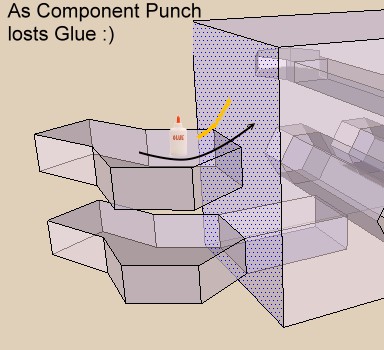
                        I have find a use of Super Glue πŸ˜„
                        and at last understood the use πŸ’š
                        punchy1.jpg

                        Frenchy Pilou
                        Is beautiful that please without concept!
                        My Little site :)

                        1 Reply Last reply
                        Reply Quote 0
                        • FletchF
                          Fletch
                          last edited by

                          @gaieus said:

                          @thomthom said:

                          @unknownuser said:

                          HAve you a little animation of what must the glue's pot must do?

                          A video of the plugin in use? Yes I'll make one once I make v1.1.0.

                          Here you go sir (especially, with the annotations it is pretty fast so pause it when needed):

                          OH! Thanks so much Gaius, I was very confused what the point of this plugin was... so now, when I copy lights on the ceiling and they don't cut the opening in the face, the "Superglue" will "fix" it so that they DO cut the opening... BRILLIANT! β˜€

                          Thanks for sharing, ThomThom!

                          Fletch
                          3D Modeling addict. Former owner/developer of Twilight Render. sleepinggiantvisual.com

                          1 Reply Last reply
                          Reply Quote 0
                          • thomthomT
                            thomthom
                            last edited by

                            @fletch said:

                            OH! Thanks so much Gaius, I was very confused what the point of this plugin was... so now, when I copy lights on the ceiling and they don't cut the opening in the face, the "Superglue" will "fix" it so that they DO cut the opening... BRILLIANT! β˜€

                            Provided that the axes are correct for the component you try to glue on - if the axis isn't aligned to match the face you try to glue on it won't do anything.

                            Thomas Thomassen β€” SketchUp Monkey & Coding addict
                            List of my plugins and link to the CookieWare fund

                            1 Reply Last reply
                            Reply Quote 0
                            • pilouP
                              pilou
                              last edited by

                              No more need glue for the plug Component Punch!!!
                              Tig found just add a # at the line 186 and all works fine! πŸ‘

                              My bottle of glue will be full at the end of the week πŸ’š
                              Sorry Thomthom πŸ˜†
                              Edit Ah damned , this modify works only on the same face!

                              My bottle of glue will be empty at the end of the week πŸ’š

                              Frenchy Pilou
                              Is beautiful that please without concept!
                              My Little site :)

                              1 Reply Last reply
                              Reply Quote 0
                              • pilouP
                                pilou
                                last edited by

                                Edit Curious this morning all works fine! 😲

                                http://forums.sketchucation.com/download/file.php?id=54488

                                Frenchy Pilou
                                Is beautiful that please without concept!
                                My Little site :)

                                1 Reply Last reply
                                Reply Quote 0
                                • free agentF
                                  free agent
                                  last edited by

                                  hey thom thom just tried this ruby and works great. thanx alot πŸ‘

                                  http://i167.photobucket.com/albums/u143/FreeAgent84/bug.gif

                                  1 Reply Last reply
                                  Reply Quote 0
                                  • thomthomT
                                    thomthom
                                    last edited by

                                    Sean! πŸŽ‰
                                    Long time no see. How are you?
                                    What have you been up to? Are you completely Max person now? Got some new work to show off?

                                    Thomas Thomassen β€” SketchUp Monkey & Coding addict
                                    List of my plugins and link to the CookieWare fund

                                    1 Reply Last reply
                                    Reply Quote 0
                                    • free agentF
                                      free agent
                                      last edited by

                                      Im good, you? and nope, i speak max and sketchup πŸ˜„ sketchups just too easy to completely throw out of ones workflow.

                                      check out the company blog http://www.constructmedia.co.uk/news πŸ˜„ will post some new stuff soon

                                      http://i167.photobucket.com/albums/u143/FreeAgent84/bug.gif

                                      1 Reply Last reply
                                      Reply Quote 0
                                      • E
                                        ellen_leung
                                        last edited by

                                        i dont understand how to use it, can anyone help explain to me?

                                        1 Reply Last reply
                                        Reply Quote 0
                                        • GaieusG
                                          Gaieus
                                          last edited by

                                          Hi Ellen,

                                          Here is a short video with captions:

                                          YouTube - Superglue Plugin for SketchUp by ThomThom
                                          [flash=480,385:22ve9z34]http://www.youtube.com/v/VS8-tjYTPXM?fs=1&hl=hu_HU[/flash:22ve9z34]

                                          Gai...

                                          1 Reply Last reply
                                          Reply Quote 0
                                          • dereiD
                                            derei
                                            last edited by

                                            It seems to not work for me 😞

                                            I made a component that makes a hole in a face, when I take the component from Components window, it cuts hole, if I copy it from model ( + Ctrl), it doesn't cut hole. I used Superglue on it, it doesn't cut hole. Am I misusing the plugin? Why that components don't cut hole when I copy them?


                                            DESIGNER AND ARTIST DEREI.UK

                                            1 Reply Last reply
                                            Reply Quote 0

                                            Hello! It looks like you're interested in this conversation, but you don't have an account yet.

                                            Getting fed up of having to scroll through the same posts each visit? When you register for an account, you'll always come back to exactly where you were before, and choose to be notified of new replies (either via email, or push notification). You'll also be able to save bookmarks and upvote posts to show your appreciation to other community members.

                                            With your input, this post could be even better πŸ’—

                                            Register Login
                                            • 1
                                            • 2
                                            • 3
                                            • 4
                                            • 5
                                            • 3 / 5
                                            • First post
                                              Last post
                                            Buy SketchPlus
                                            Buy SUbD
                                            Buy WrapR
                                            Buy eBook
                                            Buy Modelur
                                            Buy Vertex Tools
                                            Buy SketchCuisine
                                            Buy FormFonts

                                            Advertisement