Understanding repeating code In Ruby?
-
This topic has been troubling me since I left BASIC. Even as a novice I could understand Gosub and Goto. It simply meant I didn't have to repeat code, and I could jump to other subroutine.
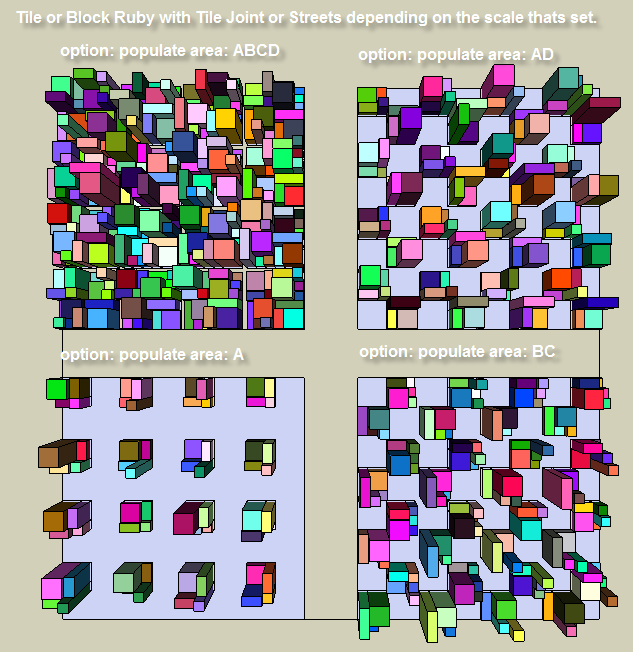
The attached pic shows 4 subroutines each can be selected from a drop down menu within a single Ruby script, I'm currently developing. Each of the 4 subroutine is contained within its own "If" statement.
The option: populate area ABCD, subroutine contains only the possible ABCD, related XY points
The option: populate area AD, subroutine contains only the possible AD, related XY points
The option: populate area BC, subroutine contains only the possible BC, related XY points
The option: populate area A, subroutine contains only the possible A, related XY pointsThe script runs perfectly! Were it not for the fact that I know something about repeating code, I would never have asked the following question.
Since all the code required for all possible XY points is already defined once in the ABCD "if" subroutine. How do I avoid repeating all of these xy points all over again in the "if" subroutines for other 3 options, (AD, BC, and A)?
-
Write a def inside the main code
Sodef process_x(args=nil) ### args can say do it a certain way or data for the points etc ### do_your_stuff end#defthen later in the main code do
self.process_x(args)and it'll run the process_x with the 'args' for you...
If you need to run it several times do something like[args1, args2, arggs3].each{|args| self.process_x(args) }or
3.times{|i|self.process_x(args)}
-
You write a method that has arguments (parameters) and inside the method you have conditional statements that do things according to that values of the arguments.
module Tomot module Tile_wizard POINTS=[..array of points..] def populate( how='ABCD' ) case how.to_s when 'ABCD' # use your module POINTS array constant when 'AD' # use your module POINTS array constant when 'BC' # use your module POINTS array constant else # just do 'A' # use your module POINTS array constant end # # you can put common code here # end # method # # you can def other methods here that # might be called by the populate method # begin # run once when module loads # setup your toolbar & menu # to call Tomot;;Tile_Wizard.populate(arg) # where arg can be the String or Symbol, # ie ;ABCD or 'ABCD' end end # module end # module -
thank you for your input!
-
With this, you can use any combination of ABCD.
blocks = UI.inputbox(["Blocks [ABCD]?"])[0]
populateA() if blocks[/A/]
populateB() if blocks[/B/]
populateC() if blocks[/C/]
populateD() if blocks[/D/]
Or even..
blocks = UI.inputbox(["Blocks [ABCD]?"])[0]
letters = blocks.split(//)
letters.each do |letter|
  populate(letter, etc)
end


Hello! It looks like you're interested in this conversation, but you don't have an account yet.
Getting fed up of having to scroll through the same posts each visit? When you register for an account, you'll always come back to exactly where you were before, and choose to be notified of new replies (either via email, or push notification). You'll also be able to save bookmarks and upvote posts to show your appreciation to other community members.
With your input, this post could be even better 💗
Register Login


Advertisement