Strange behavior
-
I have been frantically working on a project with a really tight timeline, and was asked to forward some "Elevations" for review by the site co-ordinator. Politely explaining that we have adopted a workflow where we work with the client using a floor plan, and a 3d model to give the client a better visual idea of the project as we make revisions, and that we would draw the traditional 2D elevations as part of the working drawing set, as such I would forward some perspective shots, floor plans and the renderings done to date.
When I went to export 2D jpegs, or PDF's the results I got were by no means acceptable. (see attached) There were grey areas that appeared on both versions, and try as I may I could not get rid of them.
Has anyone else experienced this? It has never happened before in this manner, although I have noticed that after exporting to Thea, the image size that was created to export does something similar, and since I have had some difficulties since installing WxSu which is required for the SketchUp to Thea export I am a little suspicious that this may be the cause.
I ended up shipping off some screenshots, which unfortunately were a little aliased, but I felt I had no choice under the circumstances.
I would appreciate any thoughts or workarounds. Thanks
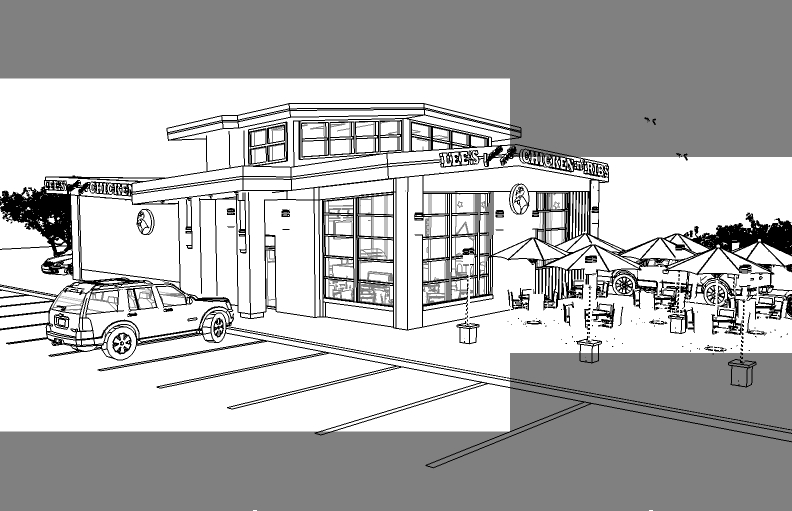
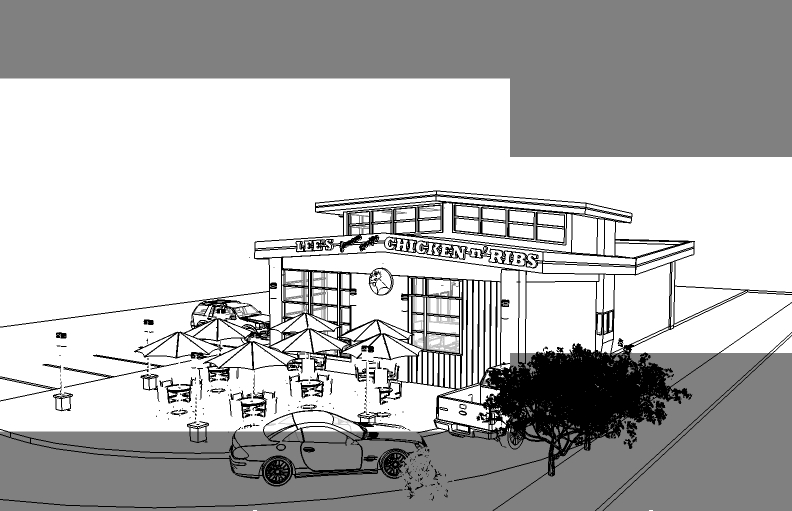
-
This is sometimes the doing of renderer export plugins like V-ray or Twilight that tweak the SU camera aspect ratio.
Thomthom posted this fix that you can try in an earlier thread:
Type this into the Ruby Console:
Sketchup.active_model.active_view.camera.aspect_ratio = 0Anssi
-
Thanks Anssi, (and Thomthom) I will give it a try.
-
SU2Thea will do letter boxing, but in my understanding only when you have set custom camera. In SU2Thea you can change camera back to original (SU2Thea exporter > Scenes > SU Window in view parameters). If that happens for some other reason, maybe there is a bug.
Some other renderers do use the same letter boxing too...


Hello! It looks like you're interested in this conversation, but you don't have an account yet.
Getting fed up of having to scroll through the same posts each visit? When you register for an account, you'll always come back to exactly where you were before, and choose to be notified of new replies (either via email, or push notification). You'll also be able to save bookmarks and upvote posts to show your appreciation to other community members.
With your input, this post could be even better 💗
Register Login


Advertisement