Changing the colour of a plan
-
Hello,
I am trying to do some diagrams in sketch up and am trying to display a 3d axo of a building with the plan in a faded colour. I can't seem to change the colour of this black however, i s there any way i can do it?
Thanks
-
Hi jonathan,
I guess you have already painted everything to some faded colur...
So open your styles window, go to "In model", select the style you want to edit > Edit > Edge settings > and at the bottom, set the edges to be coloured by material.
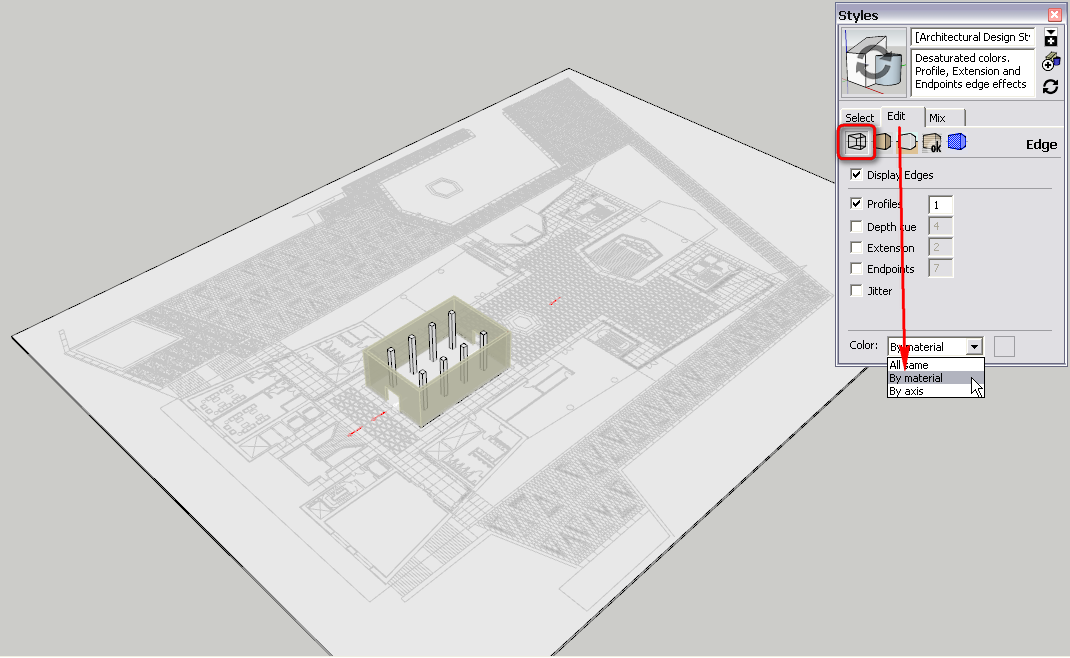
-
Thank you, that's brilliant, i'm forever discovering new things!
Saviour.
Thanks Gaieus!
-
Gai, good post, thanks.
-
You always have to be very careful when using this technique however as it will display all edges by material so if you accidentally paint other edges with some colour for instance (or paint whole groups/components from outside), they will also be displayed by those colours.


Hello! It looks like you're interested in this conversation, but you don't have an account yet.
Getting fed up of having to scroll through the same posts each visit? When you register for an account, you'll always come back to exactly where you were before, and choose to be notified of new replies (either via email, or push notification). You'll also be able to save bookmarks and upvote posts to show your appreciation to other community members.
With your input, this post could be even better 💗
Register Login


Advertisement