sketchucation logo sketchucation
    • Login
    Oops, your profile's looking a bit empty! To help us tailor your experience, please fill in key details like your SketchUp version, skill level, operating system, and more. Update and save your info on your profile page today!
    ⚠️ Important | Libfredo 15.6b introduces important bugfixes for Fredo's Extensions Update

    'Snapping' to a face above a terrain?

    Scheduled Pinned Locked Moved Newbie Forum
    sketchup
    8 Posts 3 Posters 308 Views 3 Watching
    Loading More Posts
    • Oldest to Newest
    • Newest to Oldest
    • Most Votes
    Reply
    • Reply as topic
    Log in to reply
    This topic has been deleted. Only users with topic management privileges can see it.
    • leedeeteeL Offline
      leedeetee
      last edited by

      Just wondering the best way that I can draw on a face positioned directly 'above' a terrain model so that I can then drape the lines/faces onto the terrain below (using sandbox > terain.

      Every time I try drawing above, it always snaps to the terrain below!

      Can anyone help?!

      1 Reply Last reply Reply Quote 0
      • pilouP Offline
        pilou
        last edited by

        a little file example? (in V6 save as)

        Frenchy Pilou
        Is beautiful that please without concept!
        My Little site :)

        1 Reply Last reply Reply Quote 0
        • leedeeteeL Offline
          leedeetee
          last edited by

          Attached is an example of what I am trying to do ....

          I use top view in Paralel projection and then draw my road/path, ready to be draped, but it always snaps to the terrain thus making it impossible to do!

          Thanks!


          Exampleproblem.skp

          1 Reply Last reply Reply Quote 0
          • charly2008C Offline
            charly2008
            last edited by

            Hi, leedeetee,

            this happens only if you are in the X-ray mode.

            Karlheinz

            He who makes no mistakes, makes nothing

            1 Reply Last reply Reply Quote 0
            • pilouP Offline
              pilou
              last edited by

              kill the Xray Mode
              Fill color the rectangle following taste / Edit Color, decrease the opacity 😉
              So you can see toward your surface 😎
              And draw your roads as you want ☀

              Frenchy Pilou
              Is beautiful that please without concept!
              My Little site :)

              1 Reply Last reply Reply Quote 0
              • charly2008C Offline
                charly2008
                last edited by

                Hi Pilou,

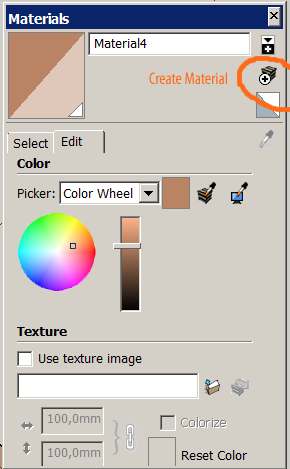
                At this opportunity I had not thought of! But I must correct your reference. The path:
                Material -> Edit Color -> Create Material -> Opacity

                Karlheinz


                Create Material.jpg

                He who makes no mistakes, makes nothing

                1 Reply Last reply Reply Quote 0
                • leedeeteeL Offline
                  leedeetee
                  last edited by

                  Many thanks! So effective, so simple!

                  1 Reply Last reply Reply Quote 0
                  • pilouP Offline
                    pilou
                    last edited by

                    @Charly
                    You create new material if you need it 😄

                    In my case I just edit the current color painted then reput color opacity to 100% at the end of the process 😉

                    Frenchy Pilou
                    Is beautiful that please without concept!
                    My Little site :)

                    1 Reply Last reply Reply Quote 0
                    • 1 / 1
                    • First post
                      Last post
                    Buy SketchPlus
                    Buy SUbD
                    Buy WrapR
                    Buy eBook
                    Buy Modelur
                    Buy Vertex Tools
                    Buy SketchCuisine
                    Buy FormFonts

                    Advertisement