PhotoSculpt
-
another thought. i think someone may be more likely to pirate software (download pirated software) that's doesn't have a full featured demo. sometimes its the only way to fully try it out without buying it first
 . also someone may have a pirated copy of a software they only use once or twice, but if the need to use it increases they are likely to get a legit license at that point because that's the software they're comfortable with. (provided its not ridiculously priced)
in short it doesn't seem to me that you will lose legitimate customers to pirates.

-
I can see the dilemma, to open it up or not. I wonder if it would make any sense using the Google SketchUp model? How about a free version with limited resolution and a pro version with unlimited resolution.
-
@xrok1 said:
another thought. i think someone may be more likely to pirate software (download pirated software) that's doesn't have a full featured demo. sometimes its the only way to fully try it out without buying it first
. also someone may have a pirated copy of a software they only use once or twice, but if the need to use it increases they are likely to get a legit license at that point because that's the software they're comfortable with. (provided its not ridiculously priced)
in short it doesn't seem to me that you will lose legitimate customers to pirates.
I made my mind and followed your advice.
My 30 day trial is now FULL FEATURED since yesterday evening.
Just download it (now here on first page http://www.photosculpt.net) and install it again and your trial will continue with save options now)
@mike lucey said:
I can see the dilemma, to open it up or not. I wonder if it would make any sense using the Google SketchUp model? How about a free version with limited resolution and a pro version with unlimited resolution.
Hey, that's an idea!
 what should the limited resolution be in your mind (256x256) ?
I actually first thought of just doing a ".sculpt" file viewer at first. (Of course unlimited in texture size) -
That "SketchUp model" is not the case any more actually - you can export full resolution with the free version, too.
However it CAN be a good model as many rendering application does this. Even a funny thing happened once in the Twilight Forums (it has resolution limitation AND watermark) a guy came and complained that he cannot export larger than 800x600 pixels and the answer was that surely he cannot with pirated versions. That must have been the case as he never came back...
They also have a computer specific licensing method and the key will only work on one computer with a certain OS install (so if you move to another computer, change hardware or reinstall OS, you need to get a new auth key) These are all good ways to minimize piracy (cannot fully eliminate it of course) but when it is so cumbersome already, users will tend to rather buy the product - especially if it is so well priced as PhotoSculpt (or in fact twilight, too - exactly the same price
) -
@gaieus said:
They also have a computer specific licensing method and the key will only work on one computer with a certain OS install (so if you move to another computer, change hardware or reinstall OS, you need to get a new auth key) These are all good ways to minimize piracy (cannot fully eliminate it of course) but when it is so cumbersome already, users will tend to rather buy the product - especially if it is so well priced as PhotoSculpt (or in fact twilight, too - exactly the same price
)Thanks!
I can do that, it's called "hardware locking". But ... as a user I don't like it
 . Maybe one day? What do you think?
 -
not particularly fond of hardware locking either. now that i think about it more i think the water mark method may actually be the best. unlimited length for trial, unlimited resolution but add watermarks to everything. just don't get carried away with watermarks. some software put so many you can't even see your work after.
-
@xrok1 said:
not particularly fond of hardware locking either. now that i think about it more i think the water mark method may actually be the best. unlimited length for trial, unlimited resolution but add watermarks to everything. just don't get carried away with watermarks. some software put so many you can't even see your work after.
Well, I did it the other way around = no watermark and time limited.
-
excellent, going to check it out now...

-
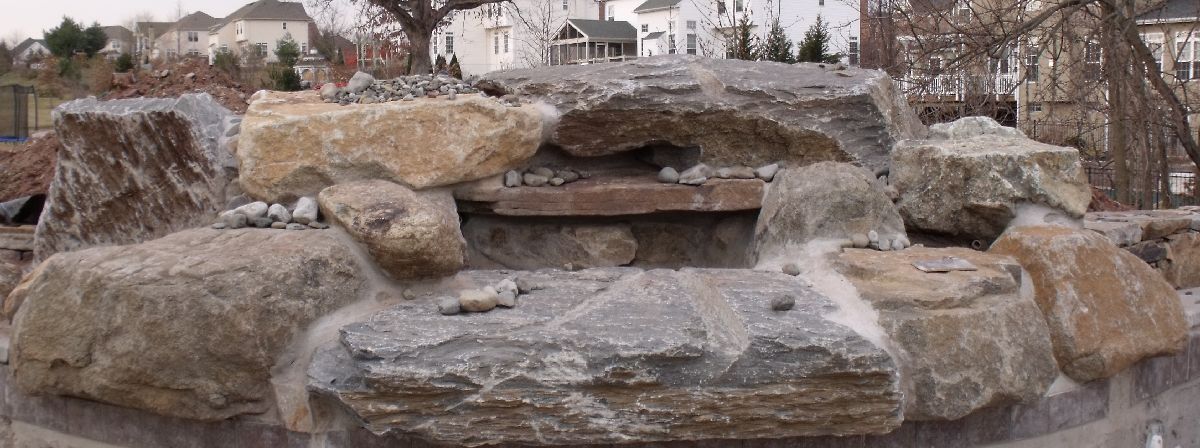
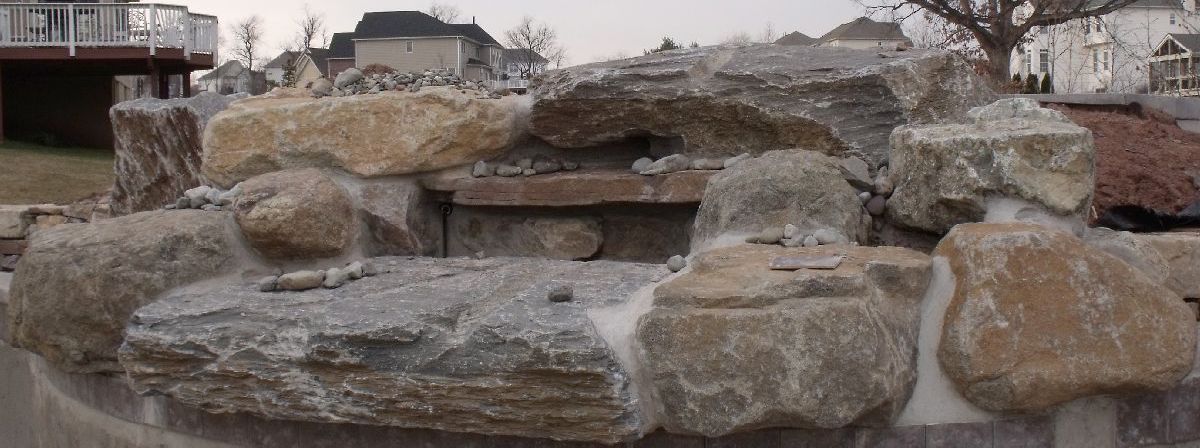
I've took these two photos of a waterfall I'm building, with the intention of trying to do a photosculpt. Results are not so good. Any suggestions for better images or how to give it more depth?
-
@earthmover said:
I've took these two photos of a waterfall I'm building, with the intention of trying to do a photosculpt. Results are not so good. Any suggestions for better images or how to give it more depth?
Hello Earthmover, nice fountain!
that's easy: your images are taken too far apart. Way beyond repair. You need to shoot them again I'm sorry.
If you want to know if your images are taken too far apart: as per the tutorial 2 (link below), check you images on your camera screen after shooting. Going back and forth front and right image should make the subject "dance" or "rock". Like an animated movie? It's maybe difficult to explain it right as my english is limited.
Here the front rock moves by 25% of the image (big move!), the left rock almost dissapear and change shape. = that tells me it's too much for photosculpt I'm sorry.See other points from the tutorial 2 for more info: http://www.photosculpt.net/tutorial/
It should work in the end, that's an easy subject.
-
No problem my friend. I will have to retake the photos sometime this week and try again. Thanks for clarifying!
-
Free Material samples are here: http://www.photosculpt.net/blog/2010/9/1/the-best-quality-seamless-tileable-3d-textures-ever.html

I think those materials are beautiful, what do you think?
Has anyone any questions about using PhotoSculpt? I've seen beautiful renders with SU recently. Who want to give a try to those Free samples?
-
Hi guys,
This month I've changed all FREE textures for download and I also upgraded them to 1024x1024. see them here:
http://www.photosculpt.net/blog/2010...s-10-pack.htmlhere is a tutorial I made on how create them / use them:
http://www.photosculpt.net/dump/2010...osculpt-t.htmlCan someone explain how these settings work with Sketchup Pro? I think they can be used by external renderers as well?
I created much more textures now (46 at the time I'm posting).

http://www.photosculpt.net/gallery/3d-materials/Not all are ready for download yet. But for the first time at http://www.photosculpt.net
I'm selling some of them here from Eur 5.99
http://www.photosculpt.net/buy-3d-textures-now/I also have a very nice Flash 3D viewer
 in front page at http://www.photosculpt.net featuring some models created with my software.
I think that's all
Does any one has made any artwork with last month's free textures yet? I really want to see that!
Don't forget there is a challenge every end of the month. http://www.photosculpt.net/challenge/
you can win a free license (value Eur 99.00) -





Advertisement