sketchucation logo sketchucation
    • 登入
    Oops, your profile's looking a bit empty! To help us tailor your experience, please fill in key details like your SketchUp version, skill level, operating system, and more. Update and save your info on your profile page today!
    ⚠️ Important | Libfredo 15.6b introduces important bugfixes for Fredo's Extensions Update

    [Plugin] PLY Importer

    已排程 已置頂 已鎖定 已移動 Plugins
    33 貼文 7 Posters 104.2k 瀏覽 7 Watching
    正在載入更多貼文
    • 從舊到新
    • 從新到舊
    • 最多點贊
    回覆
    • 在新貼文中回覆
    登入後回覆
    此主題已被刪除。只有擁有主題管理權限的使用者可以查看。
    • J 離線
      Jim
      最後由 編輯

      I re-wrote this so it should work with most ascii .ply files that have vertex and face elements. See first post for download.

      Hi

      1 條回覆 最後回覆 回覆 引用 0
      • D 離線
        driven
        最後由 編輯

        Hi Jim, thanks

        I'll try it out later on and see if there's still a Mac issue, cheers

        BTW have you ever had a play with Apanta Studio, the PC editor [that's now ported to Mac?]

        john

        learn from the mistakes of others, you may not live long enough to make them all yourself...

        1 條回覆 最後回覆 回覆 引用 0
        • D 離線
          driven
          最後由 編輯

          took longer to upload the Jpeg then to load into SU so that's very good, but I now have a request because I may have a use... can it import into a component, to save SU re-calculating all the faces?
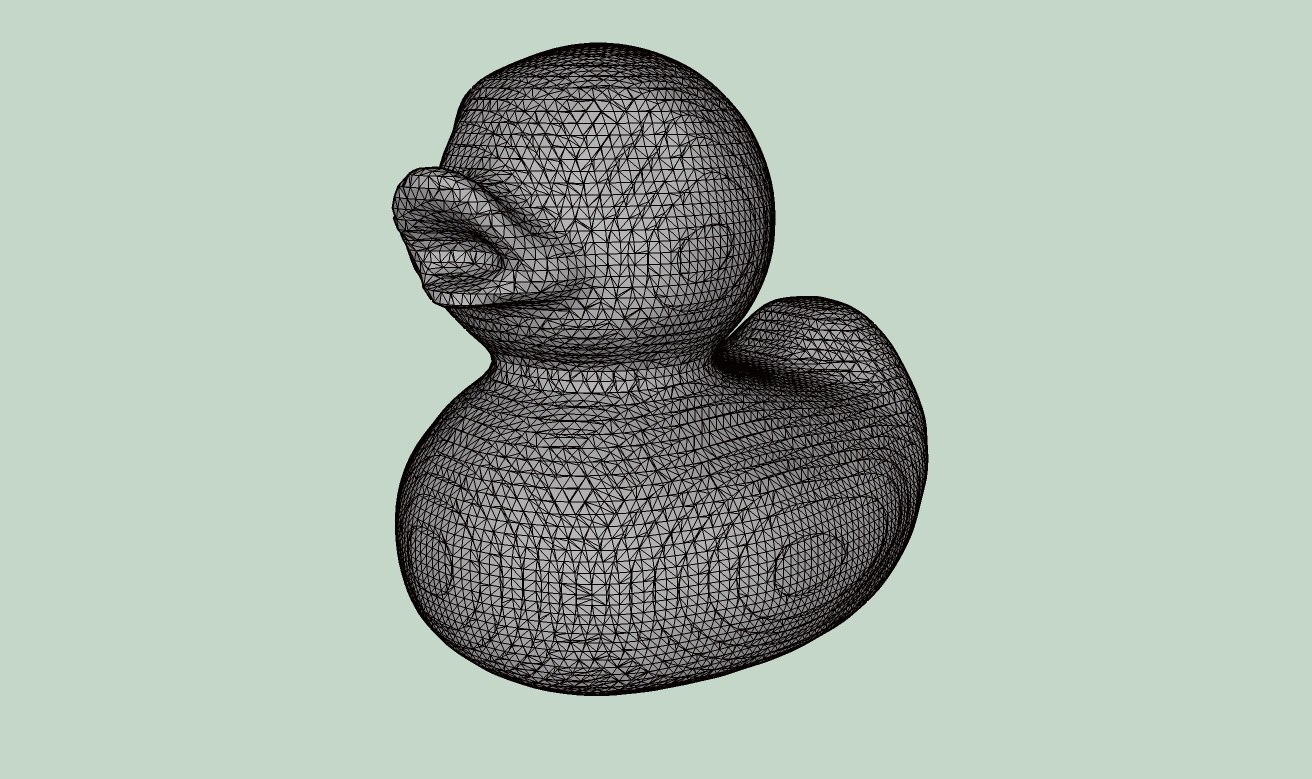
          came in so fast

          learn from the mistakes of others, you may not live long enough to make them all yourself...

          1 條回覆 最後回覆 回覆 引用 0
          • J 離線
            Jim
            最後由 編輯

            If there is any geometry in the model (i.e. the model is not empty,) then the import is made in a Group. Will that work?

            Glad to see it working.

            Hi

            1 條回覆 最後回覆 回覆 引用 0
            • D 離線
              driven
              最後由 編輯

              yep, there some very good .ply figures out there for just dropping in for a render and casting off... and group scale and move well enough.

              cheers
              jhon

              learn from the mistakes of others, you may not live long enough to make them all yourself...

              1 條回覆 最後回覆 回覆 引用 0
              • thomthomT 離線
                thomthom
                最後由 編輯

                I've been looking around at the various ruby based importers for SketchUp and I see that no one uses the Importer class. If this class is used the importer can be found in the native import list which would be very nice.
                http://code.google.com/apis/sketchup/docs/ourdoc/importer.html

                Thomas Thomassen — SketchUp Monkey & Coding addict
                List of my plugins and link to the CookieWare fund

                1 條回覆 最後回覆 回覆 引用 0
                • J 離線
                  Jim
                  最後由 編輯

                  Yeah, I used it on a ascii/binary .stl importer I wrote - works well.

                  Hi

                  1 條回覆 最後回覆 回覆 引用 0
                  • charly2008C 離線
                    charly2008
                    最後由 編輯

                    Hi Jim,

                    Thank you very much. It works very well.

                    Charly

                    He who makes no mistakes, makes nothing

                    1 條回覆 最後回覆 回覆 引用 0
                    • J 離線
                      Jim
                      最後由 編輯

                      @charly2008 said:

                      Thank you very much. It works very well.

                      Thanks, I am as surprised as you. 😆

                      Hi

                      1 條回覆 最後回覆 回覆 引用 0
                      • T 離線
                        tomws
                        最後由 編輯

                        <Newbie alert>
                        I'm trying to understand how to use this plugin (ultimately want to use it to import a terrain mesh). I've 'installed' the plugin and, to try it out, I copied the simple cube shown in http://paulbourke.net/dataformats/ply/ into a file called 'simple_cube.ply' as follows:
                        ply
                        format ascii 1.0 { ascii/binary, format version number }
                        comment made by Greg Turk { comments keyword specified, like all lines }
                        comment this file is a cube
                        element vertex 8 { define "vertex" element, 8 of them in file }
                        property float x { vertex contains float "x" coordinate }
                        property float y { y coordinate is also a vertex property }
                        property float z { z coordinate, too }
                        element face 6 { there are 6 "face" elements in the file }
                        property list uchar int vertex_index { "vertex_indices" is a list of ints }
                        end_header { delimits the end of the header }
                        0 0 0 { start of vertex list }
                        0 0 1
                        0 1 1
                        0 1 0
                        1 0 0
                        1 0 1
                        1 1 1
                        1 1 0
                        4 0 1 2 3 { start of face list }
                        4 7 6 5 4
                        4 0 4 5 1
                        4 1 5 6 2
                        4 2 6 7 3
                        4 3 7 4 0

                        I then open SketchupPro V8 and select this plugin from the plugin menu. I select the 'simple_cube.ply' file and get the following result on the Ruby Console:
                        Error: #<NoMethodError: undefined method times' for nil:NilClass> C:/Program Files (x86)/Google/Google SketchUp 8/Plugins/jf_ply_importer.rb:104:in parse_faces'
                        C:/Program Files (x86)/Google/Google SketchUp 8/Plugins/jf_ply_importer.rb:102:in each' C:/Program Files (x86)/Google/Google SketchUp 8/Plugins/jf_ply_importer.rb:102:in parse_faces'
                        C:/Program Files (x86)/Google/Google SketchUp 8/Plugins/jf_ply_importer.rb:51:in parse' C:/Program Files (x86)/Google/Google SketchUp 8/Plugins/jf_ply_importer.rb:208:in ply_import'
                        C:/Program Files (x86)/Google/Google SketchUp 8/Plugins/jf_ply_importer.rb:231
                        C:/Program Files (x86)/Google/Google SketchUp 8/Plugins/jf_ply_importer.rb:104:in `call'
                        C:/Program Files (x86)/Google/Google SketchUp 8/Plugins/jf_ply_importer.rb:104

                        Uh, what am I doing wrong?

                        And, if I get past this, what units should I set my vertices to (currently in feet, inches, fractional inches)?

                        Thanks in advance,
                        Tom

                        1 條回覆 最後回覆 回覆 引用 0
                        • J 離線
                          Jim
                          最後由 編輯

                          Hi Tom,

                          From the paragraph just before the example you copied... "The comments in brackets are NOT part of the file, they are annotations to this example."

                          Remove them and the file will import.

                          Hi

                          1 條回覆 最後回覆 回覆 引用 0
                          • T 離線
                            tomws
                            最後由 編輯

                            😳 Ooops. I feel like such a dweeb...

                            Thanks for being kind.

                            May I infer from the resulting cube, that 'units' are in inches and I need to convert all my dimensions to float inches?

                            Tom

                            Update: Worked like a champ! Thanks for your help!

                            1 條回覆 最後回覆 回覆 引用 0
                            • J 離線
                              Jim
                              最後由 編輯

                              @unknownuser said:

                              May I infer from the resulting cube, that 'units' are in inches and I need to convert all my dimensions to float inches?

                              Well, the .ply file format does not specify units at all, but SketchUp defaults to inches internally.

                              It's possible to add a units selection dialog for the importer, but the easiest thing to do is just scale the imported geometry to get the size you need.

                              Hi

                              1 條回覆 最後回覆 回覆 引用 0
                              • J 離線
                                Jim
                                最後由 編輯

                                Just a note - my .ply plugin has been adopted by SketchUp, and the code is being hosted on Github. It should soon be available in the Extensions Warehouse.

                                Hi

                                1 條回覆 最後回覆 回覆 引用 0
                                • D 離線
                                  driven
                                  最後由 編輯

                                  that's great news jim

                                  didn't you say " - it's hardly worth the effort for such an obscure file format. "

                                  john

                                  learn from the mistakes of others, you may not live long enough to make them all yourself...

                                  1 條回覆 最後回覆 回覆 引用 0
                                  • K 離線
                                    kaas
                                    最後由 編輯

                                    @jim said:

                                    ...It should soon be available in the Extensions Warehouse.

                                    It didn't make the warehouse? I cant find it searching for 'ply'. Has it been renamed maybe? Trying the one on github now.

                                    1 條回覆 最後回覆 回覆 引用 0
                                    • J 離線
                                      Jim
                                      最後由 編輯

                                      The code is probably not up to par for an official release to the EW. I wrote a lot of code years ago while I was out of work and had a lot of time. That was about 5 years ago. Since then, I have not had the time or energy to maintain the plugins and earn a living at the same time.

                                      The code on Github is currently the best version to download.

                                      Hi

                                      1 條回覆 最後回覆 回覆 引用 0
                                      • 1
                                      • 2
                                      • 2 / 2
                                      • 第一個貼文
                                        最後的貼文
                                      Buy SketchPlus
                                      Buy SUbD
                                      Buy WrapR
                                      Buy eBook
                                      Buy Modelur
                                      Buy Vertex Tools
                                      Buy SketchCuisine
                                      Buy FormFonts

                                      Advertisement
