How to publish Sketchup job in web pages?
-
Hi,
This is a very basic question but I'm searching since hours without any pertinent result.I downloaded and installed Sketchup7 and I already made a 3 model (very easy and great sw!). Now my 3d model are done for a website and here is my question:
How can I publish the model done in Sketchup into my webpage?
Is there a kind of "export" function in sketchup or should I publish my models in 3D warehouse first?As I can see in the 3d Warehouse description it can take weeks before the model is available so this way does not seem to be what I need.
Hope someone can help me here.
Thanks in advance.
BD -
Hi Baden and welcome to SCF!
There are several, quite interesting and advanced methods you could use - but first baby steps - let's see the easiest solutions provided straight by Google.
This is called "iFrame" (you can serch the web if you do not know the term) and it practically means that you can embed a webpage into another one (now of course, your own website).
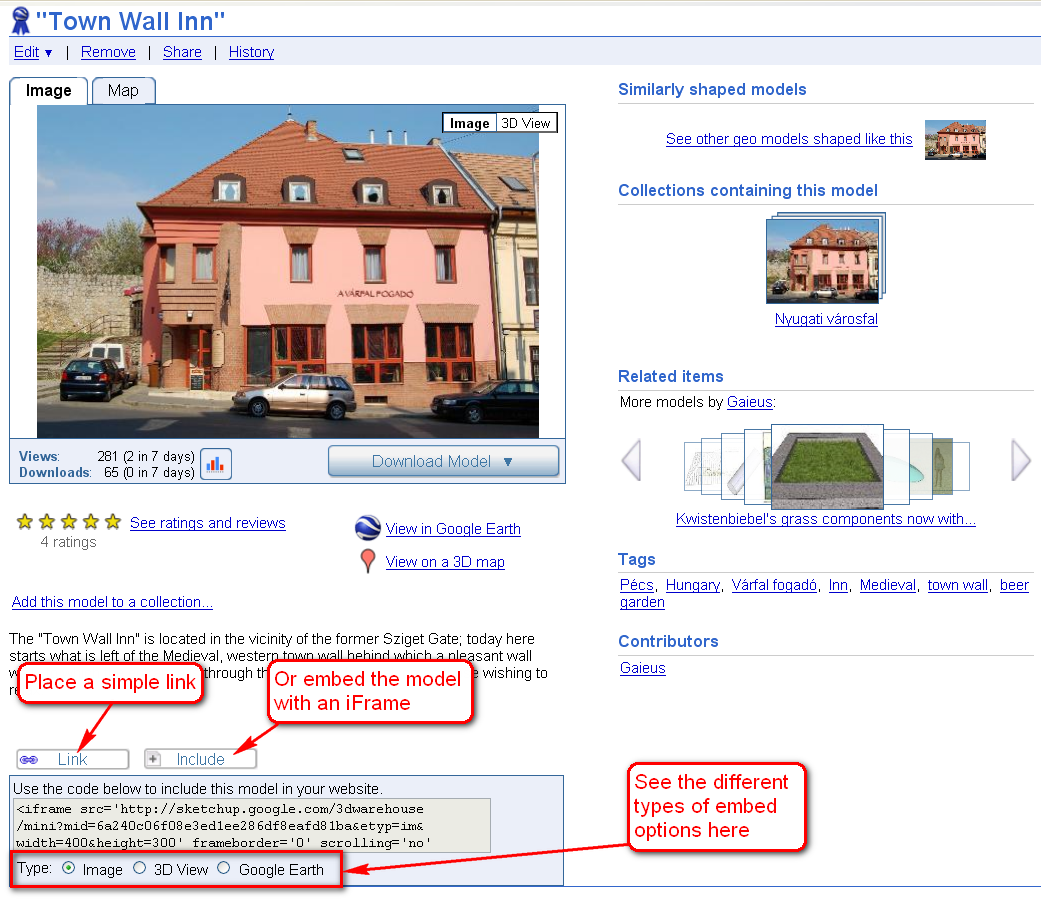
Have a look at the screenshot I took about the only building of mine that has been accepted to GE so far. At the bottom, you can see two buttons:
-
A "link" button which will do nothing more than give the same URL you can see in your browser's address bar
-
and an "include" link with all the necessary html codes you simply need to paste into your webpage. Here you even have different choices:
-
an image - which is nothing else than what you can see in the screenshot (but with the added download buttons and such)
-
a 3D View - that is normally generated within a couple of hours after you upload your model (check this function out with any of the models there)
-
and a GE link - more exactly an embedded Google Map where people can see your building just like on GE, so in 3D if they have the Google Earth Plugin installed in their browser.
This latter one is only available if your model is georeferenced and you upload it like that so the warehouse software generates a kmz file from it (or upload as kmz - just like my model in the image)
Sigh... long post and here is the screenshot.
-
-
...and here is a small supplement to Gaieus' excellent explanation from the Official Sketchup Blog

-
Dear Gaieus and d12dozr,
Thanks for your reply and the explanations. So you defintiely confirm that the only way is to publish my sketchup projets to 3d warehouse in order to embed them into my webpages?
In this case what is the best way in order to reduce the delay between the time of upload to 3D and the time when the project can be embedded?
Thanks,
BD -
No, that's not the only way but that is with the least hassle.
I would say it is a couple of hours when you can already see all the different versions of the model embedded.
-
I would like to learn what is the best way to integrate my sketchup project into my webpage. Could you tell me more about the other methods?
The delay I was talking about in my previous post is the delay needed to my project to be accepted in 3D warehouse, not the time I need to create it. Is there no "accept-delay" in 3D warehouse?
-
Do you want to include models made for Google Earth? Or just anything...
-
At the moment I do not want to include models made for Google Earth
-
Well then - there are a couple of possibilities starting from (embeddable) 3D PDF files like one posted here:
http://forums.sketchucation.com/viewtopic.php?f=80&t=24855
or another one available here:
http://www.renderplus.com/wk/RPS_3D_PDF_w.htmThen other solutions (similar to the 3D Warehouse 3D View) like the WebExporter plugin:
http://sketchup.google.com/download/plugins.html#gsuwebexporterThen other solutions like the Hypercosm Teleporter
http://sketchup.google.com/download/plugins.html#hypercosmteleor even Unity3D where you can walk about in your model:
http://unity3d.com/Or just simply upload and provide a link to everyone.
-
Thanks for your explanation and links. I'll check all this information and come back to you soon.
Regards,
BD -
@baden32 said:
Is there no "accept-delay" in 3D warehouse?
Models uploaded to the 3D Warehouse are available almost immediately (at most 1-2 hours). The "accept-delay" is only for the model to be included in the Google 3D Buildings layer (if you requested that).
-
Hi. I don't see any 'link' or 'include' buttons on the details page of my model. Is this scheme still supposed to work?
-
They have already removed them from the English language pages (and will remove from the others, too). Try to switch to a different language (top right) and grab the code as long as it is there.
-
Thanks. I got the code snippet. What do you think, will this feature work in the future? I mean: Is this something I should share with the other team members or will the iframe functionality soon disappear altogether?
-
Well, it utilizes the GE Plugin (with a little experience in html and javascript you could build your custom, much "nicer" applications this way) so I doubt it will not work - just won't be available and easily accessible from the model pages.
I really do not understand why though...
-
The iframe was very easy to embed.
There are a number of iframe parameters which are more or less self explanatory. Then I should find out if the MID-parameter is generated in 3D Warehouse or if it is the one designated in my SU application?
@gaieus said:
Well, it utilizes the GE Plugin (with a little experience in html and javascript you could build your custom, much "nicer" applications this way) ...
I do agree with your prediction that the GE Plugin shouldn't pass away very quickly. We should apparently also look for the GE Plugin documentation to be able to do the javascript tweaking you are referring to.
Thanks anyway for all the details.
-
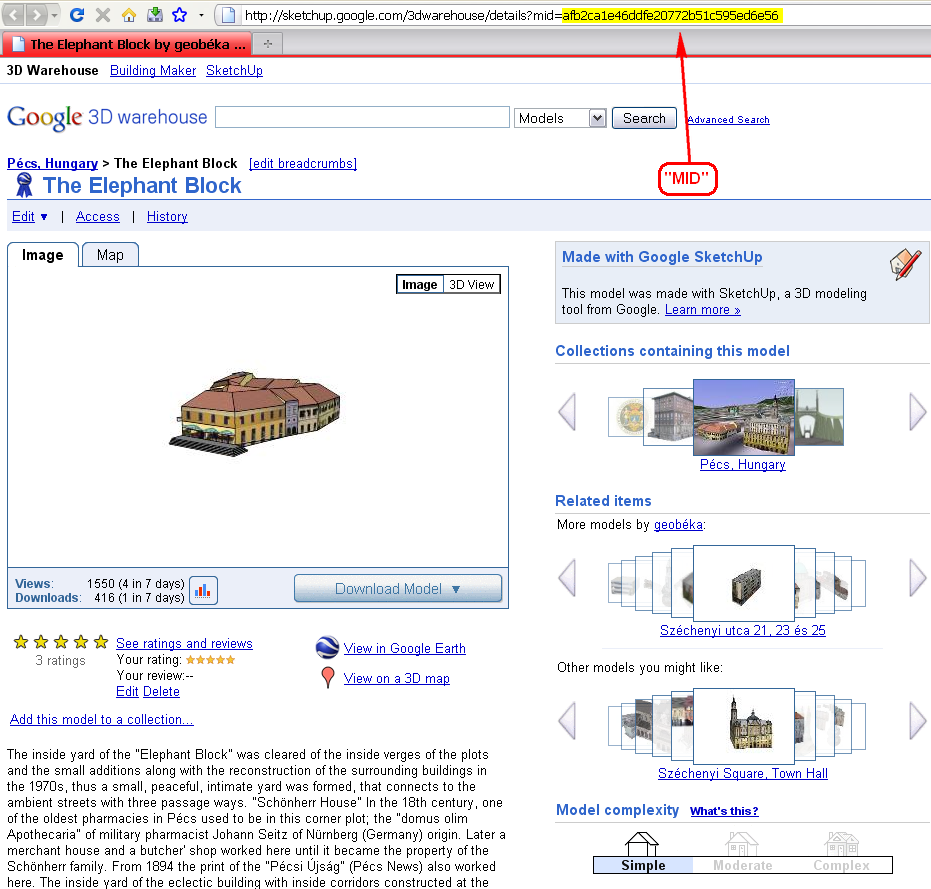
The mid parameter is simply the end key ("model ID") of the model URL after the
mid=part (see attached).Then comes three different parameters (depending what you want to embed):
&etyp=imfor a staticIMage,&etyp=swfor a 3D view ("SWivel") finally&etyp=gefor an embeddedGEPlugin window.
Finally the size parameter:&width=400&height=300
See some pretty cool GE Plugin Examples here.
-
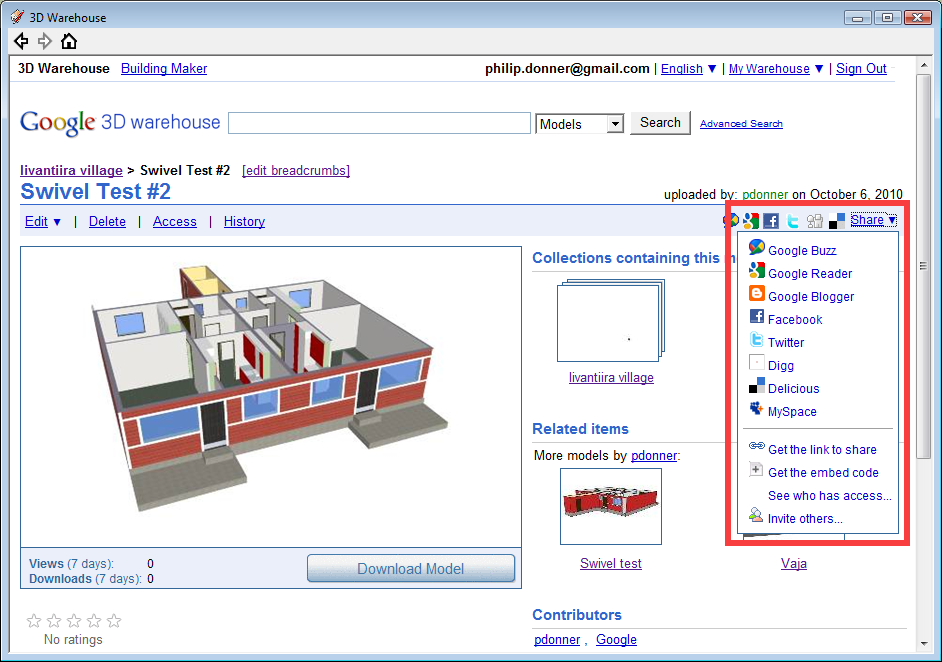
Hi again. Today when I visited Google 3D Warehouse I noticed a new item called 'Share' which triggered a dropdown menu with the missing Link and Embed items plus related code. For the time being they are available on the English page but our localized version of the site has the old style buttons.
-
Yes, that's it!

I knew they removed the embed item then added to a"share" function - I could just not see that link (as I was looking at the wrong place it seems).
-
Maybe this can interest you

@unknownuser said:
Learn how to create an online, multi-user walkthrough with your 3D model for free.
Not only can this be embedded into a website like an online video but you can share the experience in real-time with other users just be emailing them the link to the page.


Advertisement