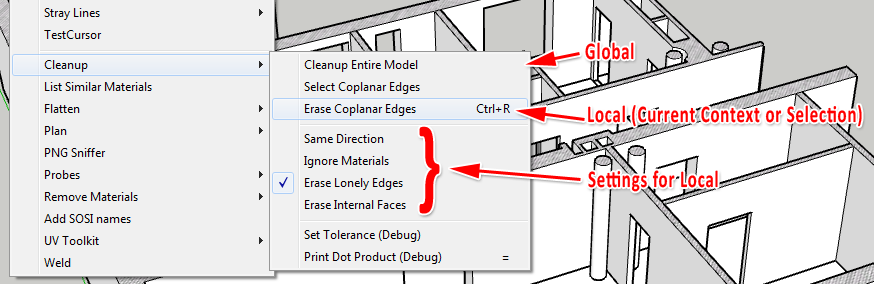
[Plugin] CleanUp
-
@thomthom said:
@brucifier said:
Where has the cleanup plugin gone too, says it has been removed?!
Sorry, I'd forgotten to update the link of the Download button at last update. I fixed it now. The link underneath was always working however.
cheers!! -
Thomthom
The heading indicates there is a Cleanup (3.1.8) However the file downloaded indicates Cleanup (3.1.7). Just a heads up that maybe you don't have the latest plugin in your first post.
Ken
-
@unknownuser said:
The heading indicates there is a Cleanup (3.1.8) However the file downloaded indicates Cleanup (3.1.7). Just a heads up that maybe you don't have the latest plugin in your first post.

Right, I re-uploaded. with a minor update that adds support for Fredo's update checker.
Thanks for the heads up!
Version 3.1.9
- Support for Fredo's Update checking utility
-
An issue I've had with the past couple version is with the plugin deleting faces. I don't recall having this issue with the first version. Do I have an incorrect setting checked or something?
-Brodie
-
The Merge Faces features should be the most stable ever in this version (3.x).
But maybe it's an issue with Erase Duplicate Faces. It's a very slow feature that can yield unpredictable results. It's why it is off by default and the tooltip has the warning.Ticking all the checkboxes doesn't mean the model gets cleaner - it just does different thing. So it's worth reading what they actually do.
I don't know what settings you have Brodie, so it's hard for me to tell anything more than that. If you have settings and a sample model I can have a look at it.
-
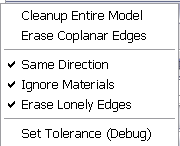
Here's the model and a screenshot of the settings below.
http://dl.dropbox.com/u/384281/Laser%20Printer.skp
The number and location of faces which are deleted seems to have a certain random nature to it. Running the script, undoing the results, and running the script again a few times resulting in different results each time
-Brodie
Edit: the original model is from here and is free http://archive3d.net/?a=download&id=3dfc187e
-
Ok, looked at the model.
The first thing I got when I opened the model was a warning:
@unknownuser said:
Results of Validity Check.
The plane equation for CFace (51806) is not valid - fixed
The plane equation for CFace (61254) is not valid - fixed
The plane equation for CFace (145402) is not valid - fixed
The plane equation for CFace (146979) is not valid - fixed
The plane equation for CFace (149505) is not valid - fixed
The plane equation for CFace (230859) is not valid - fixed
The plane equation for CFace (297112) is not valid - fixed
The plane equation for CFace (297293) is not valid - fixed
The plane equation for CFace (299305) is not valid - fixed
The plane equation for CFace (311352) is not valid - fixed
The plane equation for CFace (316611) is not valid - fixed
The plane equation for CFace (333176) is not valid - fixed
The plane equation for CFace (333255) is not valid - fixed
The plane equation for CFace (333707) is not valid - fixed
The plane equation for CFace (395589) is not valid - fixedI did not run the test - SU did that manually.
I then ran CleanUp with these settings:

A key setting might be that I didn't tell it to Ignore Normals. (Not sure - I did not compare with other settings.)
I then got a new validity check (because I'd asked for it. it's common to get error like this when the model already was producing errors.)
@unknownuser said:
Results of Validity Check.
CEdge (62898) and CEdge (1380179) connect the same 2 vertices - fixed
The plane equation for CFace (1044) is not valid - fixed
The plane equation for CFace (1425) is not valid - fixed
The plane equation for CFace (2564) is not valid - fixed
The plane equation for CFace (2604) is not valid - fixed
The plane equation for CFace (2954) is not valid - fixed
The plane equation for CFace (3000) is not valid - fixed
The plane equation for CFace (3827) is not valid - fixed
The plane equation for CFace (5067) is not valid - fixed
The plane equation for CFace (5382) is not valid - fixed
The plane equation for CFace (5702) is not valid - fixed
The plane equation for CFace (7542) is not valid - fixed
The plane equation for CFace (92317) is not valid - fixed
The plane equation for CFace (93266) is not valid - fixed
The plane equation for CFace (108967) is not valid - fixed
The plane equation for CFace (212162) is not valid - fixed
The plane equation for CFace (212355) is not valid - fixed
The plane equation for CFace (213151) is not valid - fixed
The plane equation for CFace (213681) is not valid - fixed
The plane equation for CFace (213868) is not valid - fixed
The plane equation for CFace (246903) is not valid - fixed
The plane equation for CFace (271394) is not valid - fixed
The plane equation for CFace (293150) is not valid - fixed
The plane equation for CFace (293557) is not valid - fixed
The plane equation for CFace (484265) is not valid - fixed
The plane equation for CFace (484587) is not valid - fixed
The plane equation for CFace (491934) is not valid - fixed
The plane equation for CFace (542762) is not valid - fixed
The plane equation for CFace (543339) is not valid - fixed
The plane equation for CFace (549098) is not valid - fixed
The plane equation for CFace (549228) is not valid - fixed
The plane equation for CFace (575761) is not valid - fixed
The plane equation for CFace (576252) is not valid - fixed
The plane equation for CFace (576379) is not valid - fixed
The plane equation for CFace (577820) is not valid - fixedThe printer model dropped from ~100K (!!!
) faces to "merely" 38K faces...No error messages about lost geometry.
-
Would like to suggest one item at a time be "cleaned". The results you get can be a function of the action and its sequence and the model may not be good to start with. I imported the printer to mesh lab ( 3ds) and note the things cleaned on the right side ( it corrected some of the bad faces to start) and the jpg shows the self intersecting faces. Deleting those can be destructive to the model and I did not do that. In the past I have had that problem and have not been able to figure out if it is MeshLab or SU.
Just some thoughts -

Layer text did not disply wee. Hope this is better. -
Installed the latest version of Cleanup and I am seeing these errors:
undefined method `hidden?' for #Sketchup::Vertex:0xe3d4fc4
/Library/Application Support/Google SketchUp 8/SketchUp/Plugins/tt_cleanup.rb:1142:in
erase_hidden' /Library/Application Support/Google SketchUp 8/SketchUp/Plugins/TT_Lib2/entities.rb:113:ineach_entity'
/Library/Application Support/Google SketchUp 8/SketchUp/Plugins/TT_Lib2/entities.rb:112:ineach' /Library/Application Support/Google SketchUp 8/SketchUp/Plugins/TT_Lib2/entities.rb:112:ineach_entity'
/Library/Application Support/Google SketchUp 8/SketchUp/Plugins/TT_Lib2/entities.rb:119:ineach_entity' /Library/Application Support/Google SketchUp 8/SketchUp/Plugins/TT_Lib2/entities.rb:112:ineach'
/Library/Application Support/Google SketchUp 8/SketchUp/Plugins/TT_Lib2/entities.rb:112:ineach_entity' /Library/Application Support/Google SketchUp 8/SketchUp/Plugins/TT_Lib2/entities.rb:119:ineach_entity'
/Library/Application Support/Google SketchUp 8/SketchUp/Plugins/TT_Lib2/entities.rb:112:ineach' /Library/Application Support/Google SketchUp 8/SketchUp/Plugins/TT_Lib2/entities.rb:112:ineach_entity'
/Library/Application Support/Google SketchUp 8/SketchUp/Plugins/tt_cleanup.rb:772:ineach_entity_in_scope' /Library/Application Support/Google SketchUp 8/SketchUp/Plugins/tt_cleanup.rb:1130:inerase_hidden'
/Library/Application Support/Google SketchUp 8/SketchUp/Plugins/tt_cleanup.rb:568:incleanup!' /Library/Application Support/Google SketchUp 8/SketchUp/Plugins/tt_cleanup.rb:488:inshow_cleanup_ui'
/Library/Application Support/Google SketchUp 8/SketchUp/Plugins/TT_Lib2/inputbox.rb:178:incall' /Library/Application Support/Google SketchUp 8/SketchUp/Plugins/TT_Lib2/inputbox.rb:178:inevent_inputbox_close'
/Library/Application Support/Google SketchUp 8/SketchUp/Plugins/TT_Lib2/inputbox.rb:9:into_proc' /Library/Application Support/Google SketchUp 8/SketchUp/Plugins/TT_Lib2/inputbox.rb:159:incall'
/Library/Application Support/Google SketchUp 8/SketchUp/Plugins/TT_Lib2/inputbox.rb:159:inclose' /Library/Application Support/Google SketchUp 8/SketchUp/Plugins/TT_Lib2/inputbox.rb:159:inevent_inputbox_accept'
/Library/Application Support/Google SketchUp 8/SketchUp/Plugins/TT_Lib2/inputbox.rb:9:into_proc' (eval):110:incall'
(eval):110The model I am cleaning up is very simple and these errors seem to occur after completing one (sometimes two) previous cleanup operations.
I hope this information is of some use ?
I am also experiencing a lot of Sketchup Pro crashes, without any crash reports being generated.
I am using Sketchup Pro 8.0.11751 on Mac OS X 10.7.2. Hardware is a iMac 2.93Ghz Core 2 Duo with 8Gb of DDR3 RAM.
Thanks for the excellent plugin.
Kind regards,
Marek
-
That is a very strange error!

Somehow it iterates over a Vertex entity - I cannot see any reason for that...
Can you post the model? Or send it to me privately if you don't want to publicly share?
Also, I need to know the exact settings you used. (A screenshot of the settings window)And I assume you;re using the latest CleanUp? 3.1.9?
And the exact version of TT_Lib2? -
Have sent you a PM about this

-
I looked at the model. Could not reproduce it. But I used a PC. Will have to try on my Mac.
Exactly what version of SketchUp do you have? And TT_Lib2?(btw - I did see that there where many small details - where edges where less than 1mm - which can cause issues with SU. But I'm not sure if that would cause such an error as the one you see...)
-
Specifications of software and hardware...
I am using Sketchup Pro 8.0.11751 on Mac OS X 10.7.2. Hardware is a iMac 2.93Ghz Core 2 Duo with 8Gb of DDR3 RAM. Video card is an Nvidia GT130.
TT_Lib2 is version 2.6.0
Hope that helps.
Marek
-
Another strange error today, not seen this one before:
undefined method `valid?' for #Sketchup::OptionsProvider:0xecc34c8
/Library/Application Support/Google SketchUp 8/SketchUp/Plugins/tt_cleanup.rb:1133:in
erase_hidden' /Library/Application Support/Google SketchUp 8/SketchUp/Plugins/TT_Lib2/model.rb:134:ineach_entity'
/Library/Application Support/Google SketchUp 8/SketchUp/Plugins/TT_Lib2/model.rb:133:ineach' /Library/Application Support/Google SketchUp 8/SketchUp/Plugins/TT_Lib2/model.rb:133:ineach_entity'
/Library/Application Support/Google SketchUp 8/SketchUp/Plugins/TT_Lib2/model.rb:130:ineach' /Library/Application Support/Google SketchUp 8/SketchUp/Plugins/TT_Lib2/model.rb:130:ineach_entity'
/Library/Application Support/Google SketchUp 8/SketchUp/Plugins/tt_cleanup.rb:768:ineach_entity_in_scope' /Library/Application Support/Google SketchUp 8/SketchUp/Plugins/tt_cleanup.rb:1130:inerase_hidden'
/Library/Application Support/Google SketchUp 8/SketchUp/Plugins/tt_cleanup.rb:568:incleanup!' /Library/Application Support/Google SketchUp 8/SketchUp/Plugins/tt_cleanup.rb:488:inshow_cleanup_ui'
/Library/Application Support/Google SketchUp 8/SketchUp/Plugins/TT_Lib2/inputbox.rb:178:incall' /Library/Application Support/Google SketchUp 8/SketchUp/Plugins/TT_Lib2/inputbox.rb:178:inevent_inputbox_close'
/Library/Application Support/Google SketchUp 8/SketchUp/Plugins/TT_Lib2/inputbox.rb:9:into_proc' /Library/Application Support/Google SketchUp 8/SketchUp/Plugins/TT_Lib2/inputbox.rb:159:incall'
/Library/Application Support/Google SketchUp 8/SketchUp/Plugins/TT_Lib2/inputbox.rb:159:inclose' /Library/Application Support/Google SketchUp 8/SketchUp/Plugins/TT_Lib2/inputbox.rb:159:inevent_inputbox_accept'
/Library/Application Support/Google SketchUp 8/SketchUp/Plugins/TT_Lib2/inputbox.rb:9:into_proc' (eval):3713:incall'
(eval):3713Hope this list of problems is of some help ?
-
Can you reproduce it? If so how?
Because I cannot see how on earth that ever should happen.
While iterating the model the plugin ran across an OptionsProviderobject... Never ever should such thing be possible. I don't know if it's an SU glitch or if there is some plugin conflict somewhere that messes with the core classes.I first need to know if it's a reproducible case.
-
I will have a go at reproducing the error. I seem to think it happens after several consecutive runs of the cleanup script. Will get back to you as soon as it happens again.
-
Ok I managed to produce this error:
undefined method `hidden?' for #Sketchup::Vertex:0xea1acbc
/Library/Application Support/Google SketchUp 8/SketchUp/Plugins/tt_cleanup.rb:1142:in
erase_hidden' /Library/Application Support/Google SketchUp 8/SketchUp/Plugins/TT_Lib2/model.rb:134:ineach_entity'
/Library/Application Support/Google SketchUp 8/SketchUp/Plugins/TT_Lib2/model.rb:133:ineach' /Library/Application Support/Google SketchUp 8/SketchUp/Plugins/TT_Lib2/model.rb:133:ineach_entity'
/Library/Application Support/Google SketchUp 8/SketchUp/Plugins/TT_Lib2/model.rb:130:ineach' /Library/Application Support/Google SketchUp 8/SketchUp/Plugins/TT_Lib2/model.rb:130:ineach_entity'
/Library/Application Support/Google SketchUp 8/SketchUp/Plugins/tt_cleanup.rb:768:ineach_entity_in_scope' /Library/Application Support/Google SketchUp 8/SketchUp/Plugins/tt_cleanup.rb:1130:inerase_hidden'
/Library/Application Support/Google SketchUp 8/SketchUp/Plugins/tt_cleanup.rb:568:incleanup!' /Library/Application Support/Google SketchUp 8/SketchUp/Plugins/tt_cleanup.rb:488:inshow_cleanup_ui'
/Library/Application Support/Google SketchUp 8/SketchUp/Plugins/TT_Lib2/inputbox.rb:178:incall' /Library/Application Support/Google SketchUp 8/SketchUp/Plugins/TT_Lib2/inputbox.rb:178:inevent_inputbox_close'
/Library/Application Support/Google SketchUp 8/SketchUp/Plugins/TT_Lib2/inputbox.rb:9:into_proc' /Library/Application Support/Google SketchUp 8/SketchUp/Plugins/TT_Lib2/inputbox.rb:159:incall'
/Library/Application Support/Google SketchUp 8/SketchUp/Plugins/TT_Lib2/inputbox.rb:159:inclose' /Library/Application Support/Google SketchUp 8/SketchUp/Plugins/TT_Lib2/inputbox.rb:159:inevent_inputbox_accept'
/Library/Application Support/Google SketchUp 8/SketchUp/Plugins/TT_Lib2/inputbox.rb:9:in `to_proc'All I did was attempt to cleanup two separate models. I used the default cleanup settings. The only thing I changed was to tell cleanup to clean the model rather than selected. When cleaning the second model the error above appears.
-
Attempting to repeat the cleanup process on a second model yields this error:
undefined method `current=' for #Sketchup::Face:0xdcbe564
/Library/Application Support/Google SketchUp 8/SketchUp/Plugins/tt_cleanup.rb:564:in
cleanup!' /Library/Application Support/Google SketchUp 8/SketchUp/Plugins/tt_cleanup.rb:488:inshow_cleanup_ui'
/Library/Application Support/Google SketchUp 8/SketchUp/Plugins/TT_Lib2/inputbox.rb:178:incall' /Library/Application Support/Google SketchUp 8/SketchUp/Plugins/TT_Lib2/inputbox.rb:178:inevent_inputbox_close'
/Library/Application Support/Google SketchUp 8/SketchUp/Plugins/TT_Lib2/inputbox.rb:9:into_proc' /Library/Application Support/Google SketchUp 8/SketchUp/Plugins/TT_Lib2/inputbox.rb:159:incall'
/Library/Application Support/Google SketchUp 8/SketchUp/Plugins/TT_Lib2/inputbox.rb:159:inclose' /Library/Application Support/Google SketchUp 8/SketchUp/Plugins/TT_Lib2/inputbox.rb:159:inevent_inputbox_accept'
/Library/Application Support/Google SketchUp 8/SketchUp/Plugins/TT_Lib2/inputbox.rb:9:into_proc' (eval):114:incall'
(eval):114I have now removed all but the most necessary plugins from my Sketchup installation. Any suggestions as to what I can do next to try and help resolve these issues ?
-
I don't restart Sketchup after these errors occur I get more and different error messages, like this one:
undefined method `hidden?' for #Sketchup::AttributeDictionary:0xdbb3c50
/Library/Application Support/Google SketchUp 8/SketchUp/Plugins/tt_cleanup.rb:1142:in
erase_hidden' /Library/Application Support/Google SketchUp 8/SketchUp/Plugins/TT_Lib2/model.rb:134:ineach_entity'
/Library/Application Support/Google SketchUp 8/SketchUp/Plugins/TT_Lib2/model.rb:133:ineach' /Library/Application Support/Google SketchUp 8/SketchUp/Plugins/TT_Lib2/model.rb:133:ineach_entity'
/Library/Application Support/Google SketchUp 8/SketchUp/Plugins/TT_Lib2/model.rb:130:ineach' /Library/Application Support/Google SketchUp 8/SketchUp/Plugins/TT_Lib2/model.rb:130:ineach_entity'
/Library/Application Support/Google SketchUp 8/SketchUp/Plugins/tt_cleanup.rb:768:ineach_entity_in_scope' /Library/Application Support/Google SketchUp 8/SketchUp/Plugins/tt_cleanup.rb:1130:inerase_hidden'
/Library/Application Support/Google SketchUp 8/SketchUp/Plugins/tt_cleanup.rb:568:incleanup!' /Library/Application Support/Google SketchUp 8/SketchUp/Plugins/tt_cleanup.rb:488:inshow_cleanup_ui'
/Library/Application Support/Google SketchUp 8/SketchUp/Plugins/TT_Lib2/inputbox.rb:178:incall' /Library/Application Support/Google SketchUp 8/SketchUp/Plugins/TT_Lib2/inputbox.rb:178:inevent_inputbox_close'
/Library/Application Support/Google SketchUp 8/SketchUp/Plugins/TT_Lib2/inputbox.rb:9:into_proc' /Library/Application Support/Google SketchUp 8/SketchUp/Plugins/TT_Lib2/inputbox.rb:159:incall'
/Library/Application Support/Google SketchUp 8/SketchUp/Plugins/TT_Lib2/inputbox.rb:159:inclose' /Library/Application Support/Google SketchUp 8/SketchUp/Plugins/TT_Lib2/inputbox.rb:159:inevent_inputbox_accept'
/Library/Application Support/Google SketchUp 8/SketchUp/Plugins/TT_Lib2/inputbox.rb:9:into_proc' (eval):110:incall'
(eval):110Would you like me to try reinstalling Sketchup or could this be a problem with the Ruby installation for the Mac ? Why is noone else reporting errors like this or is the case that most Sketchup users are on windows and these errors don't happen ?
Hello! It looks like you're interested in this conversation, but you don't have an account yet.
Getting fed up of having to scroll through the same posts each visit? When you register for an account, you'll always come back to exactly where you were before, and choose to be notified of new replies (either via email, or push notification). You'll also be able to save bookmarks and upvote posts to show your appreciation to other community members.
With your input, this post could be even better π
Register LoginAdvertisement