Newbie Tutorial - How to close any face in Sketchup
-
Fredo scale is a plugin (a very complex and powerful one actually) that takes a lot of SketchUp's native tools to a next level.
I have been reading (and approving) your posts this morning as I got up and suggest to "learn how to walk before you start running" though but of course, learning how to install and use plugins should also be in your "curriculum".
In short, here is Fredo scale: http://forums.sketchucation.com/viewtopic.php?t=17948
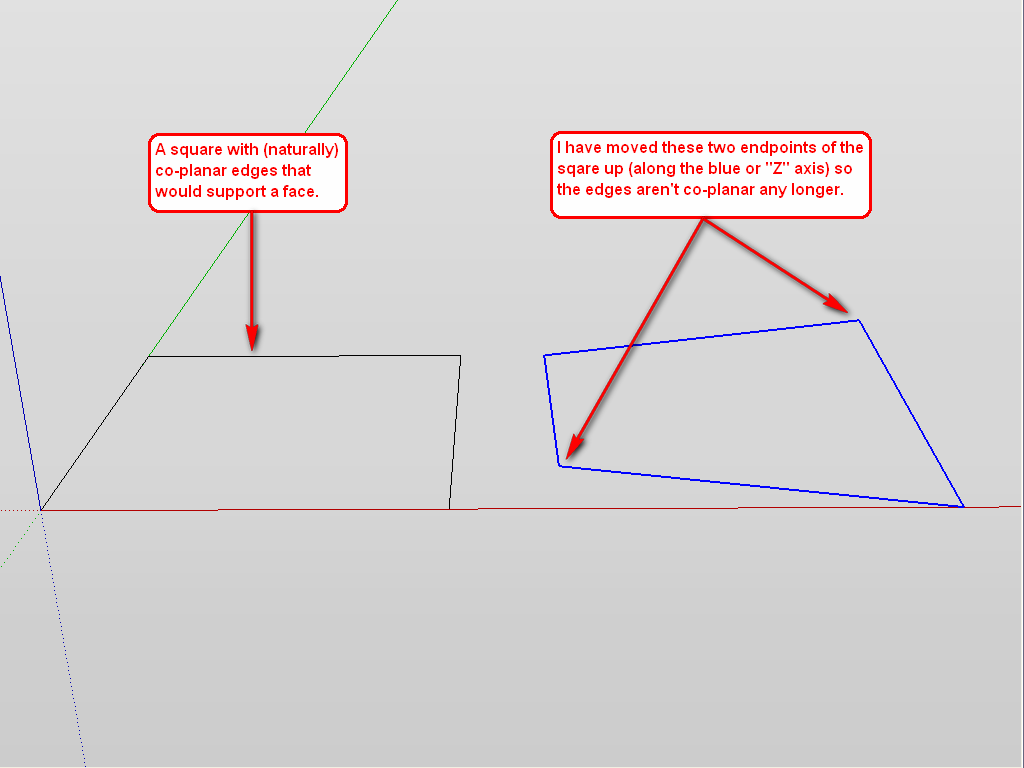
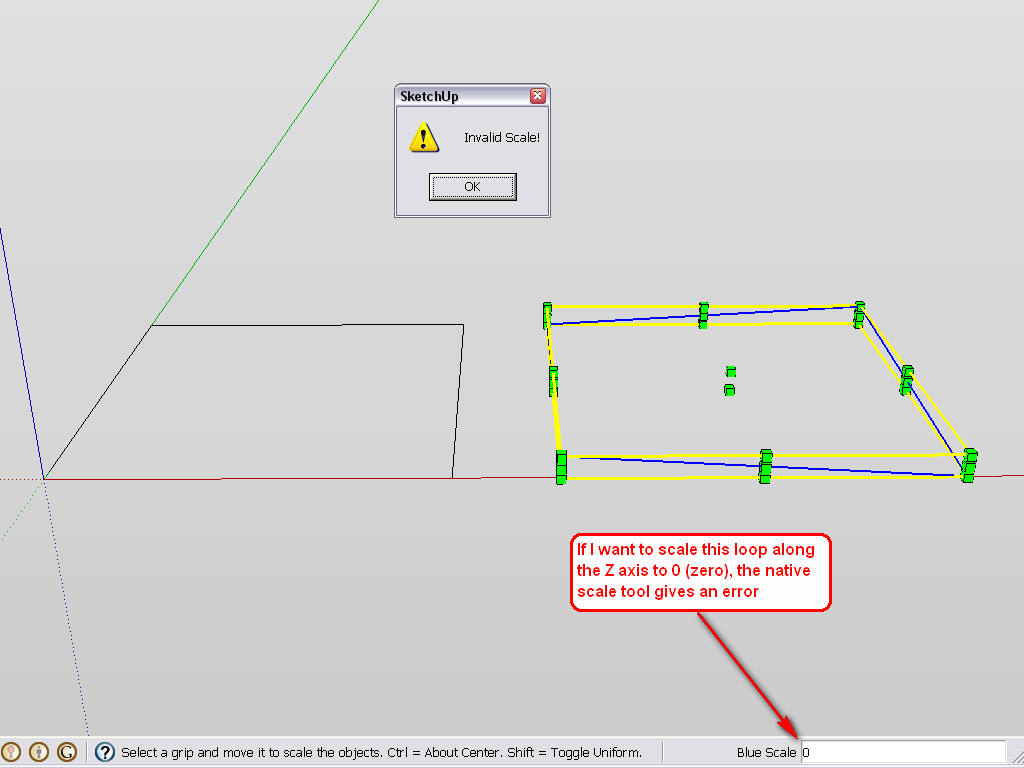
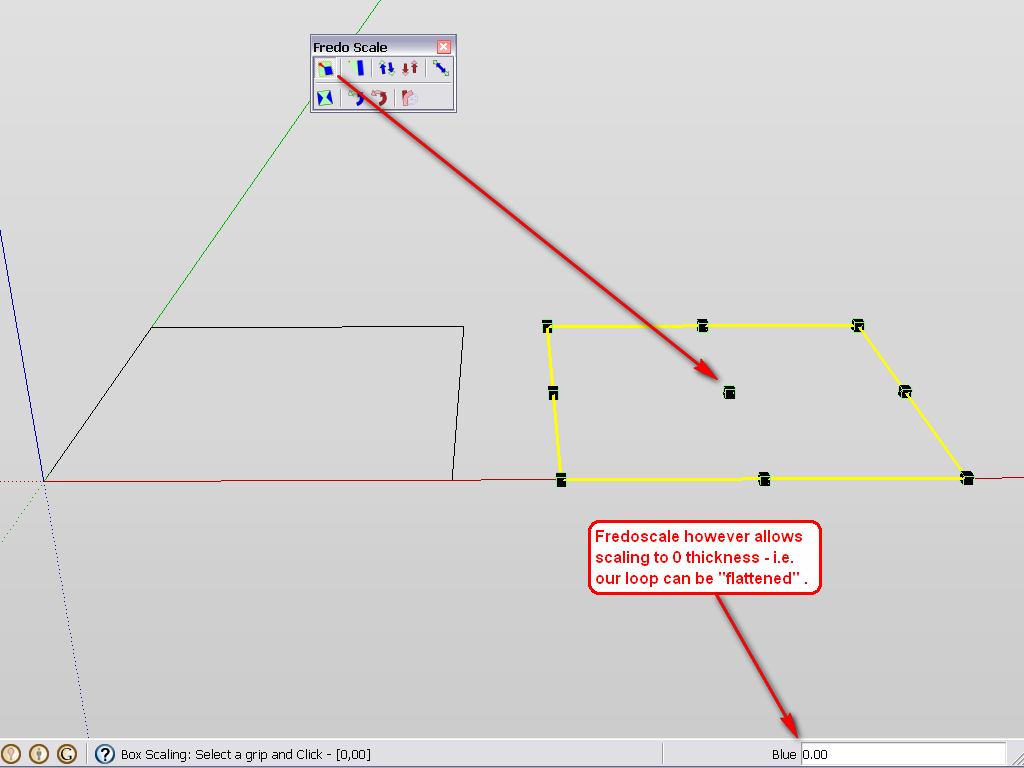
And what xrok meant here is that you can scale any loop of edges that is not co-planar to "Zero" which makes it co-planar then.
Here are some screenshots.
-
And this is a DUH moment for me regarding the scale to zero trick.
-
It was for me, too. Just checked it out after the question made me curious.

-
that cleared it up for me too. and looks useful, I'll add that one to my plugins.
I'm past the walk stage for the most part. just can't get past the jogging stage.
-
What when you ALREADY have the faces, but you have closed shapes inside that however won´t close (profiles won´t turn to edges), so the two surfaces will become different surfaces?
I have one here that I already projected onto a face, run stray lines, etc.
There are no stray lines. It was projected on a surface, I also did drape it onto another surface. Retraced everything. Nothing works!
-
You can try to select the edges and the face and make an intersection (context menu).
-
If the edges are not on the same plane, you can also make them coplanar with the Make Planar tool from Artisan, then create the face by redrawing and edge or drawing a diagonal.
Sometimes if you have any leftovers inside the face it won't close unless you draw a line from that edge to the other edges or unless you erase it.
If you have another shape inside the face you want to close,and if they are coplanar, just draw a couple of lines from the inside edges to the outside edges, it should close. If the inside shape/face is not connected to the newly created face, redraw a segment of it - it should intersect automatically.
-
Hi
This has been doing my head in
I have these small holes in my model but whatever i seem to do i cant fill-get rid of ....
i am trying to curve this item but it picks up the holes and amplifies them in the finished Bent object.
Ive tried weld etc but my brain doesn't function like most of you guys and they just keep appearing. the model is small and have tried enlarging and fixing but same response. A
could someone explain HOW and B
could someone PLEASE fix this model
thanks to all
Richard
-
Draw a diagonal and your quadrangle will be closed!
But alas the 2 triangular faces are not in the same plane! (coplanar)
For be sure kill now the diagonal --> the 2 faces will be disapear!
That is your first big problem!
So you will never close it by simple selection and use plugin like Add Faces by TIG !
This plugin is very cool for close holes in some volumes or surfaces!
But segments must be coplanar between them! -
Thanks Pilou
the diagonal trick closed them but like you say they appear to be NOT coplanar
tried add faces but nothing happened.
I dont know why it appears unclosed from an internal view BUT closed from external
Still at an impass......
Oh now my lines appear RED did you change something?Anyone please
Richard
-
as this shows once curved using shape bender then i get all these other holes ...
doesnt seem right. Has anyone got a great Trick to solve this problem. i tried closing each individual hole but there are some triangles that wont close..
buggered again
-
addfaces will not solve a shape where the edges are not coplanar. If Pilou showed the resolution with a diagonal why are you at an impasse? Red edge objects have been Locked. Unlock them in the edit menu. I am not sure what problem you are still having but where you show the back faces (blue) on the outside of the object and use "backfaces" line style, it does seem like a confusing model.
You almost had a shape made up of coplanar rectangles along the sides. For some reason the corner arcs at the point of inflection are not aligned with the long edges on the sides. In the transition between the arc and the straight sides you have need a couple triangles to complete the surface.
-
Your model has many irregularities and possibly "problems" for a simple shape.
I would
- make sure all outside faces of the object are the front face default texture.
- Turn off "backedges" style.
- Turn on profiles (helps you see edges that do not bisect a surface).
- Turn on hidden geometry (helps you see the actual faces).
- Separate the parts of your model by making them into components, so you can work on one part without worrying about the rest, and be able to hide the rest for better visibility of the part. However if edges and faces are part of the same surface, they have to be in the same context (same component etc.).
- In some instances color by axis will help keep track of edges that should be aligned with axes.
- Select all faces and edges and choose context menu "UNHIDE". You have many edges that are hidden and this doesn't help in modeling. If you want them hidden (instead of soft) do it when you are done modeling.
- Scale your model up. I think it is so small that the SU cannot tell where some of the points are. I completed some faces by connecting on continous line along one side of a rectangle--however the face still disappeared when I removed an existing (originaly hidden) inside edge. This shows inaccuracy. and SU is not accurate at small scales.
with these measures (scaled 100 times), "Make Faces" ruby could fill most of what you have there. And "fix problems" command seemed to Help. It still had undesirable diagonals in the rounded parts as well as some odd extra edges in the larger faces.
I wonder if you included parts of the model in the shape bender exercise that did not need to be bent (like that tapered shape) and so made problems you didn't need.
in bending that shape have you tried Fredoscale Radial bending? It seems to do a clean job but the use depends on whether it gives you the control you need or the correct shape. Again this was tried at 100 times scale.
-
Thanks very much for your help Pbacot
greatly appreciated
Richard -
@pilou said:
Draw a diagonal and your quadrangle will be closed!
thanks for great help with my dxf imported shapes!!!! they are pain to edit






Advertisement