sketchucation logo sketchucation
    • Login
    Oops, your profile's looking a bit empty! To help us tailor your experience, please fill in key details like your SketchUp version, skill level, operating system, and more. Update and save your info on your profile page today!
    Mac User? | Join the Rayscaper Beta for Mac Learn More

    [Plugin] Blend ver 1.12.

    Scheduled Pinned Locked Moved Plugins
    80 Posts 35 Posters 72.8k Views 35 Watching
    Loading More Posts
    • Oldest to Newest
    • Newest to Oldest
    • Most Votes
    Reply
    • Reply as topic
    Log in to reply
    This topic has been deleted. Only users with topic management privileges can see it.
    • pilouP
      pilou
      last edited by

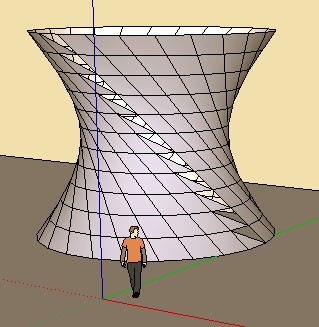
      Seems there is a little bug when you Blend 2 closed curves ๐Ÿ˜ฎ
      (here 2 circles)
      sublend.jpg

      Frenchy Pilou
      Is beautiful that please without concept!
      My Little site :)

      1 Reply Last reply
      Reply Quote 0
      • M
        Momac
        last edited by

        Hi Krill
        Is the plugin Windows only
        In Mac version the dialog / Input box does not get active

        1 Reply Last reply
        Reply Quote 0
        • R
          ricklaney
          last edited by

          Where can we download the latest version of sublend.rb
          Does it work with SketchUp Pro 7?
          I am trying to make Pipe fittings like 3/4" 90 degree Street Elbow. Do you know where to download pipe, hose and tube fittings?

          Thank you for a reply,
          Rick

          1 Reply Last reply
          Reply Quote 0
          • R
            ricklaney
            last edited by

            Where can we download Blend ver 1.9 and 'pathface.rb'

            1 Reply Last reply
            Reply Quote 0
            • D
              dedmin
              last edited by

              http://lss2008.livejournal.com/

              1 Reply Last reply
              Reply Quote 0
              • K
                kirill2008
                last edited by

                Hi, Rick.

                @ricklaney said:

                Where can we download Blend ver 1.9 and 'pathface.rb'

                pathface.rb: http://dl.dropbox.com/u/4885828/pathface.rb
                sublend.rb: http://dl.dropbox.com/u/4885828/sublend.rb
                I also sent a reply to your private message, so check your inbox for more information.

                1 Reply Last reply
                Reply Quote 0
                • EarthMoverE
                  EarthMover
                  last edited by

                  Kirill, just downloaded the new toolbar set from your site. Great idea and it works great. One suggestions would be to add the name of each tool when you hover over the toolbar icon. Thanks again...it makes life easier!

                  3D Artist at Clearstory 3D Imaging
                  Guide Tool at Winning With Sketchup
                  Content Creator at Skapeup

                  1 Reply Last reply
                  Reply Quote 0
                  • K
                    kirill2008
                    last edited by

                    @earthmover said:

                    One suggestions would be to add the name of each tool when you hover over the toolbar icon.

                    Ok, I'll add tooltips.
                    Note that there is a bug in prerelease version of lss_toolbar.rb: zoom-in/zoom-out clears selection. I already fixed it, but did not published the release version, because I want to make some other enhancements and bug fixes before release. I'll try to finalize lss_toolbar.rb in the coming days.

                    1 Reply Last reply
                    Reply Quote 0
                    • EarthMoverE
                      EarthMover
                      last edited by

                      @ricklaney said:

                      I am trying to make Pipe fittings like 3/4" 90 degree Street Elbow. Do you know where to download pipe, hose and tube fittings?

                      Thank you for a reply,
                      Rick

                      Rick, have you checked out Skeng 3D? - http://www.3skeng.com/en/index.htm

                      3D Artist at Clearstory 3D Imaging
                      Guide Tool at Winning With Sketchup
                      Content Creator at Skapeup

                      1 Reply Last reply
                      Reply Quote 0
                      • K
                        Keith Benson
                        last edited by

                        @unknownuser said:

                        Seems there is a little bug when you Blend 2 closed curves ๐Ÿ˜ฎ
                        (here 2 circles)
                        [attachment=0:2ghmer31]<!-- ia0 -->sublend.jpg<!-- ia0 -->[/attachment:2ghmer31]

                        I recently downloaded the latest version of Bland, but only occasionally can I get it to blend two shapes without "twisting" them. Am I missing something? I am just trying to blend a rectangle (12"x5") and a circle (12" diameter) over a 6 inch distance.

                        I have used every combination of choices from the drop down box that pops up and I must be setting it up wrong or something.

                        Any help would be appreciated, thanks!

                        Keith

                        1 Reply Last reply
                        Reply Quote 0
                        • EarthMoverE
                          EarthMover
                          last edited by

                          Keith, it's because each shape has a defined start and end point to SU. The plugin is set to read those points and align the new mesh to the existing segments in successive order. With the Blend plugin, Kirill added post operative capabilities so you can rotate either shape until you align the start/end points and the mesh straightens out. So after the plugin is finished, it is still waiting to receive user input to correct the errant shape, as long as you don't explode the created group.

                          3D Artist at Clearstory 3D Imaging
                          Guide Tool at Winning With Sketchup
                          Content Creator at Skapeup

                          1 Reply Last reply
                          Reply Quote 0
                          • K
                            Keith Benson
                            last edited by

                            @earthmover said:

                            Keith, it's because each shape has a defined start and end point to SU. The plugin is set to read those points and align the new mesh to the existing segments in successive order. With the Blend plugin, Kirill added post operative capabilities so you can rotate either shape until you align the start/end points and the mesh straightens out. So after the plugin is finished, it is still waiting to receive user input to correct the errant shape, as long as you don't explode the created group.

                            Ahhh - thank you. That helps me understand why some were more twisted than others.

                            Keith

                            1 Reply Last reply
                            Reply Quote 0
                            • H
                              hgdn
                              last edited by

                              Krill,
                              All your tutorial videos seem have been deleted on youtube strange??? Could you tell us an alternative source to find as a lot of people try to look for it as well. Thanks...

                              1 Reply Last reply
                              Reply Quote 0
                              • S
                                sbergstedt
                                last edited by

                                Krill,

                                I somehow cannot access the videos that you posted? could you repost them and let me know? I would really like to know the proper way to utilize these utilities you've created. They're awesome!

                                Thanks

                                1 Reply Last reply
                                Reply Quote 0
                                • A
                                  atek
                                  last edited by

                                  Great plugin what i was thinking i got it. Its not working with group and component. Is there any option i want to use with group or components. Plz reply

                                  1 Reply Last reply
                                  Reply Quote 0
                                  • Dave RD
                                    Dave R
                                    last edited by

                                    Did you read the author's first post in this thread? He says this plugin is obsolete.

                                    Etaoin Shrdlu

                                    %

                                    (THERE'S NO PLACE LIKE)

                                    G28 X0.0 Y0.0 Z0.0

                                    M30

                                    %

                                    1 Reply Last reply
                                    Reply Quote 0

                                    Hello! It looks like you're interested in this conversation, but you don't have an account yet.

                                    Getting fed up of having to scroll through the same posts each visit? When you register for an account, you'll always come back to exactly where you were before, and choose to be notified of new replies (either via email, or push notification). You'll also be able to save bookmarks and upvote posts to show your appreciation to other community members.

                                    With your input, this post could be even better ๐Ÿ’—

                                    Register Login
                                    • 1
                                    • 2
                                    • 3
                                    • 4
                                    • 4 / 4
                                    • First post
                                      Last post
                                    Buy SketchPlus
                                    Buy SUbD
                                    Buy WrapR
                                    Buy eBook
                                    Buy Modelur
                                    Buy Vertex Tools
                                    Buy SketchCuisine
                                    Buy FormFonts

                                    Advertisement