sketchucation logo sketchucation
    • 登入
    Oops, your profile's looking a bit empty! To help us tailor your experience, please fill in key details like your SketchUp version, skill level, operating system, and more. Update and save your info on your profile page today!
    ⚠️ Important | Libfredo 15.6b introduces important bugfixes for Fredo's Extensions Update

    Select Perimeter Edges only

    已排程 已置頂 已鎖定 已移動 Developers' Forum
    27 貼文 10 Posters 15.8k 瀏覽 10 Watching
    正在載入更多貼文
    • 從舊到新
    • 從新到舊
    • 最多點贊
    回覆
    • 在新貼文中回覆
    登入後回覆
    此主題已被刪除。只有擁有主題管理權限的使用者可以查看。
    • JClementsJ 離線
      JClements
      最後由 編輯

      A few years ago a script was created to select perimeter/outer edges only.

      I'm not sure why but it doesn't work quite the same now (perhaps because of program changes to SU)?

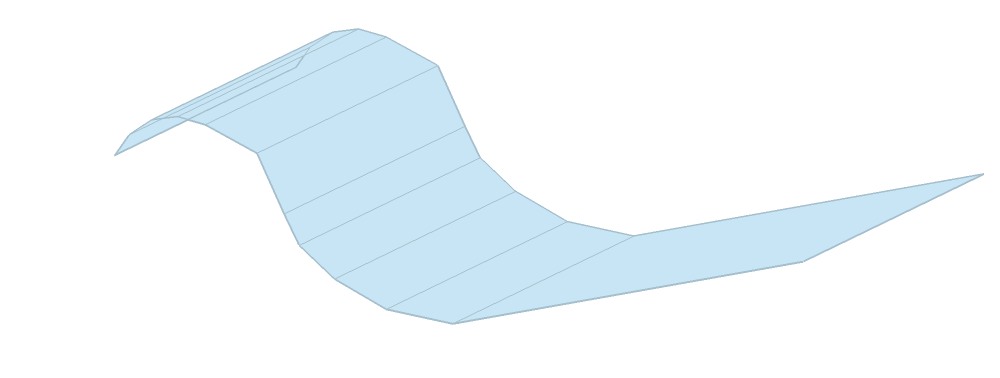
      Can a script be written to handle the two extremes examples shown here?
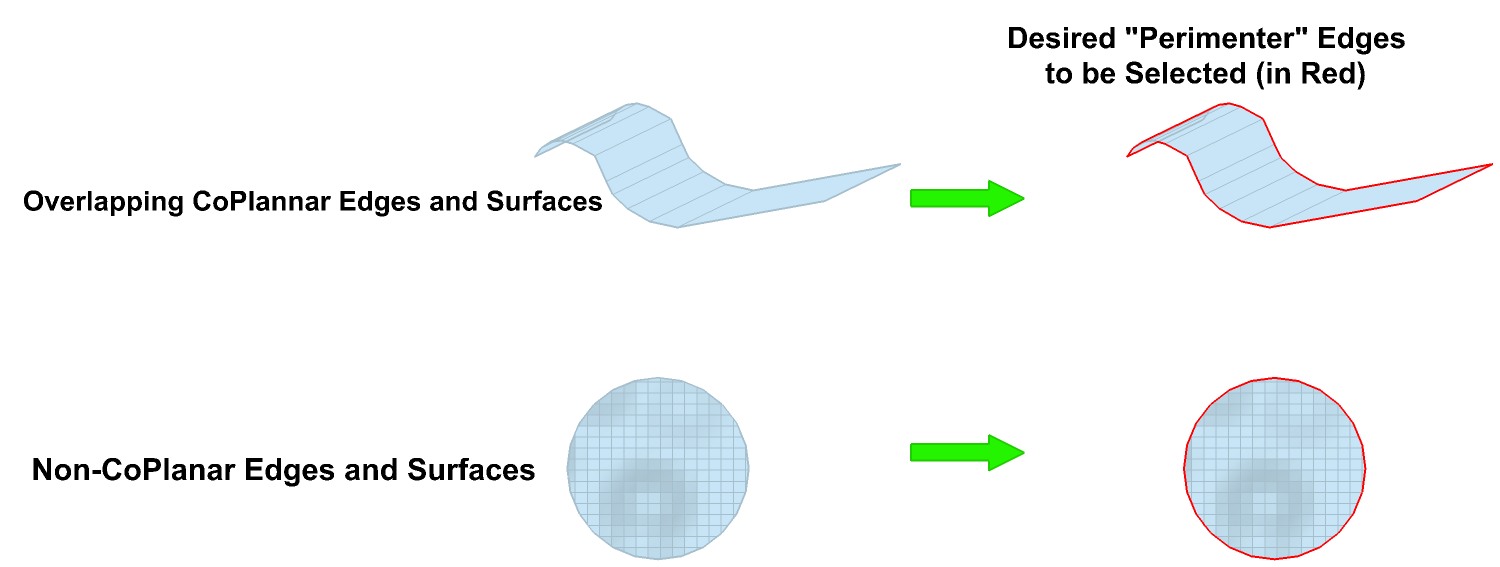
      Perimeter (outer) Edges only.jpg

      Closeup

      John | Illustrator | Beaverton, Oregon

      1 條回覆 最後回覆 回覆 引用 0
      • Chris FullmerC 離線
        Chris Fullmer
        最後由 編輯

        John, how do you see it working.

        Dose the user have to completely select the object on their own?

        Or should they be able to just select a single face/edge and the script will find everything that connects to that and determine if its a perimeter edge.

        Benefits of #1 is that you can narrow the selected permiter lines down to be only within what the user selected first. Downside is that the script only looks through what is selected. So hidden lines could get skipped.

        Benefits of #2 is its faster to be able to just select a single face/edge and run the plugin. Downside is that there is no way to let user control how much of the object to process. The script will just look at all connected entities (which really is probably just fine in most cases).

        What do you think? I already have version 1 written and done. But then I thought about version 2 perhaps being better?

        Chris

        Lately you've been tan, suspicious for the winter.
        All my Plugins I've written

        1 條回覆 最後回覆 回覆 引用 0
        • pilouP 離線
          pilou
          最後由 編輯

          exist ouliner.rb
          Seems works with all version

          Frenchy Pilou
          Is beautiful that please without concept!
          My Little site :)

          1 條回覆 最後回覆 回覆 引用 0
          • JClementsJ 離線
            JClements
            最後由 編輯

            Chris, thanks for replying.

            My initial feeling is method #1. And if the user triple-clicked the hidden edges would be get select anyway and they could then run the script, correct?

            I hadn't really considered method #2, if its a no-brainer to script then I suppose we could pick and choose between the two by installing both or either one.

            John | Illustrator | Beaverton, Oregon

            1 條回覆 最後回覆 回覆 引用 0
            • soloS 離線
              solo
              最後由 編輯

              No ruby's needed.

              http://img504.imageshack.us/img504/586/shapeselect.gif

              http://www.solos-art.com

              If you see a toilet in your dreams do not use it.

              1 條回覆 最後回覆 回覆 引用 0
              • Chris FullmerC 離線
                Chris Fullmer
                最後由 編輯

                Yes, but that only works so smoothly when you can smooth your entire object like you did. Imagine an object where you have certain things smoothed for a reason, and other edges left hard. Then that way doesn't quite work. (though quite frankly that rarely/never happens in my workflow, and I also preyy much don't ever need to select all the outer edges, so the ruby script is not one I find useful). But it only took about 5 minutes to write, and much of that was copying and adjusting the menu system and the legal mumbo jumbo.

                Anyhow, I'll post a working version in a minute John.

                Chris

                Lately you've been tan, suspicious for the winter.
                All my Plugins I've written

                1 條回覆 最後回覆 回覆 引用 0
                • B 離線
                  BTM
                  最後由 編輯

                  Pete's way can work with specifically unsoftened areas too; just do it inside the group, and when the edges are selected, hit undo 😄

                  1 條回覆 最後回覆 回覆 引用 0
                  • Chris FullmerC 離線
                    Chris Fullmer
                    最後由 編輯

                    +1 for BTM

                    but I still posted the little ruby here:

                    http://forums.sketchucation.com/viewtopic.php?f=180&t=20274

                    Chris

                    Lately you've been tan, suspicious for the winter.
                    All my Plugins I've written

                    1 條回覆 最後回覆 回覆 引用 0
                    • JClementsJ 離線
                      JClements
                      最後由 編輯

                      Thanks, Chris!

                      When the script is needed (although it may not be often) it will be greatly appreciated ... usually after doing deformations + plus mulitiple intersections, odd shapes, etc., which seems like its always at the end of the day, near a deadline, and you don't time and are impatient 😄 )

                      It worked pretty well on this one (which is a result of a projection) but not quite. Anyway it will work I think for a majority of cases 👍 . Thanks again for sharing.

                      John

                      P.S. At least keep it alive in your archives.


                      Perimeter (outer) Edges only 2.skp

                      John | Illustrator | Beaverton, Oregon

                      1 條回覆 最後回覆 回覆 引用 0
                      • Chris FullmerC 離線
                        Chris Fullmer
                        最後由 編輯

                        Wow John, how can you work like that? Where's your axis? That model was very weird to try and orient with the axis off and no prior knowledge of what should be up or down.

                        anyhow, I turned on the axis and I was able to figure it out 😄

                        As for the script not working right, that is actually because the model is a little off. Its not perfectly flat.

                        EDIT: Not that a model has to be flat for my plugin to work. But in this case, there are overlaps that apear to be flat, which are not flat. So the plugin selects edges that don't look like outer edges, but in fact are since they are not flat with the faces that are overlapping them.

                        Chris

                        Lately you've been tan, suspicious for the winter.
                        All my Plugins I've written

                        1 條回覆 最後回覆 回覆 引用 0
                        • pilouP 離線
                          pilou
                          最後由 編輯

                          Seems that is a 2D view of a 3D work 😉

                          Frenchy Pilou
                          Is beautiful that please without concept!
                          My Little site :)

                          1 條回覆 最後回覆 回覆 引用 0
                          • JClementsJ 離線
                            JClements
                            最後由 編輯

                            Chris, I only turned of the axis so they wouldn't show when I exported a jpg 😄

                            John | Illustrator | Beaverton, Oregon

                            1 條回覆 最後回覆 回覆 引用 0
                            • mitcorbM 離線
                              mitcorb
                              最後由 編輯

                              this starts to suggest selection of loops, maybe creation of loops, maybe loop subdivide on volumetric models, not just planar objects.
                              never mind-- just a tangential rambling

                              I take the slow, deliberate approach in my aimless wandering.

                              1 條回覆 最後回覆 回覆 引用 0
                              • Chris FullmerC 離線
                                Chris Fullmer
                                最後由 編輯

                                @mitcorb said:

                                this starts to suggest selection of loops, maybe creation of loops, maybe loop subdivide on volumetric models, not just planar objects.
                                never mind-- just a tangential rambling

                                Doesn't Thom have some selection toys that work with loops? Thom, I've looked at your script, but I've forgotten which it is and what exactly it does. Want to step in and enlighten us?

                                Chris

                                Lately you've been tan, suspicious for the winter.
                                All my Plugins I've written

                                1 條回覆 最後回覆 回覆 引用 0
                                • Chris FullmerC 離線
                                  Chris Fullmer
                                  最後由 編輯

                                  Well, here's his selection tools plugin:

                                  http://forums.sketchucation.com/viewtopic.php?f=180&t=14975&p=114380&hilit=%5BPlugin%5D#p114380

                                  It does have select loop. Its not something I've gotten the hang of in other modelers, so I'd have a hard time implementing it. But check out Thom's, looks like it should work for loops!

                                  Chris

                                  Lately you've been tan, suspicious for the winter.
                                  All my Plugins I've written

                                  1 條回覆 最後回覆 回覆 引用 0
                                  • mitcorbM 離線
                                    mitcorb
                                    最後由 編輯

                                    I don't think he has loop selection of edges--only faces at this time. I might be wrong. He may have updated it. What I am suggesting is already a native tool in Blender and a few other solid modelers.
                                    Selecting a loop of edges could become problematic unless you had options to select at the bifurcations of a heavy triangulated model. Of course, Zorro would make short work of it unless that would be too heavy handed--in some cases a dispassionate slasher.
                                    mitcorb

                                    I take the slow, deliberate approach in my aimless wandering.

                                    1 條回覆 最後回覆 回覆 引用 0
                                    • thomthomT 離線
                                      thomthom
                                      最後由 編輯

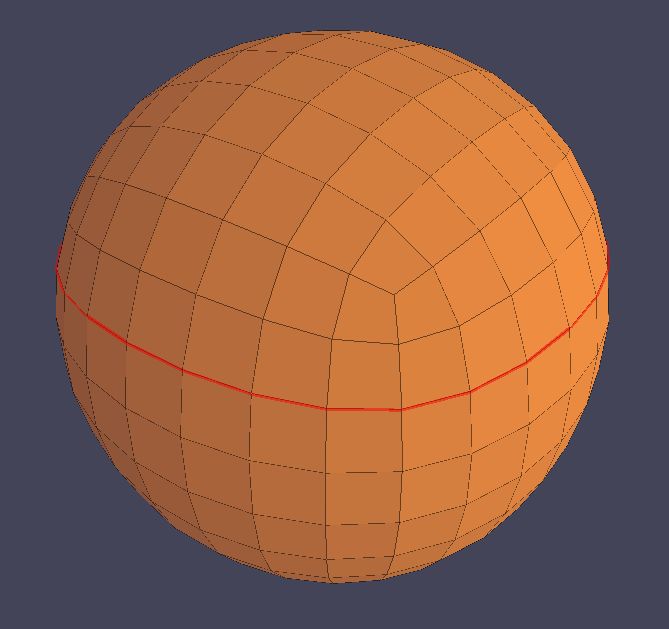
                                      Edge Loop, could anyone post a screenshot of what that means? A "Loop" can be interpreted as many things.

                                      Thomas Thomassen — SketchUp Monkey & Coding addict
                                      List of my plugins and link to the CookieWare fund

                                      1 條回覆 最後回覆 回覆 引用 0
                                      • R 離線
                                        remus
                                        最後由 編輯

                                        Here you go.


                                        edge loop.JPG

                                        http://remusrendering.wordpress.com/

                                        1 條回覆 最後回覆 回覆 引用 0
                                        • thomthomT 離線
                                          thomthom
                                          最後由 編輯

                                          The thing about these kind of selections, how do you expect them to work on irregular shaped objects? How do they work in other applications?

                                          If it assumes that the shape is made out of triangles or quads things are very easy.

                                          Thomas Thomassen — SketchUp Monkey & Coding addict
                                          List of my plugins and link to the CookieWare fund

                                          1 條回覆 最後回覆 回覆 引用 0
                                          • pilouP 離線
                                            pilou
                                            最後由 編輯

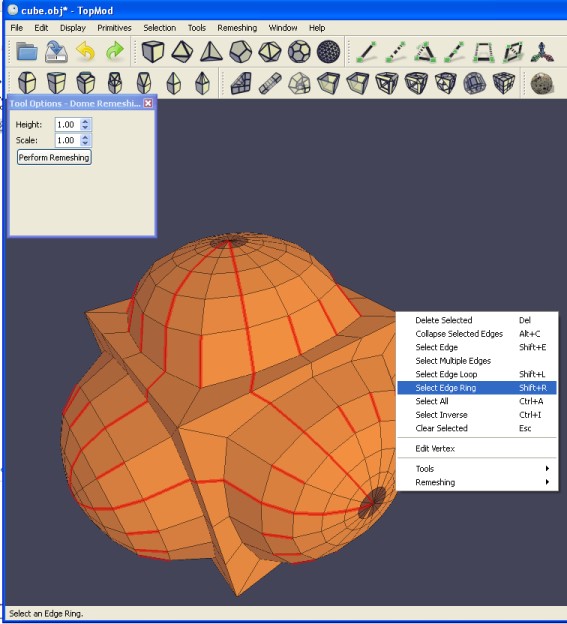
                                            See TopMod 😉 (free)
                                            Have cool loops selection 😉
                                            And it's a crazzy prog 😎 (here old version)
                                            topmod.jpg

                                            Frenchy Pilou
                                            Is beautiful that please without concept!
                                            My Little site :)

                                            1 條回覆 最後回覆 回覆 引用 0
                                            • 1
                                            • 2
                                            • 1 / 2
                                            • 第一個貼文
                                              最後的貼文
                                            Buy SketchPlus
                                            Buy SUbD
                                            Buy WrapR
                                            Buy eBook
                                            Buy Modelur
                                            Buy Vertex Tools
                                            Buy SketchCuisine
                                            Buy FormFonts

                                            Advertisement