sketchucation logo sketchucation
    • Login
    Oops, your profile's looking a bit empty! To help us tailor your experience, please fill in key details like your SketchUp version, skill level, operating system, and more. Update and save your info on your profile page today!
    ⚠️ Update | Sketchucation Tools 5.0.8 released with licensing improvements and bugfixes Download

    Swap between 2 lines

    Scheduled Pinned Locked Moved Developers' Forum
    12 Posts 5 Posters 1.3k Views 5 Watching
    Loading More Posts
    • Oldest to Newest
    • Newest to Oldest
    • Most Votes
    Reply
    • Reply as topic
    Log in to reply
    This topic has been deleted. Only users with topic management privileges can see it.
    • thomthomT
      thomthom
      last edited by

      Swap what between two lines?

      Thomas Thomassen — SketchUp Monkey & Coding addict
      List of my plugins and link to the CookieWare fund

      1 Reply Last reply
      Reply Quote 0
      • A
        arcano
        last edited by

        Swap as to make triangle for create a plane.

        1 Reply Last reply
        Reply Quote 0
        • A
          AcesHigh
          last edited by

          I was going to create a topic requesting this... and I enter the forum and see your request...

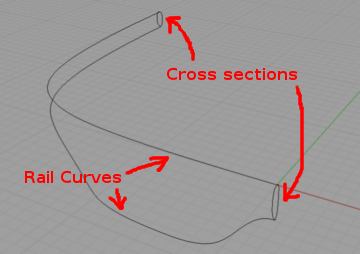
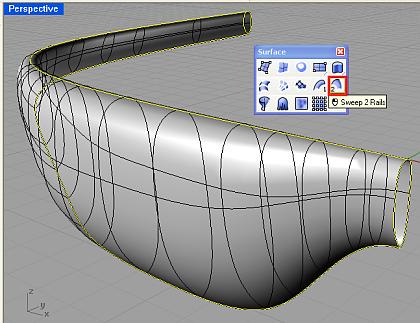
          But... are you thinking about the same thing as I am? I was thinking about SWEEP TWO RAILS (thats the exact name of the Rhino 3D Tool)

          This is Sweep 2 Rails... you use TWO CURVES as rail lines and ONE CURVE as cross section.

          http://www.3dmax-tutorials.com/graphics/il_nurbs_sweep2.jpg

          this is actually the 3D Max Sweep 2 Rails... but it may give an idea... check the link, it shows some of the options used, descriptions, etc
          http://www.3dmax-tutorials.com/_2_Rail_Sweep_Surface.html

          I once created a thread asking for Sweep2Rail... but the answer I got was "get another 3d program" 😒 😆 http://www.sketchucation.com/forums/scf/viewtopic.php?f=180&t=16447

          2 more images

          http://www.studiorola.com/wp-content/uploads/2008/10/6a.jpg

          http://www.studiorola.com/wp-content/uploads/2008/10/7.jpg

          Of course, that thread was posted BEFORE Chris entered into his amazing ruby coding frenzy! Now, with Chris´ genius, we might see Sweep2Rail come to be!!

          1 Reply Last reply
          Reply Quote 0
          • A
            arcano
            last edited by

            Wow...! 😄

            I can't see the last 2 images.

            1 Reply Last reply
            Reply Quote 0
            • A
              arcano
              last edited by

              My problem it's this:

              I'v the edge of my plan. Can I make a face with this edge automatically? Whitout make with line tool hundred of triangle...

              PS. The edge are not on the same plane !!!
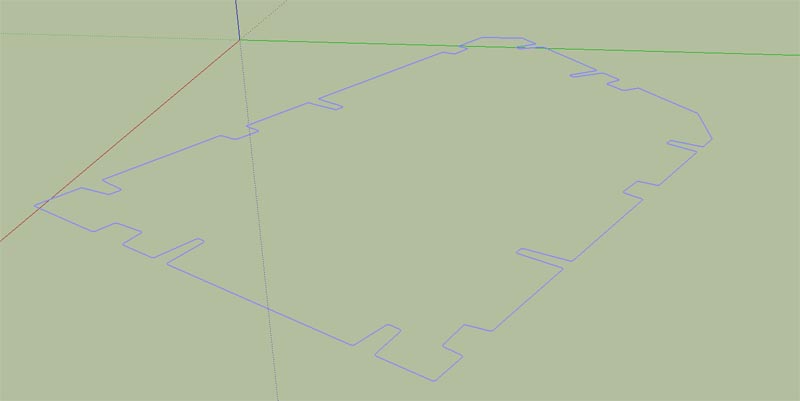

              plane.jpg

              1 Reply Last reply
              Reply Quote 0
              • R
                remus
                last edited by

                this will do it: http://www.smustard.com/script/Flatten although it'll cost you $10.

                you can then trace over one of the edges to fill in the face.

                http://remusrendering.wordpress.com/

                1 Reply Last reply
                Reply Quote 0
                • A
                  arcano
                  last edited by

                  No, I don't need to flatten my edge on a z=0 plan but I need to create faces with my non complanar edges.

                  1 Reply Last reply
                  Reply Quote 0
                  • Chris FullmerC
                    Chris Fullmer
                    last edited by

                    Have you tried running the sandbox "From Contours" tool on it? That might do the trick.

                    Once you do get faces filled in, you know that you won't be able to pushpull them though, that only works with a single face. If possible, you'd be better off to flatten it.

                    Chris

                    Lately you've been tan, suspicious for the winter.
                    All my Plugins I've written

                    1 Reply Last reply
                    Reply Quote 0
                    • A
                      arcano
                      last edited by

                      Sure Colombo's egg!

                      Thank you very much!

                      1 Reply Last reply
                      Reply Quote 0
                      • A
                        AcesHigh
                        last edited by

                        well, thus, it seems it was not a SWEEP 2 RAILS request at all! 😆 😆

                        1 Reply Last reply
                        Reply Quote 0
                        • A
                          arcano
                          last edited by

                          No, but SWEEP 2 RAILS plugin will be very usefull for me!

                          1 Reply Last reply
                          Reply Quote 0

                          Hello! It looks like you're interested in this conversation, but you don't have an account yet.

                          Getting fed up of having to scroll through the same posts each visit? When you register for an account, you'll always come back to exactly where you were before, and choose to be notified of new replies (either via email, or push notification). You'll also be able to save bookmarks and upvote posts to show your appreciation to other community members.

                          With your input, this post could be even better 💗

                          Register Login
                          • 1 / 1
                          • First post
                            Last post
                          Buy SketchPlus
                          Buy SUbD
                          Buy WrapR
                          Buy eBook
                          Buy Modelur
                          Buy Vertex Tools
                          Buy SketchCuisine
                          Buy FormFonts

                          Advertisement