The VUE thread
-
Can you send me the scene? I would like to see your settings and setup, I can then return it with a render setup which you can save in your personal folder.
-
thanks for the help, pete... much appreciated.
back to some 3ds import questions... is there a way to embed the geometry and materials into the file? i just had some issues where i re exported a piece of the model, and it replaced some materials...and then ended up messing up most of the materials in my model

-
@solo said:
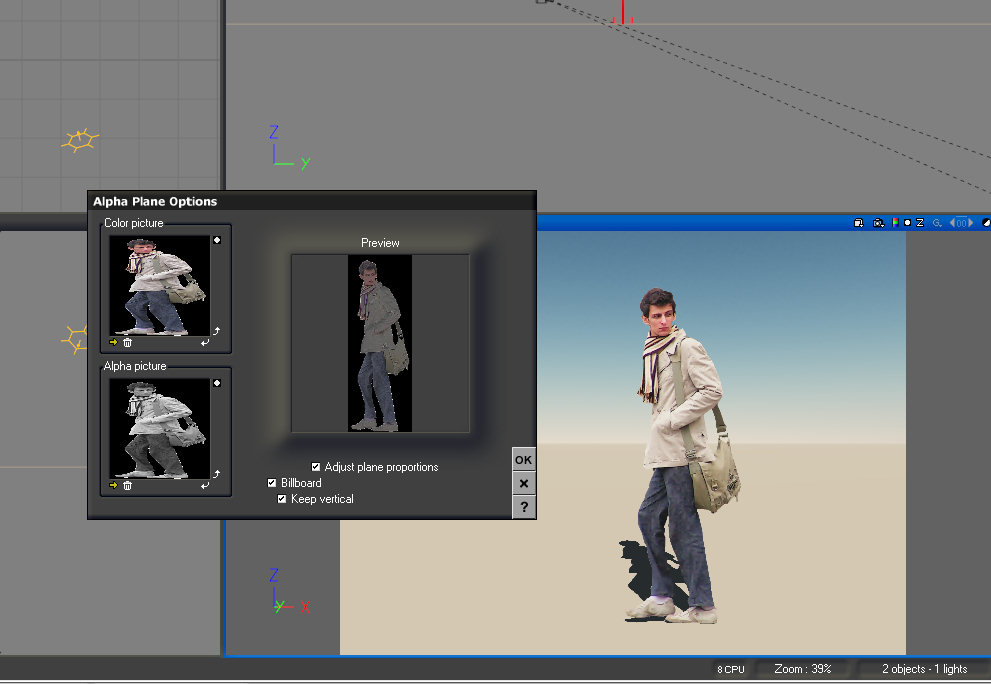
No need for a script, The image used for a SU face-me is normally .png, so in Vue create a new alpha plane, navigate to image, select fit and check 'billboard'...viola it's done and now you can even adjust the texture without it losing it's transparency.
Solo, would you mind elaborating a bit on this? I do not understand this process. Are you suggesting creating and sizing alpha planes in Vue and applying the png, thus eliminating the entire process of using face-me components in sketchup?
The sketchup components are exported into Vue no problem, but once there, they lose the ability to face the camera. Thanks in advance for any suggestions on how to fix this.
-
CaptainLS, in Vue select an alpha plane and then navigate to your .png, and apply it, then select 'Billboard' and it becomes a face-me component.
You do not need a seperate alpha image as Vue will create it for you.
If you unselect 'vertical' then it becomes face me from any angle including above.
-
Perhaps my problem lies in my exporting? Are you importing the sketchup file directly into Vue? I export an .obj from Sketchup and import that into Vue. The components become a mesh and are not alpha planes. Thanks for helping me with this.
-
Create it the way you would in SU, first create a plane, then apply the texture and make it a billboard.
Importing a mesh will not become a face-me, it needs to be created in Vue.
-
Captain,
What I found to be an easier solution than remaking all of your faceme plants into Vue alpha planes, since they import already as transparent alpha planes and the only problem is that they don't face the camera, is to just put all the faceme components onto their own layer in VUE. Once you set your camera's vantage point, select the plant layer, which will select all the objects (plants) simultaneously, and use the rotate tool and choose Local or the "L" option. Rotate all the plants on their own axis to face the camera. Granted this only works for still renders, but it's quicker than remaking 50 or more plants in a scene. I do the same thing when I import into Max and find it pretty quick to setup between scenes..
-
Adam, I was going to ask you a while back when you did a Vue render and had 2d plants in it, why 2d?
I mean Vue can handle billions of poly's and it has a great plant editor as well as vast plant libraries and resources available, why would you need to use 2d plants?
My only thought would be because you needed a certain species that you could not make or find. -
Actually Pete, I've been waiting for you to make more plants in my zone! But yes, that's the main reason. It's hard to satisfy an actual planting design with the 3D vegetation that is available. We just finished a residential landscape installation in which I had 40 different plant species designed into the job. I might have been able to satisfy a handful of them with 3D. I think the 3D vegetation is more seamless and accurate in a render, especially with shadows and lighting. Most of my clients have never even seen a 3D design in their life and wouldn't be able to tell the difference if I pointed it out. I have over 6,000 2D plants in my collection. Couple that with the RP Tools component search and place tool and I can quickly find and drop in every plant in a design in about 10 minutes.
-
You can select once all plant-components in the scene, made in SketchUp, then in the material editor (Basic mode) check and mark "Use color map" them by double-clicking in one window (invert mask, if necessary), then on the context menu RMB or in Edit menu select "Replace by (keep proportions)" with Alpha Plane, then in the menu "Orientation" enter 90 degrees (Pitch). Then the only piece mark that it is Billboard, Adjust plane proportions and Keep vertical should marked too, it is possible in a single window, not closing after each point.
It turns very quickly, I also use a lot of plants in my work






Advertisement