Native tool CREATE FACE
-
I just wish this tool was available in a right click context menu. I must be the only one who feels it necessary to close faces on tiny triangles and quads. There is an occasional selection in the right click context called "repair tiny triangles" or something like that, but it does not always show up if the program doesn't recognize the gap. Is there a way to move that command to a right click menu?
You can find it under Tools, Utilities, Create Face. You use it after selecting the perimeter of the coplanar segments surrounding either a triangular or quad opening. -
I think thats one of the example rubys, so you should be able to add it to the right click menu if you know the appropriate ruby code.
waits for ruby people
-
Well...
Learning Ruby code is one of those things on a long to do list after modeling, rendering, laundry, lawn work, and other such irrelevant activities and not necessarily in that order, because some of these seem to take priority--and maybe you know which ones I mean. -
I created a shortcut for it "Ctrl + C" I think it is even faster then if it were in the right context menu.
-
@perk:
was that before Bill Gates created his shortcut? -
Sorry I wasn't paying much attention while typing. What I meant was "Shift + C"
-
-
@perk:
Sorry for the delay in responding. Thanks for your suggestion.
I do not know how to assign multiple keystrokes for shortcuts. And I do not use ruby language interface. -
Mitcorb
You could assign it anything you like. Shift + C is just my choice. To change your shortcuts go to window preferences shortcuts. To make it multiple keys you simple hold down the shift key while pressing the other desired key.
-
Hi Tim,
In (Window - or Skethup on Mac - menu) Preferences > Shortcuts you can easily assign a keystroke to anything that appears anywhere in the SU menu system. Taking the make faces function as an example, see my screenshot:
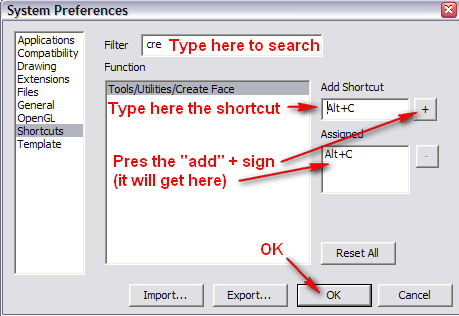
- Navigate to the panel and choose the shortcuts tab
- start typing the name of the tool you want to find - the characters "cre" (for create) have already spotted it for me.
- select it, click into the field where you have to enter the shortcut (just use the keys you would when using it - like Alt and C here)
- press the + sign to add the shortcut (it will appear below as an already assigned shortcut)
- OK and you are done.
As for the ruby thing, under the Plugins folder of your SU app, there is a "Utilities" subbfolder with a single rb file called "utilitiestools". This is the one we are talking about.
Since it's a simple text file, you can open it in a text editor like Notepad (never a word procesor like MS Word!). At the bottom, you would find this:
#----------------------------------------------------------------------------
# Add things to the Utilities menu
if( not $utilities_menu_loaded )
    add_separator_to_menu("Tools")
    utilities_menu = UI.menu("Tools").add_submenu($uStrings.GetString("Utilities"))

    utilities_menu.add_item($uStrings.GetString("Create Face")) { create_face_from_selection }
    utilities_menu.add_item($uStrings.GetString("Query Tool")) { Sketchup.active_model.select_tool TrackMouseTool.new }
    #utilities_menu.add_item($uStrings.GetString("Fix Non-planar Faces")) { Sketchup.send_action "fixNonPlanarFaces;" }

    $utilities_menu_loaded = true
end
I'm not saying that you should start editing it and find out how to get it to work from the context menu (I couldn't do it either of course) but I'm sure that there would be takers who'd do it for you.
-
Whoa:
Thanks, guys.
I wasn't expecting much attention to this thread.
It is greatly appreciated. -
Well, after we'd suffered a while to get you properly in to the forums, I thought you would like to feel that it was worth the effort.




Hello! It looks like you're interested in this conversation, but you don't have an account yet.
Getting fed up of having to scroll through the same posts each visit? When you register for an account, you'll always come back to exactly where you were before, and choose to be notified of new replies (either via email, or push notification). You'll also be able to save bookmarks and upvote posts to show your appreciation to other community members.
With your input, this post could be even better 💗
Register Login


Advertisement