sketchucation logo sketchucation
    • Anmelden
    Oops, your profile's looking a bit empty! To help us tailor your experience, please fill in key details like your SketchUp version, skill level, operating system, and more. Update and save your info on your profile page today!
    ⚠️ Important | Libfredo 15.6b introduces important bugfixes for Fredo's Extensions Update

    Call to Mac users for script portability

    Geplant Angeheftet Gesperrt Verschoben Developers' Forum
    101 Beiträge 10 Kommentatoren 6.8k Aufrufe 10 Watching
    Lade mehr Beiträge
    • Älteste zuerst
    • Neuste zuerst
    • Meiste Stimmen
    Antworten
    • In einem neuen Thema antworten
    Anmelden zum Antworten
    Dieses Thema wurde gelöscht. Nur Nutzer mit entsprechenden Rechten können es sehen.
    • fredo6F Offline
      fredo6
      zuletzt editiert von

      Problem about padding in table rows

      Here is an update to check if I can get control of the table rows margins on Mac. This only impacts the Default Parameters Dialog boxes.

      Thanks to advise

      Fredo


      to drop into LIBFREDO6_Dir_31 folder

      1 Antwort Letzte Antwort Antworten Zitieren 0
      • jeff hammondJ Offline
        jeff hammond
        zuletzt editiert von

        i'm not sure what the table row margins are but as far as i can tell, the only difference with the latest file is that it adds something weird to sketchup in general..
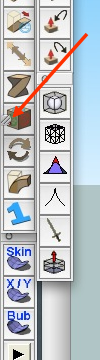
        screen.png

        that little square isn't part of the icon.. it's just floating on top (i can move the toolbar and the square will remain).. that's what the bottom-right corner of a window in os x looks like and it's used for resizing the window.

        dotdotdot

        1 Antwort Letzte Antwort Antworten Zitieren 0
        • fredo6F Offline
          fredo6
          zuletzt editiert von

          Jeff

          Did you notice the little sqare with the previous version (I mean the one fixing the button image)?

          for the row heights, they should normally be smaller (as they are on Windows). At least, this is the intent!

          Fred

          PS: the very first time you call a web dialog (Translation or default parameters), I open and close an empty web dialog in order to determine some parameters of the browser, such as the version, the screen size, etc...). You should normally see this event.

          1 Antwort Letzte Antwort Antworten Zitieren 0
          • jeff hammondJ Offline
            jeff hammond
            zuletzt editiert von

            @unknownuser said:

            Jeff

            Did you notice the little sqare with the previous version (I mean the one fixing the button image)?

            my bad.. i think that was being caused by a screencapture app i'm demoing (the one i used to make the red arrow in the previous post 😄)...

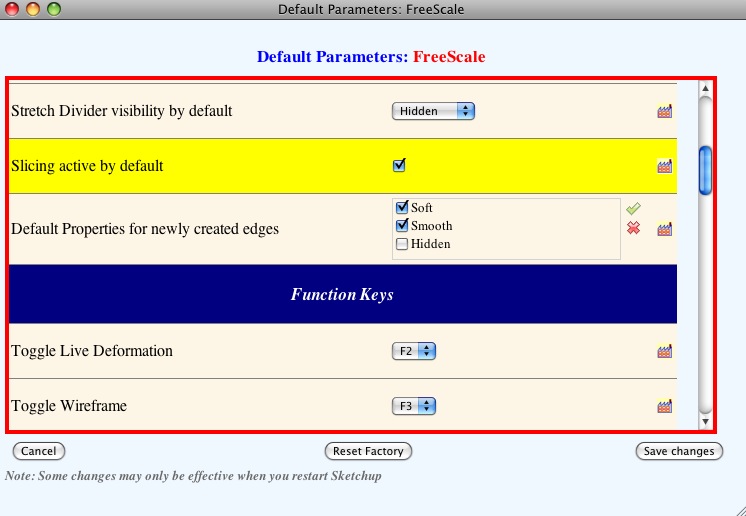
            the row heights appear the same though:
            screenshot 2.jpg
            (that's scrolled down a little to show all the icons)

            @unknownuser said:

            for the row heights, they should normally be smaller (as they are on Windows). At least, this is the intent!

            ah, i see.. it's not a problem at all with the way they are sized now but maybe your attention to detail is greater than mine 😄

            @unknownuser said:

            PS: the very first time you call a web dialog (Translation or default parameters), I open and close an empty web dialog in order to determine some parameters of the browser, such as the version, the screen size, etc...). You should normally see this event.

            yeah, i see that.. a fast flash of a blank window prior to the freescale dialog popping up..

            dotdotdot

            1 Antwort Letzte Antwort Antworten Zitieren 0
            • jeff hammondJ Offline
              jeff hammond
              zuletzt editiert von

              @unknownuser said:

              my bad.. i think that was being caused by a screencapture app i'm demoing (the one i used to make the red arrow in the previous post 😄)...

              hmm.. nope it's the latest config file causing it.

              i closed everything except sketchup and the little square pops up right after i open the freescale parameters.

              [edit] and upon reverting to the original config file (the one in version e), i get the same thing so it's not the cause..

              i'll try to go back through some of the other files to see which update it starts with.

              dotdotdot

              1 Antwort Letzte Antwort Antworten Zitieren 0
              • fredo6F Offline
                fredo6
                zuletzt editiert von

                Jeff,

                Don't spend your time finding out. It is very plausible that it related to SU Web dialogs, where the modal mode for Web dialogs does not really exist on Mac. So LibFredo6's fault.

                Can you try the attached file and watch:

                • the little square
                • the row heights

                Thanks


                to drop into LIBFREDO6_DIR_31 folder

                1 Antwort Letzte Antwort Antworten Zitieren 0
                • jeff hammondJ Offline
                  jeff hammond
                  zuletzt editiert von

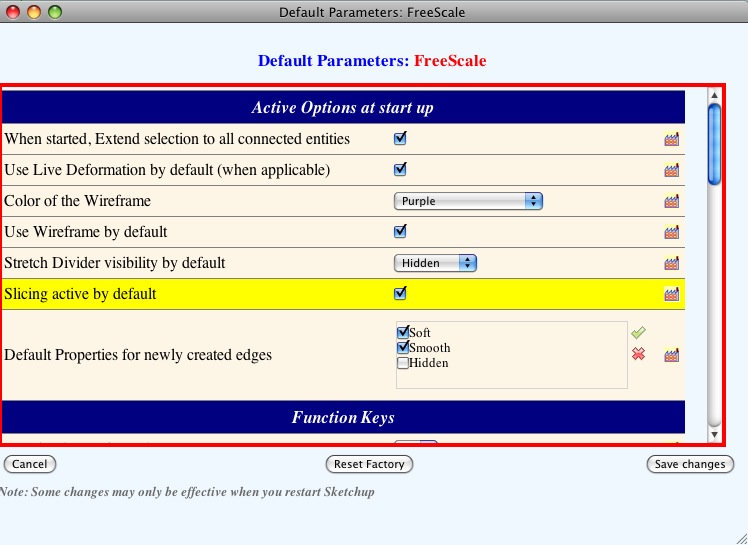
                  looking good..
                  no little square and the rows are smaller

                  screenshot 3.jpg

                  dotdotdot

                  1 Antwort Letzte Antwort Antworten Zitieren 0
                  • fredo6F Offline
                    fredo6
                    zuletzt editiert von

                    Jeff,

                    Thanks. That was the reason for the small square. You're the first one to notice.
                    For row heights, it seems I have also found the subtilities for Safari (which behaves very differently from IE).

                    Could you make a try with the 2 attached files on:

                    • the Default Parameter dialog boxes
                    • The translation boxes
                    • the language definition dialog box (within the translation dialog box, select 'New language' in the combo box at the top left).

                    Thanks

                    Fredo


                    to drop into LIBFREDO6_Dir_31 folder


                    to drop into LIBFREDO6_Dir_31 folder

                    1 Antwort Letzte Antwort Antworten Zitieren 0
                    • jeff hammondJ Offline
                      jeff hammond
                      zuletzt editiert von

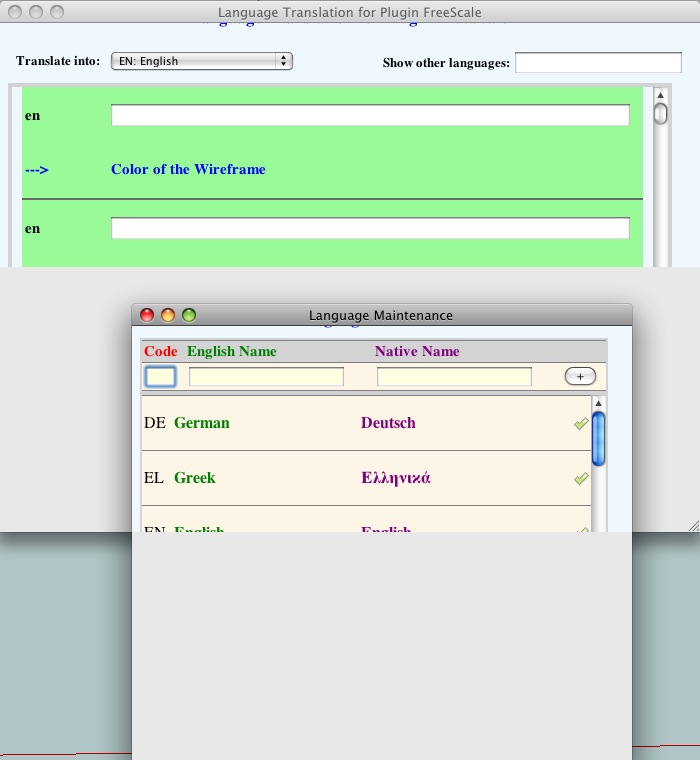
                      these ones make the row spacing big again in the default parameters.

                      i haven't opened the language boxes lately but they're looking like the original parameters windows.
                      this is how they look with the new and old files..

                      screenshot 4.jpg

                      dotdotdot

                      1 Antwort Letzte Antwort Antworten Zitieren 0
                      • fredo6F Offline
                        fredo6
                        zuletzt editiert von

                        Well, this means that Safari definitely takes some freedom with the W3C specifications.
                        Can you try this one then?

                        Fredo


                        to drop into LIBFREDO6_Dir_31 folder

                        1 Antwort Letzte Antwort Antworten Zitieren 0
                        • D Offline
                          driven
                          zuletzt editiert von

                          Hi Fredo and Jeff,

                          it's working for me now (cheers for the heads up Mac info Jeff) , including arrow keys and shft lock

                          and thanks for a nice program Fredo

                          I just finished a length of c1962 Moulton bicycle frame tube (tappered and formed thin wall)

                          I'm very happy... I've attached pics of both yesterdays and todays LibWeb Parameters

                          cheers

                          john

                          I emailed you some screen shots, won't upload.

                          learn from the mistakes of others, you may not live long enough to make them all yourself...

                          1 Antwort Letzte Antwort Antworten Zitieren 0
                          • fredo6F Offline
                            fredo6
                            zuletzt editiert von

                            John,

                            From the screenshots, I see that the top and bottom margins are still a little bit large.

                            Can you try with the attached file and tell me if the margins get smaller.

                            Thanks

                            Fredo


                            to drop into LIBFREDO6_Dir_31 folder

                            1 Antwort Letzte Antwort Antworten Zitieren 0
                            • jeff hammondJ Offline
                              jeff hammond
                              zuletzt editiert von

                              yep, the margins are now smaller and almost everything is visible without stretching the window..
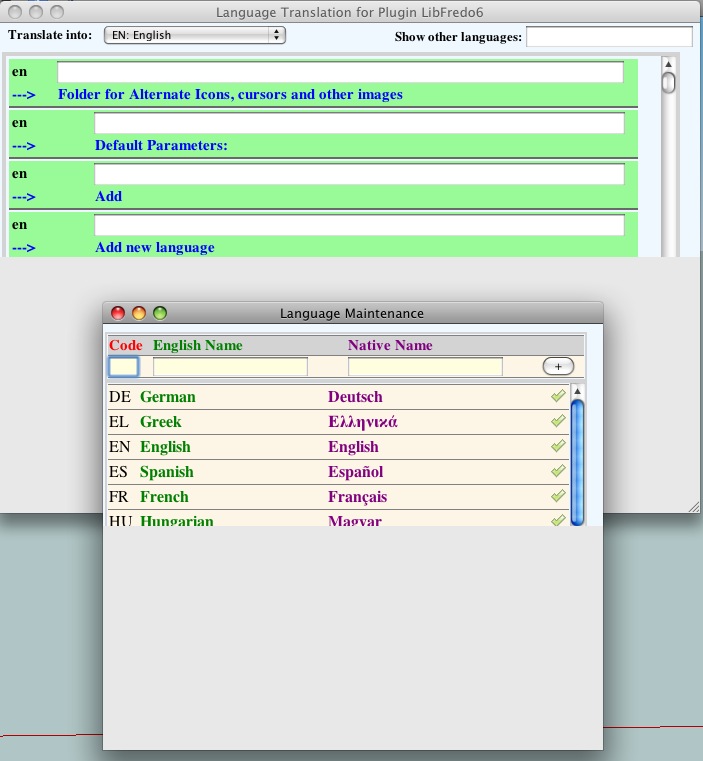
                              the only problem i see now is that i have to stretch the window in order to see the 'save' and 'close' buttons for language translations.. also, when i select 'new language' from the 'translate into' dialog, there's no way to stretch the window so i'm not sure if there are supposed to be save/cancel buttons at the bottom.
                              screenshot 1.jpg

                              the default parameter dialogue is still ok ( with both libfredo6 and freescale)

                              [btw, i'm moving the windows into these positions for ease of making the screenshot.. normally, these exact two windows wouldn't be opened together.. this is how it looks if i don't change anything and only go Language Translation-> Translate Into -> new language.. ]
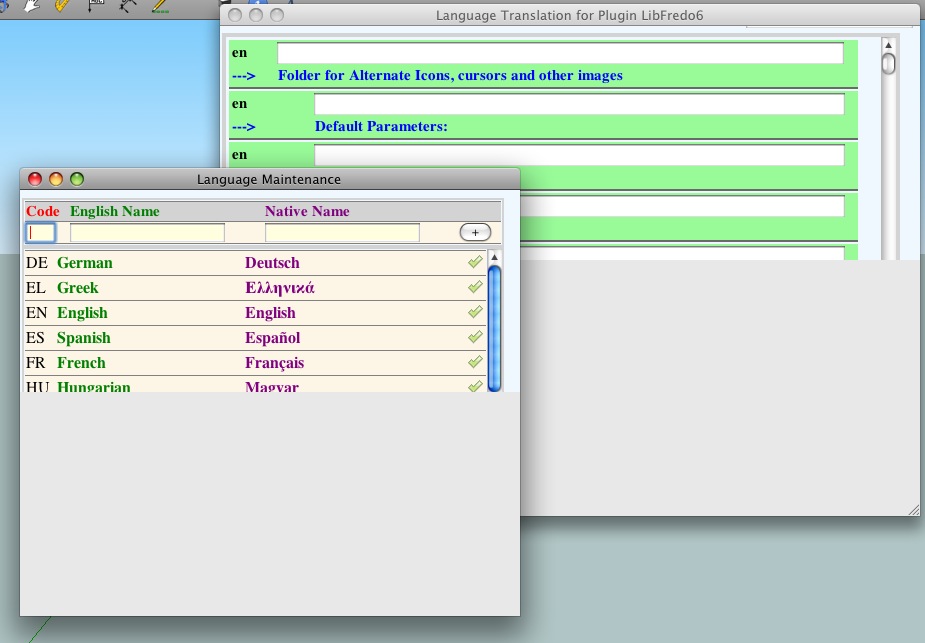
                              screenshot 2.jpg

                              it's the same with libfredo6 and freescale

                              dotdotdot

                              1 Antwort Letzte Antwort Antworten Zitieren 0
                              • fredo6F Offline
                                fredo6
                                zuletzt editiert von

                                Jeff,

                                I am a little bit lost. Are you sure you ever saw the push buttons of the Translation (and Language List) dialog boxes ? It seems you have the same old bug about windows half displayed which I fixed for the Default Parameter box.

                                Just to be sure, I reattach the 2 files that correspond to my current version.

                                Again, many, many thanks for your help to all, I know this is a lengthy process, but actually it did not worked that bad!

                                Fredo


                                to drop into LIBFREDO6_Dir_31 folder


                                to drop into LIBFREDO6_Dir_31 folder

                                1 Antwort Letzte Antwort Antworten Zitieren 0
                                • jeff hammondJ Offline
                                  jeff hammond
                                  zuletzt editiert von

                                  @unknownuser said:

                                  Jeff,

                                  I am a little bit lost. Are you sure you ever saw the push buttons of the Translation (and Language List) dialog boxes ? It seems you have the same old bug about windows half displayed which I fixed for the Default Parameter box.

                                  Just to be sure, I reattach the 2 files that correspond to my current version.

                                  no, i can't remember ever seeing the buttons for the translation box (though i haven't been checking it with all of the updates.. i've just been looking at default parameters).
                                  the translation boxes look like the the default parameter boxes did when this thread started so i guess whatever you did to fix the default params would be the same thing you could do to the translations?

                                  @unknownuser said:

                                  Again, many, many thanks for your help to all, I know this is a lengthy process, but actually it did not worked that bad!

                                  oh, no problem.. it's good timing for this because i haven't had any onsite work lately.. just at home with the kids 😄

                                  dotdotdot

                                  1 Antwort Letzte Antwort Antworten Zitieren 0
                                  • fredo6F Offline
                                    fredo6
                                    zuletzt editiert von

                                    Jeff,

                                    Do you mean that the Translation box is still 'half-shown' with the latest rb files?

                                    1 Antwort Letzte Antwort Antworten Zitieren 0
                                    • jeff hammondJ Offline
                                      jeff hammond
                                      zuletzt editiert von

                                      yes, it is still half shown using the latest attached files

                                      dotdotdot

                                      1 Antwort Letzte Antwort Antworten Zitieren 0
                                      • fredo6F Offline
                                        fredo6
                                        zuletzt editiert von

                                        It means that I did not yet how I fixed it for the Default Parameters box!

                                        Could you try this one


                                        to drop into LIBFREDO6_Dir_31 folder

                                        1 Antwort Letzte Antwort Antworten Zitieren 0
                                        • jeff hammondJ Offline
                                          jeff hammond
                                          zuletzt editiert von

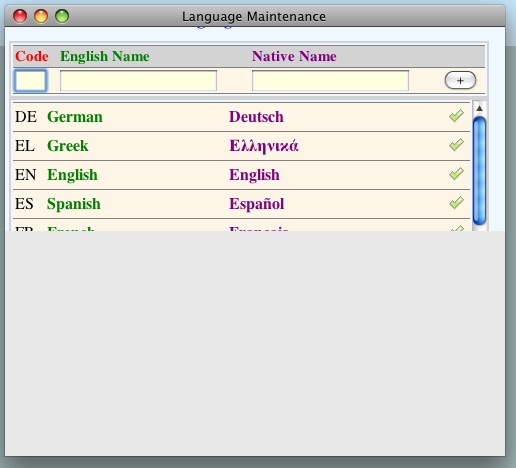
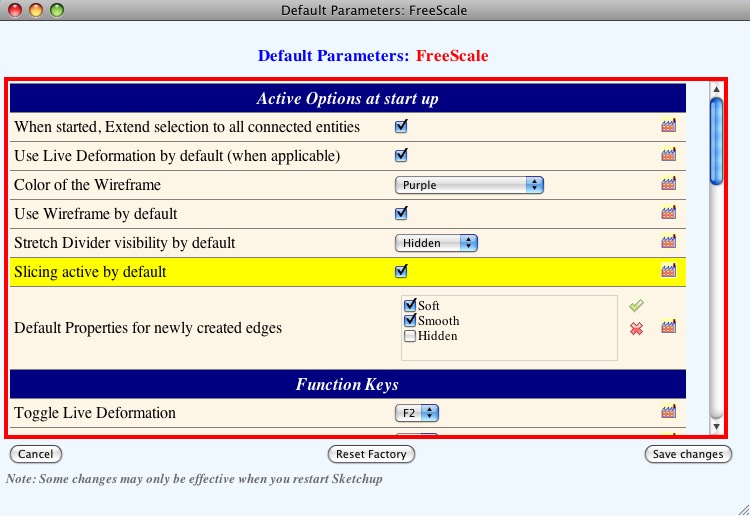
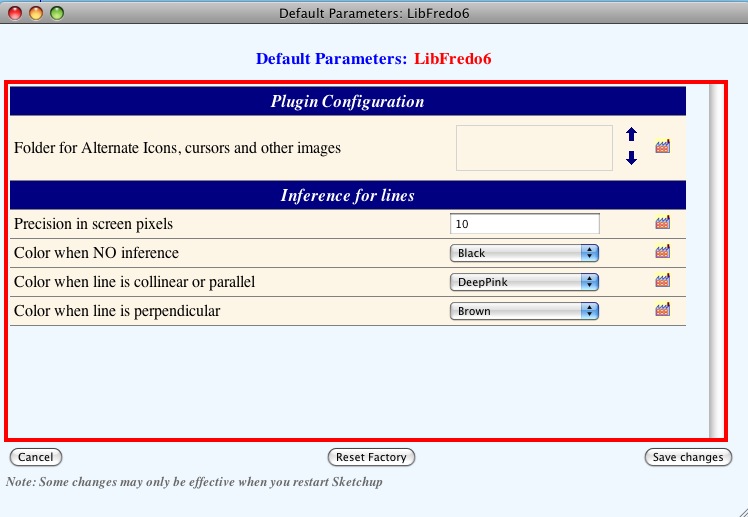
                                          ok, that fixed it.. the language maintenance box is the only weird one now.. (and i noticed i can stretch it to get to the save/cancel buttons.. there's just no stretch graphic showing at the bottom right)

                                          here's where it's at right now:

                                          language translation
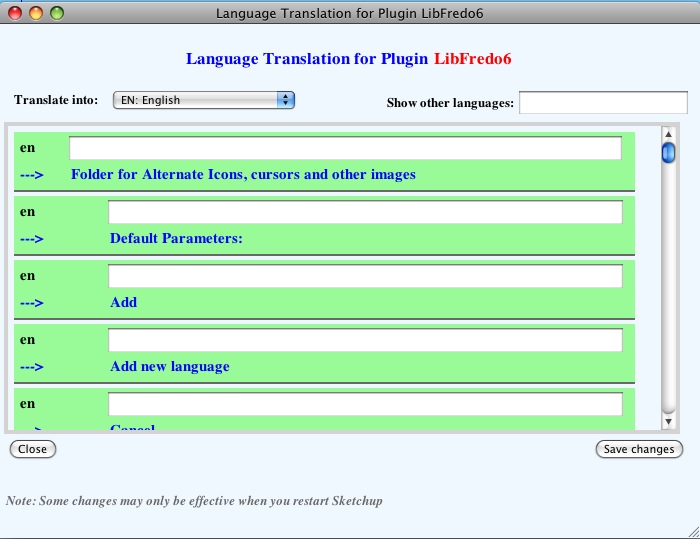
                                          screenshot 5.jpg

                                          language maintenance:
                                          screenshot 6.jpg

                                          freescale default parameters:
                                          screenshot 7.jpg

                                          libfredo6 default parameters:
                                          screenshot 8.jpg

                                          dotdotdot

                                          1 Antwort Letzte Antwort Antworten Zitieren 0
                                          • fredo6F Offline
                                            fredo6
                                            zuletzt editiert von

                                            If the attached one works on the Language dialog box, then it means I have understood the weird things with the SU web dialog boxes (i.e. the order of set position and set size).

                                            Thanks to advise


                                            to drop into LIBFREDO6_Dir_31 folder

                                            1 Antwort Letzte Antwort Antworten Zitieren 0
                                            • 1
                                            • 2
                                            • 3
                                            • 4
                                            • 5
                                            • 6
                                            • 4 / 6
                                            • Erster Beitrag
                                              Letzter Beitrag
                                            Buy SketchPlus
                                            Buy SUbD
                                            Buy WrapR
                                            Buy eBook
                                            Buy Modelur
                                            Buy Vertex Tools
                                            Buy SketchCuisine
                                            Buy FormFonts

                                            Advertisement