Problem with Sand box tools
-
Ok I have made a TIN with quite a few elevation and I wan to put a model of house on it. Stamp tool doesn't really work really well with what I want to do since it makes quite a bit of a mess around the TIN.
The idea of what I want to do is to drape the outline of the house on the tin and then make that surface flat and somehow even it out as well and easy as possible with the rest of the tin.
The TIN is not that "curvy" but the model of the house is a bit long and I have a highest difference of the model to the tin (if I just move it in blue axis) of arround 4 meters.
Any ideas of any addons for that?
And how can I make a specific area of a TIN flat? (using smoove seems impossible) -
Well, you say that the stamp tool is not an ideal solution - however all your description (what you want to achieve) is about how the stamp tool works and what it does.
Is there really 4 metres difference in that building? As I can imagine, such a building wouldn't be placed on such a terrain with all the terrain built up / dug into around but the building itself would be somewhat on a sloping foundation.
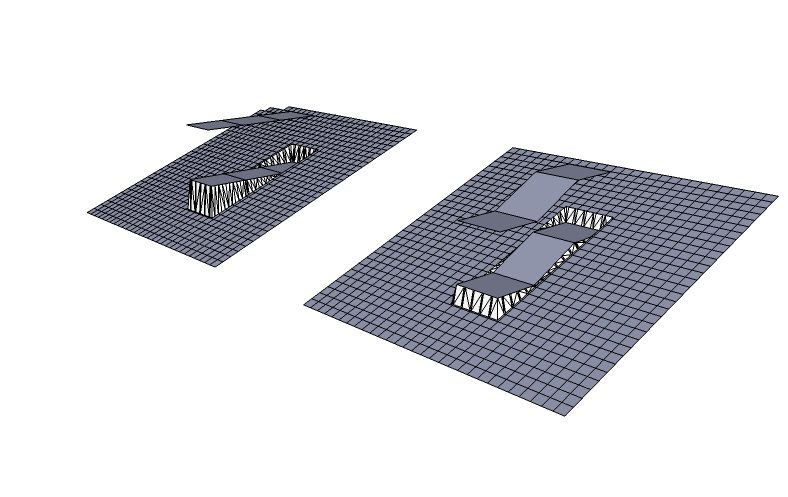
Note that you can always stamp a slanting face or even a collection of (joined) faces that are not coplanar - the only thing you cannot stamp is a face perpendicular to the terrain (i.e. basically vertical faces). See what I mean in attached:

Hello! It looks like you're interested in this conversation, but you don't have an account yet.
Getting fed up of having to scroll through the same posts each visit? When you register for an account, you'll always come back to exactly where you were before, and choose to be notified of new replies (either via email, or push notification). You'll also be able to save bookmarks and upvote posts to show your appreciation to other community members.
With your input, this post could be even better 💗
Register Login


Advertisement