Message "there was a problem exporting to this file"
-
Hi
I´m trying to export a pdf file from LO and this message keep standing. I´ve tried everything that i know , like changing the quality settings to low or medium and the path to C:, without any success.Any suggestions? What am I doing wrong?
-
Hi Ricardo,
I could export it at high resolution without any problem (it took about 20-30 seconds though on A4 paper size). See attached.
-
Thanks Gaieus.
I don´t know what is going on...maybe I´ll reinstall the program.
I solved the problem with Printing pdf. Any way , thanks again for the quick answer. -
I also use virtual PDF printers however with LO I believe it should be better to be able to print from the program as there are more settings (like quality and all).
-
I also didn't have a problem exporting to high quality.
I have seen problems when you try to change the default
pdf file name (don't know why). Just take all the defaults-
don't change the suggested filename and see if that works. -
Hi,
I just experienced the same problem. "There was a problem exporting to the file" keeps popping up and won't allow me to export to PDF. Never happened before. The only thing I did differently that I haven't tried before in the layout drawing is I copy and pasted text from Word onto one of my pages. I also tried the above suggestions to no avail. I'll attach my drawing if someone is willing to help me figure this out. Much thanks,
-
-
I just ran into this problem last night. The PDF failed at all quality levels, but exporting an image was fine. By removing one page at a time, and then specific elements on the problem page, I was able to narrow it down to an imported PNG. Oddly the PNG was fine, but I opened it in an image editor, did a save as, and then inserted it vs. the original file. Everything was fine. I'll see If I can make a clean Layout file and re-create this with the original png. If I can, I'll send it to Google to see what about the PNG causes the problem. The workflow for making this png wasn't different from others in the file.
-
For anyone interested. Here is the file (very small png) If I place this in a new Layout file and try to make a pdf, it fails.

-
Ditto here. Export error!
Nice find!
-
I thought I'd try to do a compare of bad png and good png (after you do saveas on it) to see what changed. But unfortunately I can't use an application meant to DIFF text files for this. I'm assuming something in the file header is changing?
-
Well, I opened it in Gimp and it gave me this prompt:
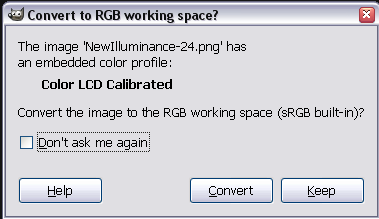
There's obviously something in this Color profile LO doesn't like. -
Interesting. I thought I had the same workflow for all the files, which started with a screenshot from SketchUp. Most of them were done here at work on my PC using Snagit, which saves with an srgb profile. Screenshots at home on mac were made with the OS, and have the "Color LCD Calibrated" profile. I have never had a problem with that profile in the past. Some old MS apps used to not like CMYK jpgs vs. RGB jpgs, but I dont' remember specific profiles being a problem.
Another interesting thing I noticed is that if you keep the "Color LCD Calibrated" profile and save the image to a jpg then and insert that, the PDF export is fine. Save it back to a PNG and you get the error again.
So it seems to be a combination of the "Color LCD Calibrated" profile and the PNG file format. If I get a chance I can try this at home and see if only a windows Layout problem, but I'm flying out of town tomorrow, may not get a chance.
-
I have also run into this problem exporting a LO document to PDF. Very frustrated, I put in a support ticket but haven't heard a peep in 2 days.
The file is too large to post (1GB+) and I have no interest in deleting pages one at a time to find the culprit since there are over 40 pages. Each time they put out a new version of LO I get excited and try a project in it. Each time all my effort gets eaten by a bug(s).
I would still be excited about a stable version, especially since there are some huge advances with this build in my opinion.
Any other ways to trouble shoot this since I haven't heard from Google?
-
got a reply:
"Thank you for your note. To reduce the size of the file and potentially
resolve this issue, I suggest purging the LayOut file:- Click "File" > "Document Settings..."
- Click "References" in the right pane.
- Click the "Purge" button in the right pane.
If you continue to encounter a crash after purging the LayOut file, you
may consider exporting to PDF in increments of 5 pages. You can then use
Adobe Acrobat to combine the resulting PDFs into a single PDF."Will try later but not too thrilled that the solution may involve a program I do not own.
-
PDFCreator (free) can also stitch several pdf (and actually other kind of) files together.
Yet I understand that it's just another workaround
-
Purge worked. I guess if something doesn't work I will try that.
-
I am having this same problem with only one page on a 6 page layout file. I tried the purge routine to no avail. Any help would be appreciated.
-
I am having similar problem. I have a LO file which I have previously exported to pdf no problem. Now I want to add a small text box. Every time I export to pdf, if I choose overwrite option it shows me the previous version eg without the new text box. If I choose to resave with a new name, I get the message 'problem opening pdf viewer' and nothing happens. I have done a purge of the LO file, and tried re-saving the LO file with a different name first, done a re-boot - nothing! Any ideas?
Thanks, Rose -
I had the same problem. In my case I resolved the issue after setting "Preserve Scale on Resize" on every Sketchup Model View.(put the check mark on)
No more problems after that.



Hello! It looks like you're interested in this conversation, but you don't have an account yet.
Getting fed up of having to scroll through the same posts each visit? When you register for an account, you'll always come back to exactly where you were before, and choose to be notified of new replies (either via email, or push notification). You'll also be able to save bookmarks and upvote posts to show your appreciation to other community members.
With your input, this post could be even better 💗
Register Login


Advertisement