sketchucation logo sketchucation
    • Login
    Oops, your profile's looking a bit empty! To help us tailor your experience, please fill in key details like your SketchUp version, skill level, operating system, and more. Update and save your info on your profile page today!
    Mac User? | Join the Rayscaper Beta for Mac Learn More

    [Plugin] Perpendicular Face Tools (UPDATED 26-03-09)

    Scheduled Pinned Locked Moved Plugins
    201 Posts 64 Posters 216.4k Views 65 Watching
    Loading More Posts
    • Oldest to Newest
    • Newest to Oldest
    • Most Votes
    Reply
    • Reply as topic
    Log in to reply
    This topic has been deleted. Only users with topic management privileges can see it.
    • S
      stpauljason
      last edited by

      Chris,

      I love your plugins.

      However I've just recently added your plugins (Extended Views and Perpendicular Faces to Sketchup 2013. When I check the box for the toolbars, they seem to create a unique toolbar just below the normal context menu (File, edit, etc). This toolbar is hidden if any other toolbar is there, and the unique toolbar can not be moved. Additionally only one of the toolbars either Exteneded Views, or Perpendicular Faces displays at one time, hiding the other one.

      1 Reply Last reply
      Reply Quote 0
      • thomthomT
        thomthom
        last edited by

        Jason: That's a bug in the first release of SketchUp 2013 - install the update that was released some weeks ago and it should work fine.

        Thomas Thomassen β€” SketchUp Monkey & Coding addict
        List of my plugins and link to the CookieWare fund

        1 Reply Last reply
        Reply Quote 0
        • V
          vojo
          last edited by

          I want to take a quick minute to point out that this plugin works VERY WELL.
          I have not had one problem with this and have used it quite extensively.
          This is a plugin I would recommend

          1 Reply Last reply
          Reply Quote 0
          • S
            stpauljason
            last edited by

            Thanks Thomas,

            I updated Sketchup 2013 and the plugin has its own toolbar now.

            1 Reply Last reply
            Reply Quote 0
            • H
              Hammerhead64
              last edited by

              Chris this is such a good tool, I have spent years using a combination of the standard tools in SU to get elements perpendicular to a path. Thx for sharing.

              ....... Quicker models here I come.

              1 Reply Last reply
              Reply Quote 0
              • gonashviliG
                gonashvili
                last edited by

                Just wanna say that this plugin is them bananas. Super, SUPER useful.

                Cheers.

                1 Reply Last reply
                Reply Quote 0
                • sicksickisckS
                  sicksickisck
                  last edited by

                  still does not work inside a component

                  1 Reply Last reply
                  Reply Quote 0
                  • cottyC
                    cotty
                    last edited by

                    @sicksickisck said:

                    still does not work inside a component

                    What do you mean here? Do you have an example?

                    my SketchUp gallery

                    1 Reply Last reply
                    Reply Quote 0
                    • Dave RD
                      Dave R
                      last edited by

                      @sicksickisck said:

                      still does not work inside a component

                      Yes. What do you mean? I just tried it and it works fine inside a component. I made a component of the Bezier curve, opened the component for editing and ran the tool. It put the face on the end where I clicked.
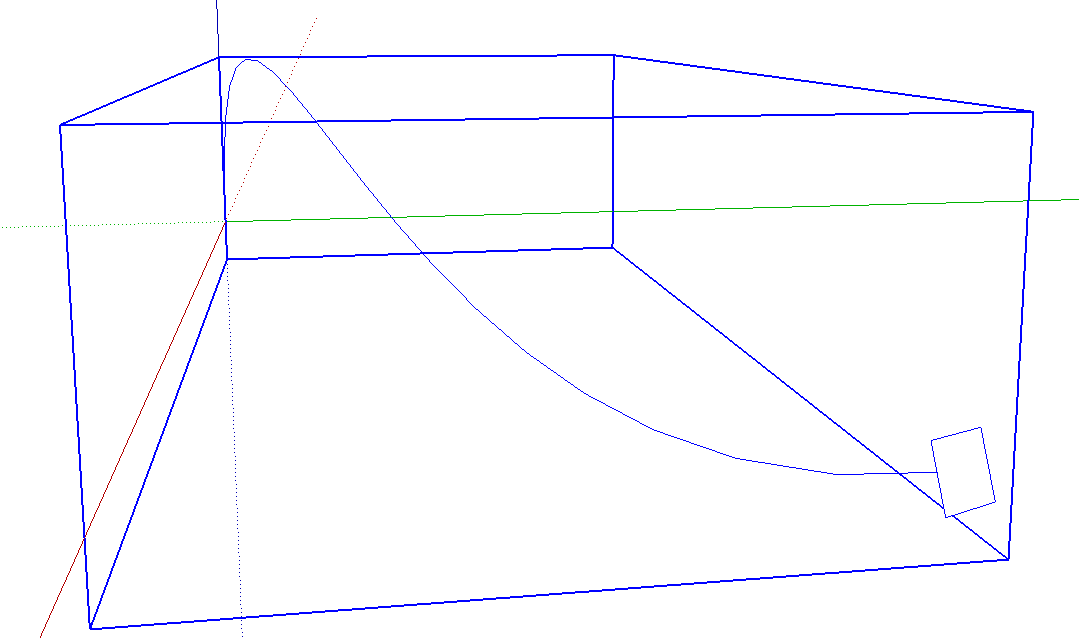
                      Screenshot - 10_16_2014 , 4_18_46 AM.png

                      Etaoin Shrdlu

                      %

                      (THERE'S NO PLACE LIKE)

                      G28 X0.0 Y0.0 Z0.0

                      M30

                      %

                      1 Reply Last reply
                      Reply Quote 0
                      • djohnson.nzD
                        djohnson.nz
                        last edited by

                        Thanks Chris, extremely useful time saver.
                        I did have trouble creating a circle in a group, it didn't seem to work but after closing the group I found the circles outside the group. I was able to remedy this by changing your "Perpendicular Circle" script to read entities=model.active_entities which I found was the only thing different from your Perpendicular Square script.
                        Thanks for all your great work...

                        nO fiKst ideas

                        1 Reply Last reply
                        Reply Quote 0
                        • designerbursaD
                          designerbursa
                          last edited by

                          [highlight=#ffffbf:39kxqslm]still does not create circles of less than 30 mm[/highlight:39kxqslm]

                          I'm working in mm, 2540 is the default by default.
                          Changed by changing the r.b code
                          thanks for the plugin

                          my edit:

                            def activate
                              @ip = Sketchup::InputPoint.new
                              @iptemp = Sketchup::InputPoint.new
                              @displayed = false
                              @sp = []
                              @end_pos = []
                              @ctrlflag = 0
                              @group = nil
                              if @@ls.to_s == ""
                                @@ls = **100.mm**
                              end
                              Sketchup.set_status_text @@ls.to_l, SB_VCB_VALUE
                              Sketchup.vcb_label = "Face Width x Height"
                            end
                          
                          1 Reply Last reply
                          Reply Quote 0
                          • T
                            thegoodguy
                            last edited by

                            Hi,

                            I just installed this on Sketchup 2016. It worked well and was super-useful when I had Sketchup 8, but is not working on 2016. There are no notes I can find saying which versions this plugin is compatible with. Am I missing something?

                            Thanks.

                            1 Reply Last reply
                            Reply Quote 0
                            • Dave RD
                              Dave R
                              last edited by

                              It works fine in SU2016 as well as every version up through SU2020.

                              You might try restarting SketchUp to make sure the plugin loads.

                              Are you sure it's not working? Is it possible the face it's creating is just so large its edges are outside the view of the camera?

                              Etaoin Shrdlu

                              %

                              (THERE'S NO PLACE LIKE)

                              G28 X0.0 Y0.0 Z0.0

                              M30

                              %

                              1 Reply Last reply
                              Reply Quote 0
                              • Z
                                zaz1
                                last edited by

                                I just discovered this extremely handy plugin. Thanks so much Chris. Plays very well with Curviloft for drawer pulls and other yet to be discovered objects. I have a couple of questions and please forgive me if these were answered earlier but there are 197 posts on this thread. I am using a MAC and that may be part of the problem with the issues I am seeing.

                                1. What key controls the rotation? I have tried up, down arrow, option, control but no success.

                                2. How to access the circle radius change in the VCB ?
                                  The VCB only displays Face Width x Height. I can enter a value, say 2" and that will set the circle radius. The video shows a VCB display of circle radius which I cant seem to display.

                                3. Is a 1" radius circle the lower limit ? If I enter a value for a circle radius less then 1", it does not display the circle when I click on the line segment. Currentlly I use a 1" radius circle and change it to less than 1" later with entity info.

                                1 Reply Last reply
                                Reply Quote 0
                                • P
                                  ParkKangSuck
                                  last edited by

                                  Hello? I am using the Perpendicular Face Tools created by you. Recently, I would like to modify the content of the source code to add new features according to my needs. Your copyright notice will remain intact, and there will be no changes regarding the copyright. Can you give me permission to modify the source code?

                                  1 Reply Last reply
                                  Reply Quote 0
                                  • P
                                    ParkKangSuck
                                    last edited by

                                    Hello? I am using the Perpendicular Face Tools created by you. Recently, I would like to modify the content of the source code to add new features according to my needs. Your copyright notice will remain intact, and there will be no changes regarding the copyright. Could you grant me permission to modify the source code? Thank you.

                                    1 Reply Last reply
                                    Reply Quote 0
                                    • P
                                      ParkKangSuck
                                      last edited by

                                      Hello? I am using the Perpendicular Face Tools created by you. Recently, I would like to modify the content of the source code to add new features according to my needs. Your copyright notice will remain intact, and there will be no changes regarding the copyright. Could you grant me permission to modify the source code? Thank you.

                                      1 Reply Last reply
                                      Reply Quote 0

                                      Hello! It looks like you're interested in this conversation, but you don't have an account yet.

                                      Getting fed up of having to scroll through the same posts each visit? When you register for an account, you'll always come back to exactly where you were before, and choose to be notified of new replies (either via email, or push notification). You'll also be able to save bookmarks and upvote posts to show your appreciation to other community members.

                                      With your input, this post could be even better πŸ’—

                                      Register Login
                                      • 1
                                      • 2
                                      • 3
                                      • 4
                                      • 5
                                      • 6
                                      • 10
                                      • 11
                                      • 4 / 11
                                      • First post
                                        Last post
                                      Buy SketchPlus
                                      Buy SUbD
                                      Buy WrapR
                                      Buy eBook
                                      Buy Modelur
                                      Buy Vertex Tools
                                      Buy SketchCuisine
                                      Buy FormFonts

                                      Advertisement