[Plugin] FollowMe and keep (v0.04 update 20090210)
-
The '[More ]Info' button when considering downloading/installing etc is a good starting point, but also read the main thread's posts for each tool - there are often good tips and advice in those...
-
TIG,
It was from clicking on the, ‘More Info’, that I got to this forum. And, I have read all of the posts but found nothing that would help me.
Also, as I mentioned earlier, on the menu line, under Extensions, I have FollowMeAndKeep and Mirror Selection. Mirror Selection works, but FollowMeAndKeep does nothing.
Any ideas?
johnmtb
-
The FaK instructions are in the first post: https://sketchucation.com/forums/viewtopic.php?p=129504#p129504
There's also some discussion in subsequent posts...It is old and unsupported for many years, so it's unsigned - set your Extension Manager > Extensions Loading Policy to 'Unrestricted' and restart SketchUp to see the menu-item if needed...
There's no Toolbar...
It appears under the Plugins menu - which is now known as 'Extensions' in newer SketchUp versions...
put simply, preselect a path and a face and run the tool, it should extrude OK...
Run it with the Ruby Console open to see if there are any issues... -
TIG,
In the Extension Manager, FAK is there and it is marked as Enabled.
As I mentioned previously, under Extensions, I have FollowMeAndKeep and Mirror Selection. Mirror Selection works, but FollowMeAndKeep does nothing. However, when I downloaded FAK.skp, at the beginning of this forum, and clicked on FollowMeAndKeep it worked; why?
Unfortunately, I am very new to SketchUp and I do not know what you mean by, ‘Run it with the Ruby Console open to see if there are any issues.’ Where do I find the Ruby Console?
johnmtb
-
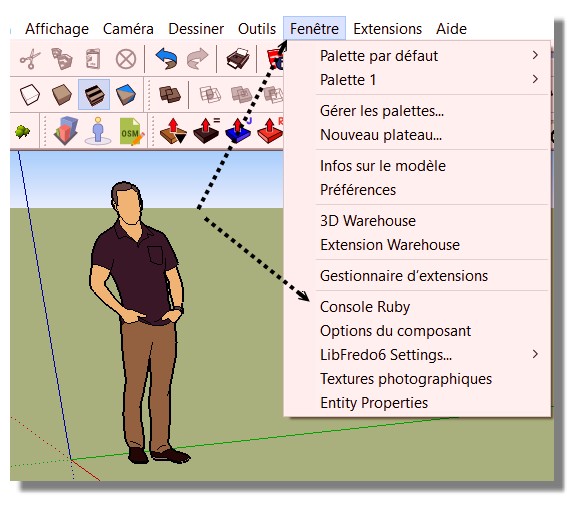
Menu Window / Ruby Console
 (till 2017... i suppose that is the same for new versions)
Sorry in French but ...
-
Pilou,
Thank you for that information.
TIG,
The Ruby Console was blank when I used FollowMeAndKeep but when I used Mirror the console was populated with information.
johnmtb
-
Please copy/paste those messages from the Ruby Console, explaining which tool was being used...
My Mirror should not produce any error-messages in the RC...
Sometimes the FAK tool can produce error messages - usually around 'zero-length' vectors when the path is overly complex...Perhaps conflating these two tools is confusing ?
-
TIG,
When I used the Mirror Extension (which I assume was written by you), the console was populated with information, because I made a mistake in the way I used the extension.
When I used the FollowMeAndKeep Extension there were no comments in the Ruby Console, but nothing happened either.
However, subsequently, I changed the position of the surface from horizontal to vertical, and changed the path from pointing downwards at an angle of about 42° to 0° which then created the extrusion. But it did not correctly follow the path will have to try other angles, dimensions, etc. until I get it right.
Previously I have used the Eneroth Upright extruder, but I had problems with that one as well.
I shall keep on trying.
Thank you all for your help.
johnmtb
-
John, it sounds like Follow and Keep may not be what you need.
Best bet would be to start a new thread asking 'How to make this shape?'
Add images of what you want to achieve and any model you have so far so we can perhaps offer better suggestions. -
Box,
After having changed the position of the surface from horizontal to vertical, and changed the path from pointing downwards at an angle of about 42° to 0°, I also used the Scale tool to increase the size of the whole thing by 100; this appeared to make the FollowMeAndKeep Extension do what I wanted. Then I used the Scale tool to take me back to the original size; all was good.
So, I have finally solved my problem and once again thank everyone for their help and suggestions.
johnmtb





Advertisement