Greeble Beta (Updated Feb-06-2009)
-
This version is outdated! Please follow the link below to the new version
New version here:
http://www.sketchucation.com/forums/scf/viewtopic.php?f=180&t=16599%(#BFBFFF)[Hi, this is a greeble like script I am working on. It requires RickW's offset.rb script to work and also ProgressBar.rb. I am re-inventing the wheel to some degree because Tig has made a random pushpull that works great and Jim also has a protrude script that is great and really much more functional than mine. Both are probably more stable than my script. I am really just writing this as an exercise in manipulating geometry through Ruby.
It will greeble everything, or you can select faces before hand and have it only greeble a selection. The options in the pop-up window are Min Height, Max Height, Min Offset and Max Offset, and "Offset face or Original Face"
1 and 2 are straightforward. They work in the default unit that the model is in. If your working in cm, you can enter 100 to get one meter. Or you could enter 1m to get a meter. Or enter 1" (inch) to get 2.54cm. Units work like this in the pushpull and the offset boxes.
3 and 4 allow you to set the minimum and maximum amount to offset the face. Two negative values will inset the face, two positive values will make the offset be larger than the original face. The minimum value should be closer to zero than the maximum value. In order they should -2 and -10 or 3 and 12 for example. Two numbers that are the same will make all offsets equal.
5 allows you to choose if the script push/pulls the newly created offset face, or if it push/pulls the other face (think of a square, and then offset a square inside the big square. You have two faces. The innermost face and the face around that. The innermost face is the new face, the outerface is the original face).
[flash=812,612:1mswscnk]http://chrisfullmer.com/forums/Greeble_.03.swf[/flash:1mswscnk]
Chris]
UPDATES;
.01 original
.011 Added speed up compatibility for SU7.
.02  * Added min/max options to the offset.
     * Added some checks on the menu inputs to help make sure that useable values are entered.
     * Added rough metric support.
.025 * Lots of quirks and bugs found during this release, updated frquently for bug testing until v.03
.03  * Ability to Set min/max offset distances is much more stable.
     * Correctly uses the speed up capability of SU 7.
     * Works with SU 6 (and lower).
     * Uses (and requires) ProgressBar.rb to show its working and estimate how much time it will take.
%(#FF0080)[NOTE: This file is not the most current. Please go to:
http://www.sketchucation.com/forums/scf/viewtopic.php?f=180&t=16599 and download it there.]
-
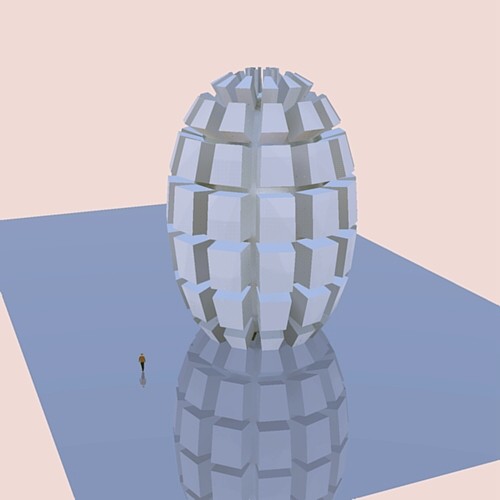
More and more powerful!

A lot of fun in perspective!
-
I like that last shape you made there.
A tip for your script, if you change
model.start_operation ("Greeble")to
model.start_operation("Greeble", true)you will most likely get a speed boost. All though, it won't be compatible with SU then. (you can do a version check to work around that.)
-
Thanks Chris, great script
-
A little icon "hourglass" will be useful because anything show that the program is calculating!

Suggestion : introduce a new form inside the start's facet like a circle or triangle or anything on the first volume!
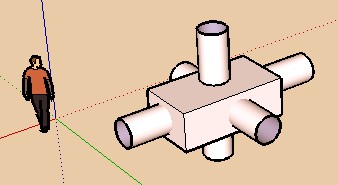
PS You have forgotten Didier Bur and his "Push Push Randomly within an Interval" inside his projection bar tools
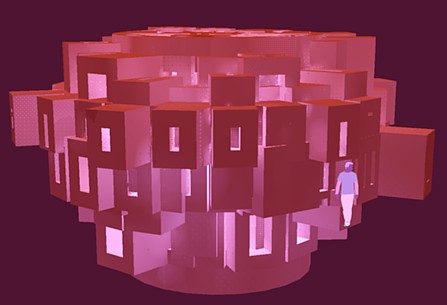
Here Greeble Super Beta
-
Cool script and pretty stable.

-
Just a short trial, wonderfull
 and very clear tutorial too !
Pilou's clock idea would be appreciate
MALAISE
-
@thomthom said:
A tip for your script, if you change
model.start_operation ("Greeble")to
model.start_operation("Greeble", true)you will most likely get a speed boost. All though, it won't be compatible with SU then. (you can do a version check to work around that.)
Great suggestion Thom, I've now added that with a version check to the code. So if you have version 7 or higher, it will use the speed-up code. Anything lower than 7 does not use it. I'll look into the hourglass mouse too. Thanks for the suggestions and compliments,etc.
Chris
-
Chris:
Not only a good effort at scripting, but a good, easy-to-follow video. Congrats!
-
Works nice....Thank you.
-
Nice job, Chris!
The next step would be to get min/max offset parameters (that could be the same if consistency is desired) to randomize the offset size.
-
Yeah, I agree Rick. I think that would be another great addition, and something within my abilities right now.
I also want to add better units support so that the inputs work with the user's default units instead of always being in inches. I am guessing there is a way to figure out what units they are in and convert them around and stuff.
Another key thing I am working on is a taper on the greebled face. But I'm still thinking that through. Transforming is not as easy as scaling. Also adding widgets onto the greebled faces, making the offset greebles not be perfectly centered on their parent face, but randomly organized. Ahh, the list goes on and on.
But I'll start with the offset min.max and the organizer.rb compatibiltity. Thanks for the tips Rick, and the comments from everyone,
Chris
-
Cool script. Does it support metric?
-
@chango70 said:
Cool script. Does it support metric?
Thanks! But no, it does not currently support metric really. All units are in inches at this point so you have to convert it all beforehand. I'm just finishing up some touches on the offset random distances feature. Once that is done, metric is then officially my next development phase. So hopefully by this weekend (or maybe tonight with any luck) I'll get metric working.
Chris
-
Change all the ".to_i" methods to ".to_l" when handling the user input data, and you'll have metric support. Users will be able to enter 50mm, 12m, 23'4", etc. and it will be converted to SU units automatically.
Oddly enough, though the ruby console will convert 1.km to SU units, it will not work from within a text string.
-
@rickw said:
Change all the ".to_i" methods to ".to_l" when handling the user input data, and you'll have metric support. Users will be able to enter 50mm, 12m, 23'4", etc. and it will be converted to SU units automatically.
Oddly enough, though the ruby console will convert 1.km to SU units, it will not work from within a text string.
Ok, now you can specify min/max scale offsets. It might take some time to figure that out. I'm pretty sure it is easy to break. But I generally use two negative numbers. The first one being larger than the second. But rememeber they are negative, so larger actually means closer to zero. So I would use -10 and -100 in that order.
It should also be compatible with metric now too. It has serious issuse though with accuracy and I'm sure its how I'm doing it. In inches and feet, you enter values (like 100-1000 inches) and it would always stick to whole integers. But in metric, it doesn't stick to whole numbers because of how SU is converting the value to a length. So maybe I'll figure out a fix for that.
Chris
-
What, no WebDialog user interface??? Chicken!!
Very nice work indeed Chris!!! Very nice. You can implement ProgressBar.rb and you'll satisfy Pilou. It's real easy, instructions are on Smustard with the script.
Todd
-
Ps Seems to me there is a big bug
After use the Super Greeble, grouping this one, the Move, Rotation with copy don't work for the greebled object or for any other object!!!
Curious that don't make that at each time but sometime
After the * only one group is created and it is re-centered like the first! -
 , yeah I know this version right now has bugs. I made the mistake of updating it thinking I had all the bugs worked out. Then I found some problems and realized I did not have a backup copy of the older version - oops! So give me some time and I'lkl get a more stable version up, but I might have to revert a few features.
@Todd the progressbar.rb is a great idea. I was a little overwhelmed thinking about making an hourglass cursor and stuff, but progressbar sounds like a great option!
Chris
-
Interesting. It should not happen. Would you mind trying again with this new version I just finished? It now supports (requires) progressbar.rb from smustard and it also supports a min/max offset value. I think its kind of confusing, but I'll leave it in because it is sort of cool what it allows you to do. But to get decent results, the first offset # should be closer to zero than the second offset number. Or set them both to zero for no offset or both to -10 for an even -10 offset on all faces. And remember, that negative numbers will make an inset face, while positive numbers will offset a larger face. It might be time to update my beginning video now. Thanks for testing everyone!
Chris








Advertisement