sketchucation logo sketchucation
    • Login
    Oops, your profile's looking a bit empty! To help us tailor your experience, please fill in key details like your SketchUp version, skill level, operating system, and more. Update and save your info on your profile page today!
    Mac User? | Join the Rayscaper Beta for Mac Learn More

    Hanoi Project

    Scheduled Pinned Locked Moved Gallery
    35 Posts 15 Posters 4.4k Views 15 Watching
    Loading More Posts
    • Oldest to Newest
    • Newest to Oldest
    • Most Votes
    Reply
    • Reply as topic
    Log in to reply
    This topic has been deleted. Only users with topic management privileges can see it.
    • H
      howardhong
      last edited by

      heres my process of SR1.

      1.copy tif and shorten that name. sometimes truncated when export.
      2.copy tif to jpeg and prepare B/W alpha.
      3.change tif file name applyed to trunk and leaf in Xfrog.
      4.export 3ds and check scale option.
      5.import 3ds in SU and explode one time.
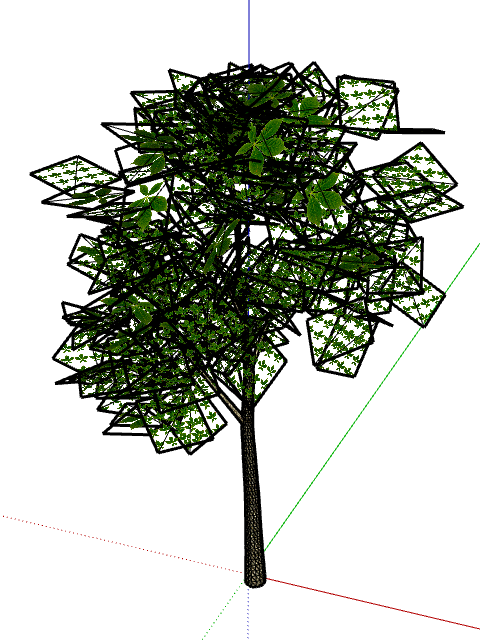
      http://i241.photobucket.com/albums/ff294/howardhong/p1.png

      6.check the size of tif file in material tab of SU (25.4 x 25.4).
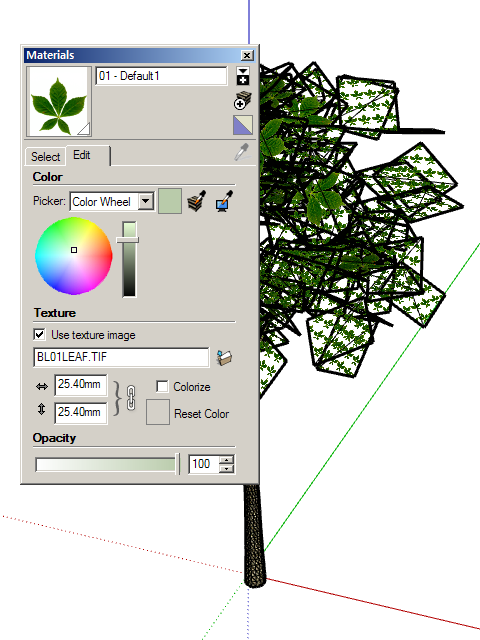
      http://i241.photobucket.com/albums/ff294/howardhong/p2.png

      7.apply jpeg to diffuse of VFSU material tab and apply alpha too.
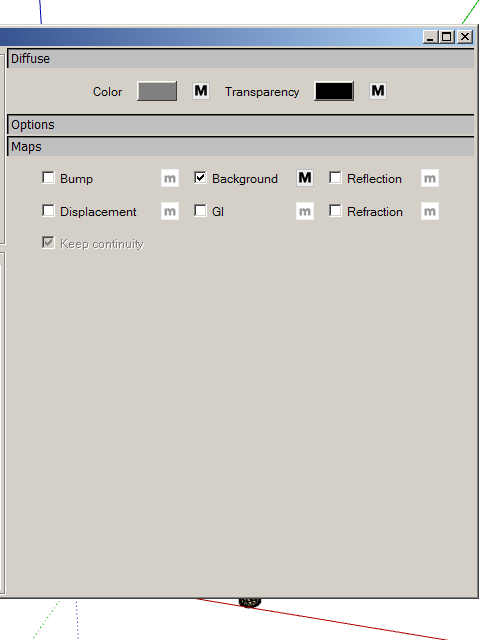
      http://i241.photobucket.com/albums/ff294/howardhong/p4.png

      8.change the size of JPEG (254 x 254) in materialtab of SU to 25.4 x 25.4.
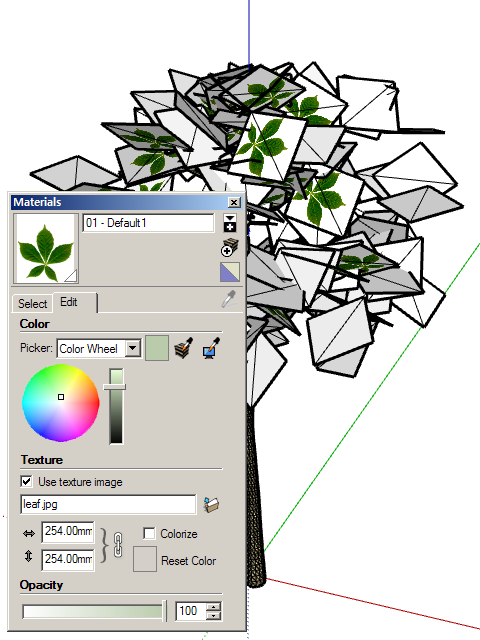
      http://i241.photobucket.com/albums/ff294/howardhong/p3.png

      9.apply VFSU material to model. dont be scared with the appearance of su model.
      10.render.

      1 Reply Last reply
      Reply Quote 0
      • N
        nomeradona
        last edited by

        thanks howard. i hope you will send this tutorial to asgvis. i will try this workaround. thansk again.

        visit my blog: http://www.nomeradona.blogspot.com

        1 Reply Last reply
        Reply Quote 0
        • H
          howardhong
          last edited by

          As you know, materials of vfsu SR1 and SU is related each other.
          so you cant control materials of SU.

          if you use vfsu V1., all the process is same as above, but

          6.check the size of tif file in material tab of SU (25.4 x 25.4).
          and move opacity slider to 0 all the way.

          because it makes materials of SU invisible when rendered.

          1 Reply Last reply
          Reply Quote 0
          • S
            skyscraper100
            last edited by

            great work sir! galing


            The way you think Creates reality for yourself.

            1 Reply Last reply
            Reply Quote 0
            • N
              nomeradona
              last edited by

              @skyscraper100 said:

              great work sir! galing
              wow very seldom to meet filipinos here. thanks bro bro for dropping by.

              visit my blog: http://www.nomeradona.blogspot.com

              1 Reply Last reply
              Reply Quote 0
              • W
                WEB
                last edited by

                That is a lovely rendering and a handsome building.

                One thing: the mind's eye does not see the vertical perspective in relatively short buildings; so when one looks at a photograph or rendered image that does show it, the building seems somehow wrong. Architectural photographers use a shifted lens to keep the film vertical. Your renderings might look better, even though they would be technically wrong, if you could somehow achieve the same result.

                1 Reply Last reply
                Reply Quote 0
                • T
                  tomislavm
                  last edited by

                  congratulations

                  1 Reply Last reply
                  Reply Quote 0
                  • N
                    nomeradona
                    last edited by

                    @web said:

                    That is a lovely rendering and a handsome building.

                    One thing: the mind's eye does not see the vertical perspective in relatively short buildings; so when one looks at a photograph or rendered image that does show it, the building seems somehow wrong. Architectural photographers use a shifted lens to keep the film vertical. Your renderings might look better, even though they would be technically wrong, if you could somehow achieve the same result.

                    will take note of your excellent observation.

                    visit my blog: http://www.nomeradona.blogspot.com

                    1 Reply Last reply
                    Reply Quote 0
                    • N
                      nomeradona
                      last edited by

                      @skyscraper100 said:

                      great work sir! galing
                      salamat bro. thank you.

                      visit my blog: http://www.nomeradona.blogspot.com

                      1 Reply Last reply
                      Reply Quote 0
                      • F
                        FoXar
                        last edited by

                        Looking really good, I like the tree you added very much!
                        Keep up the work ;]

                        1 Reply Last reply
                        Reply Quote 0
                        • 3
                          3lii
                          last edited by

                          Good job
                          thanks for sharing

                          1 Reply Last reply
                          Reply Quote 0
                          • N
                            nomeradona
                            last edited by

                            @foxar said:

                            Looking really good, I like the tree you added very much!
                            Keep up the work ;]

                            thank you very much foxar
                            ☀

                            visit my blog: http://www.nomeradona.blogspot.com

                            1 Reply Last reply
                            Reply Quote 0
                            • N
                              nomeradona
                              last edited by

                              @3lii said:

                              Good job
                              thanks for sharing

                              yeap my pleasure bro.

                              visit my blog: http://www.nomeradona.blogspot.com

                              1 Reply Last reply
                              Reply Quote 0

                              Hello! It looks like you're interested in this conversation, but you don't have an account yet.

                              Getting fed up of having to scroll through the same posts each visit? When you register for an account, you'll always come back to exactly where you were before, and choose to be notified of new replies (either via email, or push notification). You'll also be able to save bookmarks and upvote posts to show your appreciation to other community members.

                              With your input, this post could be even better 💗

                              Register Login
                              • 1
                              • 2
                              • 1 / 2
                              • First post
                                Last post
                              Buy SketchPlus
                              Buy SUbD
                              Buy WrapR
                              Buy eBook
                              Buy Modelur
                              Buy Vertex Tools
                              Buy SketchCuisine
                              Buy FormFonts

                              Advertisement