Help with edges?
-
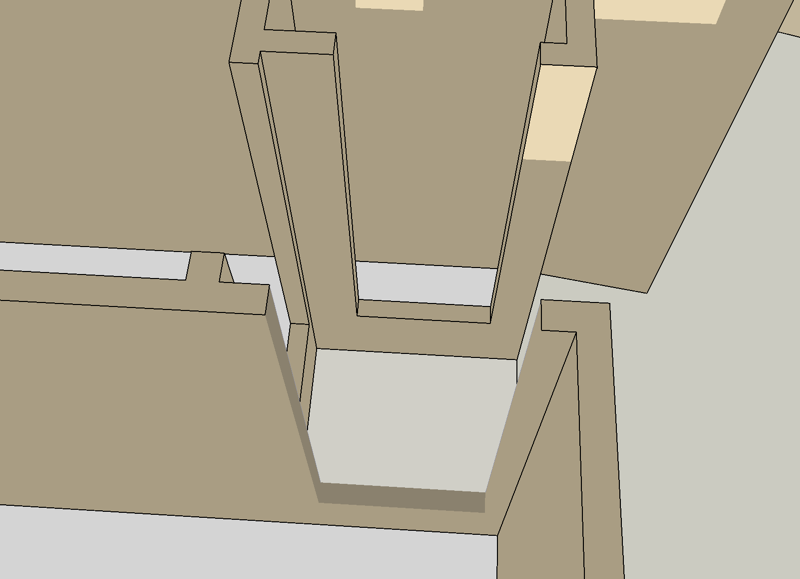
I will try to post an image of my problem. I haven't seen this issue before.
This view is up from the below the floor so you can see a doorway cut into a double wall. As you see the rest of the doorways have edges. This one does not. When I draw around it the lines just disappear. I can select the header surface and choose "select bounding edges" but nothing I do makes them appear in the model.
For some reason a couple of the faces would not take the right color, but I have since made that work. (later edit)
Not crucial in this model, as one would cover this with a component but trying to figure this out for the future.
-
You might have accidentally put the lines on another layer then hidden that layer, just make all your layers visible to check it and move the lines back if neccesary.
-
Thank you. That seeems to be it.
So that can be done. Oddly: I made the other layer visible and saw the lines. I then made it invisible again and lines were now there on the same layer as the surfaces. Hmmm.

Hello! It looks like you're interested in this conversation, but you don't have an account yet.
Getting fed up of having to scroll through the same posts each visit? When you register for an account, you'll always come back to exactly where you were before, and choose to be notified of new replies (either via email, or push notification). You'll also be able to save bookmarks and upvote posts to show your appreciation to other community members.
With your input, this post could be even better 💗
Register Login


Advertisement