Color/materials suddenly goes darker?
-
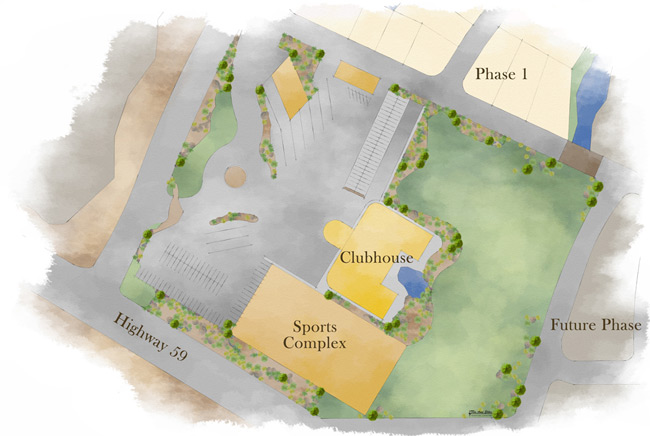
I've attached two files. A finished rendering with the "original" colors (although modified through PP) and the file I'm having trouble with. The reason this is a problem is I have some revisions to make and this color change is making that difficult.
 color problem.skp
 -
Another variation is that you could have been working w/o the sun shading the model, then changed the time of day to a time when the sun wouldnt be out bright. Then turned on "Use Sun For Shading". That would also make your model go from bright to dark rather quickly.
Chris
-
@chris fullmer said:
Quite possibly the setting is in the shadows dialogue box. It gives you a light and dark slider. They are set at default to 80% on light an 20% on dark. If you turn them down to darker, the whole model gets darker. Its only visible when shadows are on or when you also select "Use sun for shading". Try that,
Chris
Thanks Chris. I did think of that and that wasn't it

-
@chris fullmer said:
Another variation is that you could have been working w/o the sun shading the model, then changed the time of day to a time when the sun wouldnt be out bright. Then turned on "Use Sun For Shading". That would also make your model go from bright to dark rather quickly.
Chris
tried that too -
I definitely got it brighter by going to noon on 6/21 and upping the light to 100% and sliding the dark up to 45 -100 (too bright). So I think play with that. Good luck,
Chris
-
Thanks Chris. You are right, that makes it lighter, but really throws the colors way out. I'm trying to find the RGB values from PS, but still not have the best luck, but at least it's closer. Thanks for looking at it

-
I noticed some weird thing while playing with the shadow settings (generally speaking I could get it darker as well but I don't know how it should originally look).
So in the top right corner of the model, there is a face that changes colour when you toggle display shadows on/off (does not when toggle use sun for shading). It is definitely not a shadow but the brown colour it is next to. I wonder how you made it Tina!
-
@gaieus said:
So in the top right corner of the model, there is a face that changes colour when you toggle display shadows on/off (does not when toggle use sun for shading). It is definitely not a shadow but the brown colour it is next to. I wonder how you made it Tina!
I saw that too! Weird.. I think I'm going to have to give up trying to figure it out and just start over. bummah!
-
Looks like the odd surface at top right has two surfaces on top of each other. Delete one of them and everything is normal again.
Don't have any insight on how your colors could have changed. It would be better for us to look at your previous raw export vs. the Photoshoped file. One thing to keep in mind is that SketchUp exports un-tagged images which I believe are srgb just not tagged as such. Depending upon your color settings in Photoshop it may be displaying it as if it was adobeRGB or something else?
It is annoying that SketchUp doesn't let you pick RGB values (at least on mac, unless I'm missing it) but there could be workaround. Just save color patch out from Photoshop; making sure that it is an srgb image. Then import that into SketchUp as a texture. Then oddly, go to edit the texture and remove texture (not the actual material, just the applied texture), it will then fall back to a color that I assume will be good rgb value match. I have not tested this, but do know if you take brick and throw it away, it converts to same color that showed if you had been viewing model with textures off.
-
Thanks David. This is good advice.
I pretty much just started over and re-did the colors. It's not exact to what it was but it'll do. I should have just done that to begin with but I started on a rant of "this shouldn't be". Well as my sister would say "shoulda, coulda, woulda... get over it" I just wasted 2 days of what took me 30min to just adjust the colors to something close. Some lessons are expensive....
-
Well, glad it worked out in the end. Hopefully you were able to get it back to a close approximation of the color.
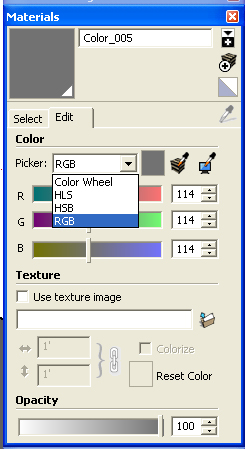
David, I know that the PC and Mac interface is different, but on the PC, ni the material editor you can set material color by RBG. I attached a screenshot of where the setting is. But again, it might be different on a Mac.
Chris
-
That colored face that appears when Shadows is turned on is a duplicate face...just delete it and you'll see the same face below, but white. Then retexture it.
I guess I'm not sure what the expected brightness of the colors should be... do you have a before and after shot?
- CraigD -
@craigd said:
I guess I'm not sure what the expected brightness of the colors should be... do you have a before and after shot?
I don't have a raw output of the colors, just what was done PP. Basically, I took a middle value color from the final and adjusted to that. It's not exact, but it'll have to work.
-
Chris, thanks for the screen shot. My mistake, and now that I think about it I new it was there in the past but stopped using it and forgot about it. Here is why I stopped using it. When I go to edit materials with the color wheel. I see a point that represents the current color, and I can make minor adjustments. I found that the sliders don't update to the current color so was fine for new colors but not tweaking existing ones.
Looking at it now I see can choose Grayscale, RGB, CMYK, HSL sliders. Interesting next there is also a pulldown to choose a profile next to the slider, so If my photoshop document is AdobeRGB, I can choose adobe RGB profile before I enter color, and then if I switch to srgb. The color appearance won't change, but the numbers will. This is the first thing I've noticed in SketchUp that mentions color profiles.
-
I got the same problem and just solved.
Seems have to turn the color mode in Sketchup to align with the graphic card of the device.Solution:
Go to System Preferences > Open GL> Capabilities
Then change (try) the color mode.After changing to the correct one, the viewing color on sketchup screen will align with the color of the device system and hence the exported image.
UN







Advertisement