sketchucation logo sketchucation
    • Login
    Oops, your profile's looking a bit empty! To help us tailor your experience, please fill in key details like your SketchUp version, skill level, operating system, and more. Update and save your info on your profile page today!
    Mac User? | Join the Rayscaper Beta for Mac Learn More

    [Plugin] Align tool 3D (bug fix)

    Scheduled Pinned Locked Moved Plugins
    58 Posts 38 Posters 159.2k Views 38 Watching
    Loading More Posts
    • Oldest to Newest
    • Newest to Oldest
    • Most Votes
    Reply
    • Reply as topic
    Log in to reply
    This topic has been deleted. Only users with topic management privileges can see it.
    • A
      alexdobras
      last edited by

      thank you !

      1 Reply Last reply
      Reply Quote 0
      • J
        jbrfrk
        last edited by

        really useful.... thanks
        πŸ‘

        J=K

        1 Reply Last reply
        Reply Quote 0
        • archman212A
          archman212
          last edited by

          fantastic..i have been looking for this one... πŸ‘

          archman212@gmail.com

          1 Reply Last reply
          Reply Quote 0
          • O
            Omez
            last edited by

            THANK YOU! πŸ‘ πŸ‘ πŸ‘
            I even not trying it yet, but i believe its very useful... once again, Thanks! πŸ˜„

            1 Reply Last reply
            Reply Quote 0
            • john2J
              john2
              last edited by

              couldn't understand 4m the pdf. 😞 is there any video tutorial πŸ˜’

              Sketchup Make 2017 (64-bit), Vray 4.0 , Windows 10 – 64 bit, corei7-8750H, 16GB RAM, Nvidia GeForce GTX 1050Ti 4GB

              1 Reply Last reply
              Reply Quote 0
              • Didier BurD
                Didier Bur
                last edited by

                Yes here: http://sketchuppluginreviews.com/2010/06/01/align-tool-google-sketchup-plugin-review-2/

                Google is your friend πŸ˜‰

                DB

                1 Reply Last reply
                Reply Quote 0
                • kenK
                  ken
                  last edited by

                  @didier bur said:

                  Yes here: http://sketchuppluginreviews.com/2010/06/01/align-tool-google-sketchup-plugin-review-2/

                  Google is your friend πŸ˜‰

                  Didier

                  Not asking anything to be changed, however it took me some time to determine that what you call the "X axis" and "Y axis" can be any particular orientation. I was always trying to determine what the "X and Y axis" were while using the plugin. Lead to much frustration.

                  I always wanted to be able to get inside the plugin and change the "X" to "1" and the "Y" to "2". To me that would have been more logical to remember, I wanted the "1's" and "2's" to align with each other.

                  Thank you for your contribution.

                  Ken

                  Fight like your the third monkey on Noah's Ark gangway.

                  1 Reply Last reply
                  Reply Quote 0
                  • Didier BurD
                    Didier Bur
                    last edited by

                    Hi Ken,
                    You can also think that X represent the red axis, Y the green axis, just as when you locate/translate/rotate the SU axis system.

                    DB

                    1 Reply Last reply
                    Reply Quote 0
                    • R
                      raineysky
                      last edited by

                      Ken,

                      πŸ‘

                      I really like your idea too because I'm not use to the "x,y,z" language yet. Just now getting orientated in the 3d space πŸ˜„

                      Thank You for the plugin Mr. Didier Bur.

                      1 Reply Last reply
                      Reply Quote 0
                      • K
                        kevinbearshu
                        last edited by

                        Thank you very mach!

                        1 Reply Last reply
                        Reply Quote 0
                        • W
                          wodur
                          last edited by

                          it's an impressive plugin, almost equal to the Autocad's align tool. Autocad can scale the objet as it aligns, is it possible to do that with this plugin?
                          Thanks for your work, all of you are making sketchup a very advanced tool.

                          1 Reply Last reply
                          Reply Quote 0
                          • S
                            seebe
                            last edited by

                            Thank you so much for this tool. You have saved me so much time.

                            1 Reply Last reply
                            Reply Quote 0
                            • Didier BurD
                              Didier Bur
                              last edited by

                              @seebe: you're welcome

                              DB

                              1 Reply Last reply
                              Reply Quote 0
                              • T
                                Trogluddite
                                last edited by

                                D'oh moment for me! 😳
                                I spent so long trying to align things using the rotate/protractor tools - when all I needed to do was type "Align" into the search box and intall this super plugin!

                                Many thanks Didier, you have made my Sketchuping so much easier!

                                1 Reply Last reply
                                Reply Quote 0
                                • B
                                  bonzi_ses
                                  last edited by

                                  Thank you very mauch

                                  1 Reply Last reply
                                  Reply Quote 0
                                  • Z
                                    ZyberCool
                                    last edited by

                                    thanks bro..

                                    1 Reply Last reply
                                    Reply Quote 0
                                    • R
                                      redgray
                                      last edited by

                                      i like align tool just like in autocad command, thanks a lot for this tool.

                                      1 Reply Last reply
                                      Reply Quote 0
                                      • D
                                        desunvn
                                        last edited by

                                        @didier bur said:

                                        Hi,
                                        Here is an updated version of my align tool with a bug fix (components were deformed when non orthogonal axis were clicked). User guide also added.
                                        Regards,

                                        thank for sharing

                                        1 Reply Last reply
                                        Reply Quote 0
                                        • R
                                          rv1974
                                          last edited by

                                          Didier, could you please add 'multiple copy' and 'preserve original instance' options (may be with say CNTRL key pressed once)?
                                          P.S. I hope I post in the right topic: is it Tools\Align command?
                                          (Align, align tool, align 2D, align 3D.. I'm confused a bit).

                                          1 Reply Last reply
                                          Reply Quote 0
                                          • irwanwrI
                                            irwanwr
                                            last edited by

                                            Anyone experienced groups/components axes that cannot be hidden or erased?
                                            I've this plugin for quite long. But lately just realise that axes cannot be hidden or removed from the groups/components on the screen.
                                            How should i clear those axes after aligning groups/components?
                                            Thank you.
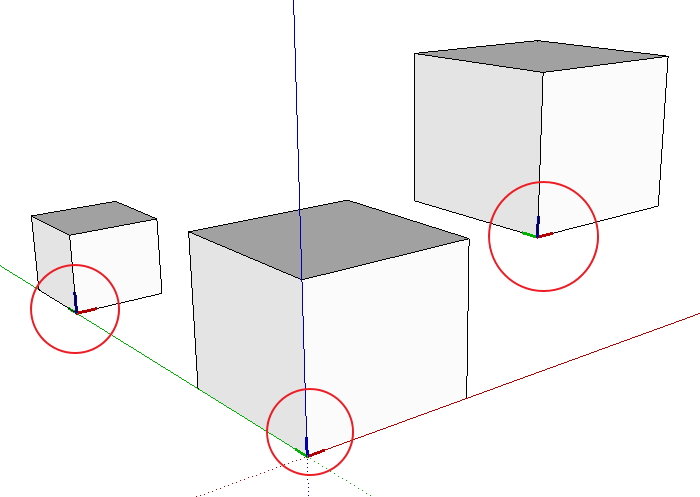

                                            align plugin test.jpg

                                            1 Reply Last reply
                                            Reply Quote 0

                                            Hello! It looks like you're interested in this conversation, but you don't have an account yet.

                                            Getting fed up of having to scroll through the same posts each visit? When you register for an account, you'll always come back to exactly where you were before, and choose to be notified of new replies (either via email, or push notification). You'll also be able to save bookmarks and upvote posts to show your appreciation to other community members.

                                            With your input, this post could be even better πŸ’—

                                            Register Login
                                            • 1
                                            • 2
                                            • 3
                                            • 1 / 3
                                            • First post
                                              Last post
                                            Buy SketchPlus
                                            Buy SUbD
                                            Buy WrapR
                                            Buy eBook
                                            Buy Modelur
                                            Buy Vertex Tools
                                            Buy SketchCuisine
                                            Buy FormFonts

                                            Advertisement