sketchucation logo sketchucation
    • Login
    Oops, your profile's looking a bit empty! To help us tailor your experience, please fill in key details like your SketchUp version, skill level, operating system, and more. Update and save your info on your profile page today!
    Mac User? | Join the Rayscaper Beta for Mac Learn More

    [Plugin] 3d Shapes Tool (was: Pyramid Tool)

    Scheduled Pinned Locked Moved Plugins
    53 Posts 21 Posters 54.5k Views 21 Watching
    Loading More Posts
    • Oldest to Newest
    • Newest to Oldest
    • Most Votes
    Reply
    • Reply as topic
    Log in to reply
    This topic has been deleted. Only users with topic management privileges can see it.
    • JClementsJ
      JClements
      last edited by

      Good job and thanks!

      John | Illustrator | Beaverton, Oregon

      1 Reply Last reply
      Reply Quote 0
      • C
        CPhillips
        last edited by

        @macs said:

        Hello,
        During my experiments with ruby programming for SU I've produced
        this tool for drawing pyramids based on rotated rectangle tool.
        Maybe it's useful to someone...

        usage:
        Menu->Draw->Rotated Pyramid

        I think it's easy to use, but suggestions are welcome.

        Nice job! I think modeling tools like this are sorely missing from the basic Sketchup functionality.

        Do you have any interest in expanding this to support other shapes? If so I would give you any support you need and I could provide a good head start on some of the other shapes (box, cylinder, cone, sphere, capsule).

        Chris

        1 Reply Last reply
        Reply Quote 0
        • M
          Macs
          last edited by

          I've done some more work on it, completed a cone tool
          and added a toolbar. I'm progressing with work, soon a new release
          with more 3d shapes.

          Well it's a sort of toolbar for newbies πŸ˜„
          who don't know how to draw more complex shapes in few steps.
          I'm sure expert modelist know well how draw these shapes,
          perhaps it will help when there are many to draw.

          1 Reply Last reply
          Reply Quote 0
          • urgenU
            urgen
            last edited by

            @macs said:

            I've done some more work on it, completed a cone tool
            and added a toolbar. I'm progressing with work, soon a new release
            with more 3d shapes.

            Well it's a sort of toolbar for newbies πŸ˜„
            who don't know how to draw more complex shapes in few steps.
            I'm sure expert modelist know well how draw these shapes,
            perhaps it will help when there are many to draw.

            ...Marcs, it is very good and useful idea! πŸ‘ I thought of it and wished to ask about it Chris πŸ˜• ... Success to you... It is necessary not only to beginners... really ! πŸ˜‰

            --pupil forever...------

            1 Reply Last reply
            Reply Quote 0
            • GaieusG
              Gaieus
              last edited by

              Macs,

              Before you invest much time in this project, have a look at shapes.rb (by @Last) downloadable from Didier's site here:
              http://www.crai.archi.fr/RubyLibraryDepot/Ruby/em_geo_page.htm

              It will create an item in the Draw menu.

              I'm glad however that there are more and more ruby scripter around soo keep up the good work! πŸ‘

              Gai...

              1 Reply Last reply
              Reply Quote 0
              • M
                Macs
                last edited by

                I've seen that script, mine is a little different, but it was useful to learn from it.

                1 Reply Last reply
                Reply Quote 0
                • GaieusG
                  Gaieus
                  last edited by

                  OK then, I just wanted to let you know... πŸ˜‰

                  Gai...

                  1 Reply Last reply
                  Reply Quote 0
                  • urgenU
                    urgen
                    last edited by

                    ////MMMMM πŸ˜’ ...... shapes rb.- table skript πŸ˜• ... SK-FIZ (shapes)-it only drawing tool, but it

                    does not work with the keyboard... πŸ˜• Let's make that the keyboard there worked! It will

                    be excellent and very useful tool! πŸ˜„ πŸŽ‰

                    --pupil forever...------

                    1 Reply Last reply
                    Reply Quote 0
                    • C
                      CPhillips
                      last edited by

                      In case you haven't seen it. Here is a demo of the shapes that are in the Solids toolbar of SketchyPhysics. It should probably be split out as a separate plugin. But I have too many plugins as is.

                      http://sketchyphysics2.googlecode.com/files/SketchySolids2.gif

                      1 Reply Last reply
                      Reply Quote 0
                      • M
                        Macs
                        last edited by

                        Ok! This is almost identical at what i'm coding... πŸ˜†
                        I've missed this in SketchyPhysics.

                        I've seen there is some difference in how the shapes are drawn,
                        and I've inserted support for VCB input.

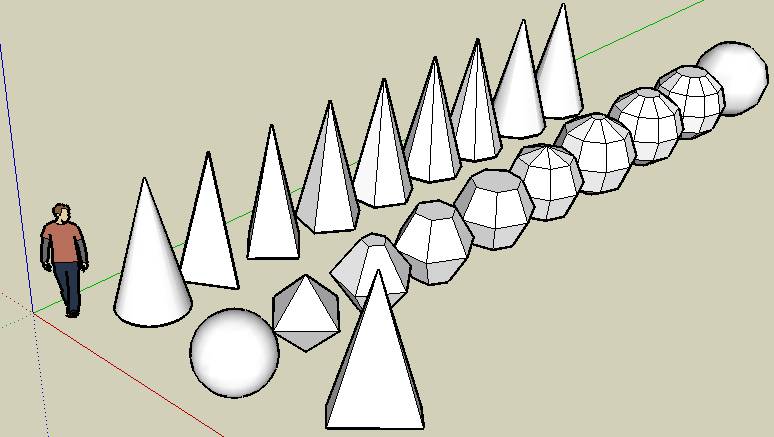
                        however here there is the new script, now "3D Shapes Tool"

                        3DShapesTool.zip


                        toolbar.jpg


                        examples.jpg

                        1 Reply Last reply
                        Reply Quote 0
                        • C
                          CPhillips
                          last edited by

                          😍

                          Looks like you are doing great. But feel free to copy anything you want out of SketchySolids. It is also based on the rotated rectangle code.

                          1 Reply Last reply
                          Reply Quote 0
                          • urgenU
                            urgen
                            last edited by

                            ...πŸ‘ πŸ‘ πŸ‘ don,t stop this work ,please! πŸ˜„

                            --pupil forever...------

                            1 Reply Last reply
                            Reply Quote 0
                            • JClementsJ
                              JClements
                              last edited by

                              Macs, nice work.

                              Is there any way to allow the tools to respond to a User Defined Axis?

                              John | Illustrator | Beaverton, Oregon

                              1 Reply Last reply
                              Reply Quote 0
                              • J
                                Jim
                                last edited by

                                Hi Macs,

                                Thank you for working on this. πŸ‘ It is a needed and important plugin, don't stop now!

                                Hi

                                1 Reply Last reply
                                Reply Quote 0
                                • C
                                  CPhillips
                                  last edited by

                                  Loving the plugin dude!

                                  Suggestion. Once you place the shape it is hard to set the height. You need to have something to infer the height and if nothing is available it is frustrating. My solution was to add a construction line to the center of the shape after the second click.

                                  http://sketchyphysics2.googlecode.com/files/3dShapesCLines.gif

                                  Try adding the following line to the the ConeTool::increment_state() function.

                                  
                                  def increment_state
                                  	@moved = false
                                  	@state += 1				
                                      case @state
                                      when 1
                                  		@ip1.copy! @ip
                                  		Sketchup;;set_status_text "Click to set the radius"
                                  		Sketchup;;set_status_text "Radius", SB_VCB_LABEL
                                  		Sketchup;;set_status_text "Move mouse", SB_VCB_VALUE
                                      when 2
                                          @ip1.clear
                                  ###################        
                                          Sketchup.active_model.entities.add_cline(@pts[0],@normal)
                                  ###################        
                                          Sketchup;;set_status_text "Click to set the height"
                                          Sketchup;;set_status_text "Height", SB_VCB_LABEL
                                          Sketchup;;set_status_text "Move mouse", SB_VCB_VALUE
                                      when 3
                                          self.create_geometry
                                      end
                                  
                                  end


                                  Getting rid of the cline and having it work right with undo is a bit tricky, but if you are interested I can walk you through it.

                                  Chris

                                  1 Reply Last reply
                                  Reply Quote 0
                                  • D
                                    dylan
                                    last edited by

                                    This is really nice macs and very useful.

                                    Thanks πŸ‘

                                    http://dmdarchitecture.co.uk/

                                    1 Reply Last reply
                                    Reply Quote 0
                                    • M
                                      Macs
                                      last edited by

                                      @cphillips said:

                                      Loving the plugin dude!

                                      Suggestion. Once you place the shape it is hard to set the height. You need to have something to infer the height and if nothing is available it is frustrating. My solution was to add a construction line to the center of the shape after the second click.
                                      [CUT]

                                      Chris

                                      Strange.. on my system my tool works differently 😞
                                      when you do the second click with the cone tool it goes up
                                      and down with the height without being locked on the surface.
                                      I have to review the code to see if I made some mistrake invocking
                                      some method without "self.".

                                      thank you for the suggestion on the costruction line, I'll think about it.

                                      1 Reply Last reply
                                      Reply Quote 0
                                      • C
                                        CPhillips
                                        last edited by

                                        @unknownuser said:

                                        Strange.. on my system my tool works differently 😞
                                        when you do the second click with the cone tool it goes up
                                        and down with the height without being locked on the surface.
                                        I have to review the code to see if I made some mistrake invocking
                                        some method without "self.".

                                        thank you for the suggestion on the costruction line, I'll think about it.

                                        I figured this out. In my case I build a lot of shapes on a big floor plane. When I draw a cone it infers the height from the floor. I don't think this is a flaw in your plugin. But the construction line is still useful in many cases.

                                        1 Reply Last reply
                                        Reply Quote 0
                                        • urgenU
                                          urgen
                                          last edited by

                                          ....Please wait ....will be OK! πŸ˜‰ πŸ˜„ ..

                                          --pupil forever...------

                                          1 Reply Last reply
                                          Reply Quote 0
                                          • M
                                            Macs
                                            last edited by

                                            You are right!
                                            I've adde the construction line feature ( ripped from your tool πŸ˜„ )
                                            It will be available in the next release, thank you.

                                            1 Reply Last reply
                                            Reply Quote 0

                                            Hello! It looks like you're interested in this conversation, but you don't have an account yet.

                                            Getting fed up of having to scroll through the same posts each visit? When you register for an account, you'll always come back to exactly where you were before, and choose to be notified of new replies (either via email, or push notification). You'll also be able to save bookmarks and upvote posts to show your appreciation to other community members.

                                            With your input, this post could be even better πŸ’—

                                            Register Login
                                            • 1
                                            • 2
                                            • 3
                                            • 2 / 3
                                            • First post
                                              Last post
                                            Buy SketchPlus
                                            Buy SUbD
                                            Buy WrapR
                                            Buy eBook
                                            Buy Modelur
                                            Buy Vertex Tools
                                            Buy SketchCuisine
                                            Buy FormFonts

                                            Advertisement