sketchucation logo sketchucation
    • Login
    Oops, your profile's looking a bit empty! To help us tailor your experience, please fill in key details like your SketchUp version, skill level, operating system, and more. Update and save your info on your profile page today!
    ⚠️ Update | Sketchucation Tools 5.0.8 released with licensing improvements and bugfixes Download

    Can a non-repeating (non-tiling) texture be produced?

    Scheduled Pinned Locked Moved Developers' Forum
    8 Posts 8 Posters 10.6k Views 8 Watching
    Loading More Posts
    • Oldest to Newest
    • Newest to Oldest
    • Most Votes
    Reply
    • Reply as topic
    Log in to reply
    This topic has been deleted. Only users with topic management privileges can see it.
    • JClementsJ
      JClements
      last edited by JClements

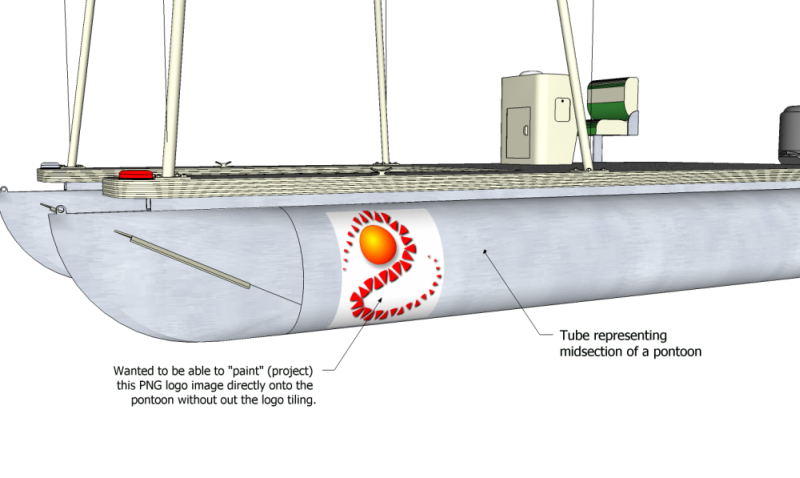
      Lets say you import a client's logo as texture then project it onto the surface of a cylinder.

      The logo tiles itself across the entire surface.

      Is there a way progamatically to prevent the bitmap for tiling so it appears only once?

      If not, automtically draw new edges around the boundaries of the image and project and intersect those edges onto a surface and apply the logo to the surface formed by the intersection. This what I did manually to produce the attached image.test logo.png


      test.png

      John | Illustrator | Beaverton, Oregon

      1 Reply Last reply
      Reply Quote 0
      • S
        sorgesu
        last edited by

        You can't get it to not tile in SketchUp, but you can change the size of the logo image. Increase the heigth and width of the logo image in Photshop to encompass a far larger transparent background.
        Then, the repeat will be for a larger texture and on your object, the repeat will not be apparent.

        Susan Sorger
        Former Seller Hand Rendered Entourage
        Former Canadian Authorized Training Centre, SketchUp

        1 Reply Last reply
        Reply Quote 0
        • A
          andreyjash
          last edited by

          Create the texture in psd and put in skp.

          1 Reply Last reply
          Reply Quote 0
          • R
            remus
            last edited by

            Another idea might alos be to apply the texture as normal, and let it tile, then trace around the section where you want the image before applying the original texture to the rest of the surface.

            http://remusrendering.wordpress.com/

            1 Reply Last reply
            Reply Quote 0
            • K
              kwistenbiebel
              last edited by

              The intersection option is probably your best bet.
              Personally I would just use photoshop on the ouput image (rendering?) to get it on that hull . It's fast and very easy to get it to blend with the hull material.

              1 Reply Last reply
              Reply Quote 0
              • ibonI
                ibon
                last edited by

                I would import the image as image, position it in front of the boat, explode and then project it to the boat.

                1 Reply Last reply
                Reply Quote 0
                • Dave RD
                  Dave R
                  last edited by

                  @ibon said:

                  I would import the image as image, position it in front of the boat, explode and then project it to the boat.

                  That results in a tiled image on the boat. kwistenbiebel's intersection suggestion couple with importing as an image would work. I should have added a final step to this. That is hiding the edges around the logo. Could it be done programatically?

                  (Pardon the "logo". It was the first square image I came acroos when I was looking for something to use for this.)

                  http://img.photobucket.com/albums/v506/weekender410/e44225ff.jpg

                  Etaoin Shrdlu

                  %

                  (THERE'S NO PLACE LIKE)

                  G28 X0.0 Y0.0 Z0.0

                  M30

                  %

                  1 Reply Last reply
                  Reply Quote 0
                  • GaieusG
                    Gaieus
                    last edited by

                    Yes, you definitely need to separate the geometry from the rest of the tube. If you paint the rest with the same colour you have in the outside of the logo part (white in this case), you can smooth the surrounding lines later; the image will stay separated.

                    Gai...

                    1 Reply Last reply
                    Reply Quote 0

                    Hello! It looks like you're interested in this conversation, but you don't have an account yet.

                    Getting fed up of having to scroll through the same posts each visit? When you register for an account, you'll always come back to exactly where you were before, and choose to be notified of new replies (either via email, or push notification). You'll also be able to save bookmarks and upvote posts to show your appreciation to other community members.

                    With your input, this post could be even better 💗

                    Register Login
                    • 1 / 1
                    • First post
                      Last post
                    Buy SketchPlus
                    Buy SUbD
                    Buy WrapR
                    Buy eBook
                    Buy Modelur
                    Buy Vertex Tools
                    Buy SketchCuisine
                    Buy FormFonts

                    Advertisement