[Plugin] SU2POV for GSU6
-
Hi all,
It's been a long time since su2pov has not been updated. Although the poll about Pov-Ray on the old board din't really motivate the masses, around 70% of the voters were wanting an update. So here it is. It is far more simple than the previous version, I mean far more simple to use, only a few options and only one click is necessary to launch a render.Here are the main features:
· More user-friendly and more simple to use than previous versions,
· SketchUp scene support: ground, background, fog, render mode settings,
· Sun light, point lights, spot lights, (active/inactive, visible/invisible)
· Automatic coloring and intensity of sun light/shadows,
· Unlimited nested levels for groups/components,
· UV mapping support for textured objects and imported images.
· What's visible is what's exported,
· Clay render, Glass render, Clay-Glass render, Textures & X-Ray render
· No shadows/ambient option
· Image settings: 5 formats,size,antialias on/off,alpha channel on/off
· Camera types: perspective, orthographic,panoramic,spherical,cylindrical,fisheyeWindows only (if someone wants to help me to make it Mac compatible...).
PDF doc and quick start guide included, that can be found in the Plugins folder after unzipping the package.
Please download the test scene separately.Have fun,
April 24th 2008 - Version 3.1.
April 25th 2008 - Bug fix.
Sample scene for tests with the quick start guide.
-
Merci beaucoup Didier!
Salut
- Diego -
PS That's 100% of the French I can write w/o embarrassing myself

-
i am going to download it ... i guess it would be great.................my special thanx to u ...... G R E A T job..
-
Thanks Didier, was over at your website earlier this evening, wondering if the SU2POV will be getting an update any time soon.
-
i am gonna be crazy... i have a dialuap connettion.. after 5 time i had just got the user guide.... do u mind if separete files in different folders?
yours majid -
@ Majid: I PM'ed you the package without the user guide.
-
Didier
Big thanks for this!Simple question: can you add Antialias functions(from QUICKRES.INI) into options?
When i use Final settings, can see pixel-stair.
And another(please don't beat me ) how manage materials?(or need gui for it like poseray)
 -
Hi Ilay7k,
@unknownuser said:
can you add Antialias functions(from QUICKRES.INI) into options?
No, I cannot do that, because the only thing I can do is to launch Povwin but without parameters.
Tip: select a render size which ends with "AA 0.3" in you render sizes list.
@unknownuser said:
how manage materials?(or need gui for it like poseray)
That's another story...
-
any way thanks a'lot
 ...for mat.effects like xray(glass) and ect.
-
Hi Didier:
I tried creating a spotlight per your pdf instructions.
I open the dialog, changed the settings, and clicked the OK button but nothing happened when clicking the mouse.Also, I tried to render a couple simple cylinders and got the following (the jpg is copy of the bmp that POV generated).
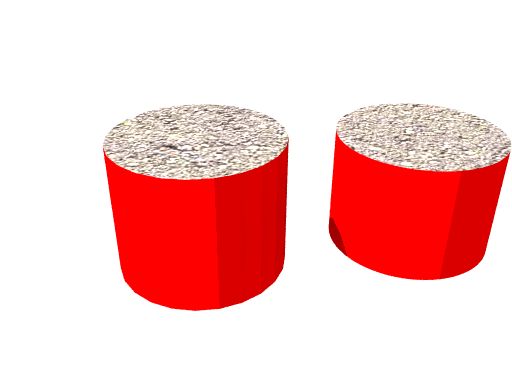 .
.Is this due to the limitations of SU regarding how it deals with softening and smoothing?
Finally, is there a way in POV to change the format of the POV render from .bmp to .png or jpg.?
-
Hello John, have you put su2pov folder(with light components: su2pov_sun.skp, povray_reserved.txt, su2pov_pl.skp, su2pov_sl.skp) into Sketchup components folder?
it works fine! -
No. I followed the instructions in the PDF of the zip file I downloaded and they were added to the Plugins/Su2pov subdirectory.
-
i have su2pov in folders of components and plug-ins. if not, lights aren't created...
Sometimes i see "su2kt" notifications in console when creating of lights(something about status)
another question to Didier: what about area-light's feature to spotlight?
-
Hi,
@unknownuser said:
Is this due to the limitations of SU regarding how it deals with softening and smoothing?
Yes. It could be done but very tricky to code, because Pov-Ray needs normals interpolation at vertices and SketchUp doesn't deliver this kind of information. Next update maybe...
Tip: use a (reasonably) high number of segments for your arcs/circles in SU.@unknownuser said:
I open the dialog, changed the settings, and clicked the OK button but nothing happened when clicking the mouse.
I followed the instructions in the PDF of the zip file I downloaded and they were added to the Plugins/Su2pov subdirectory.
Correct. I confirm that su2pov lights components are in the Plugins/su2pov folder.
@unknownuser said:
Finally, is there a way in POV to change the format of the POV render from .bmp to .png or jpg.?
Yes. Go to the Tools menu and select "Edit master POVRAY.INI". A text file is opened. Copy one of these lines somewhere in the file (no matter where):
Output_File_Type=N -> to get a PNG image
Output_File_Type=C -> Compressed Targa-24 format
Output_File_Type=T -> Uncompressed Targa-24 formatYou can also add:
Output_Alpha=on -> Sets alpha output on for further Photoshoping for instanceSave and close the ini file. Run the render again. This has to be done one time only, all your next renders will have the format you specified in the ini file.
Note that if you put the povray.ini file where your pov file is, this ini will only be used with this model.I have releases a new sample "windmill" scene file, because the first one was including a bad spot component
Hope this helps, -
Dider:
1. I am using a PC and I still am having problems with the Add Point and Spotlight options.
For Point lights I found I have to press the ESC key for it to execute.
For Spotlights, I have to press the ESC key for the 1st prompt to select the target, then when the next prompt for the aperture angle appears my cursors changes but when I click the next step of the script is not triggered and if I press the ESC key the script goes in a loop.2.a. If the Add Point and Spotlight options/scripts can't work for me (possibly because of other scripts I am loading), if I import the .skp light components should they function in a similar manner as if they had been loaded via the scripts?
2.b. Will the components only work if they are placed on the su2pov layer or will they on other layers too?
3. Am I correct that quotes need to be put around the N in ......Output_File_Type="N" ....?
-
Hi
@unknownuser said:
if I import the .skp light components should they function in a similar manner as if they had been loaded via the scripts?
Yes.
@unknownuser said:
Will the components only work if they are placed on the su2pov layer or will they on other layers too?
If they are on other layers, their geometry can possibly be exported (if this layer is active) and will inhibit light from lighting the scene. The script automatically hides the su2pov layer to prevent this problem.
@unknownuser said:
Am I correct that quotes need to be put around the N in ......Output_File_Type="N" ....?
No, no quotes needed, just: Output_File_Type=N
I'll publish a minor release soon: you'll have additionnal output options such has image size, image format, antialias on/off, alpha channel on/off.
For the image size you'll be able to render the same size as your SU window, or common sizes, or choose your size as usual within pov-ray.
But remember, I want to keep this thing as simple as possible... -
Didier:
I DO appreciate your designing the script to keep "keep it simple". It is partcularly useful for "beginners" or "casual" users like myself and I thank you for doing so.
I was a bit frustrated that the Point and Area light scripts didn't work as designed for me but since I can import the light components manually it is not that big of a deal.
I do wish cylindrical (smoothed) surfaces could be handled better since they are prevelent in many of my models, but what the POV renderer does offer will be helpful in certain instances. **Question:**Do you think Fred06's the forthcoming subdivision scripts would be helpful in POV generating better renderings of smoothed surfaces?
-
Hi again,
@unknownuser said:
I was a bit frustrated that the Point and Area light scripts didn't work
Small bug found and fixed. I will publish the patch asap.
@unknownuser said:
Do you think Fred06's the forthcoming subdivision scripts would be helpful in POV generating better renderings of smoothed surfaces?
Yes, as it will creta more faces to represent curved surfaces.
Now let's go to sleep
-
also
i catch this when selected Phong Matt in mat.converter, something is wrong.
resent mat.options is normal@unknownuser said:
If you change the color of a Point Light component (by painting the selected component without editing the component), then the SU display of ALL Point Lights are changed to that color as well even though the actual color properties of individual Point Lights (as seen in its Entity Info) are different.
it likes feature of light-group(described in manual of pov-ray).
i remember about unique-function...John, you work with studio-lighting setup?
i add some info in pov-ray editor, for example about area-lights...it's simple... -
Hi,
@unknownuser said:
If you change the color of a Point Light component (by painting the selected component without editing the component), then the SU display of ALL Point Lights are changed to that color as well even though the actual color properties of individual Point Lights (as seen in its Entity Info) are different.
The PointLight component in "Windmill.skp" is not the good one
because to avoid what you describe, the material of the component must be "default". But I formerly painted the bulb with a yellow material. The su2pov_pl.skp component in the Plugins/su2pov folder is OK.
Sorry for all these little inconveniences...






Advertisement