Where have all the textures gone?
-
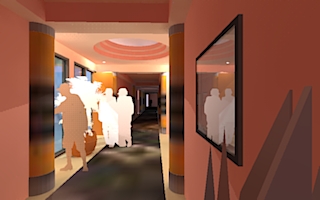
I have lost the textures in one of my KT renders.
As a check on what was happening I then made another render of just a rectangle with one of the textures applied. It worked fine. Then I opened the xml on both files and looked for glaring errors such as different paths or differences in the texture name. Nothing jumped out at me as being incorrect. I hate to go back and try to rebuild the whole project.
Has anyone experienced the problem or does anyone have ideas on why this would happen?

-
Hi Roger,
I suggest that you simply put your XML-file in the same folder as your textures... This will ensure that KT will find them...

Did you re-export your model - or part of it - and then use the "merge" tool..??

It seem as if you've exported this scene with the Export default UVs set to "YES"...
If this is the case I suggst that you re-export again with "No" instead...

Hello! It looks like you're interested in this conversation, but you don't have an account yet.
Getting fed up of having to scroll through the same posts each visit? When you register for an account, you'll always come back to exactly where you were before, and choose to be notified of new replies (either via email, or push notification). You'll also be able to save bookmarks and upvote posts to show your appreciation to other community members.
With your input, this post could be even better 💗
Register Login


Advertisement