[Plugin] Voronoi - Convex Hull
-
I managed to figure out a way of generating 3D voronoi objects from SU geometry but it is FAR from automatic and doesn't involve SU as much as you would think/like. First you will need to download and install Python. Second download an unzip somewhere this collection of Python scripts specifically for creating 3D meshes from voronoi diagrams - voronoi3d.zip (The following has worked for me in SU6:
1)First create a cloud of points - you can either use the Qhull program rbox.exe (i.e. command prompt & type "rbox.exe 1000" for a cloud of a 1000 points) or you can use the Plugins>Qhull>Pointify and then Export C-Points to generate a point cloud from your selected SU geometry.
2)Next use a text editor like Notepad to edit the points.txt file. The first line will be something like "3 129" The first number is always 3 (I believe this is how many dimensions the file has 2 for 2d, 3 for 3d but don't quote me) and the second number is the amount of points in the cloud.
3)Change this line to "3 rbox 129" (i.e. insert "rbox" in between these two numbers.)
4)Hit the enter button to create a new line below this one and then type the number of points again (i.e. 129).
5)Save the file.
6)Next open a command prompt to the SU>Plugins>Qhull directory and type or paste the following completely including the word "type" - "type points.txt|qvoronoi p Fv >out.txt", which will generate a voronoi diagram to a file called "out.txt".
7)Next copy both the points.txt and out.txt files to the directory where you unzipped the voronoi3d.zip file containing the handy Python scripts.
8)Double-click on the manifold3d.py Python script (from voronoi3d.zip), which will open a command window.
9)Wait for this to complete ( this can take a minute or two) and you should have a Wavefront obj file called obj.obj.
10)Use MeshLab to convert to 3ds or use the obj import plugin for SU from Jim Foltz to bring the 3D voronoi mesh into SU.
So that was what I had to do to generate a 3D Voronoi model from a point cloud in SU. Whewwww!
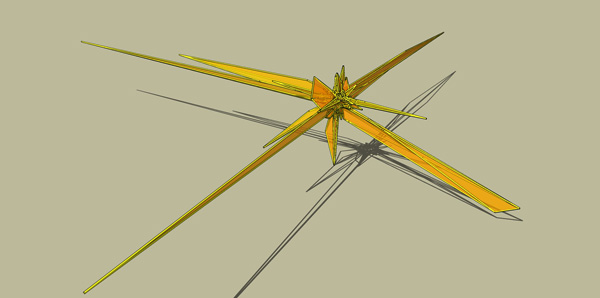
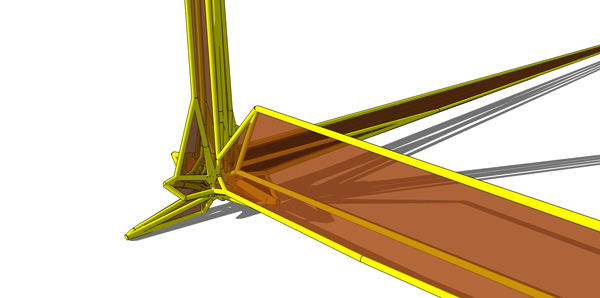
 I have attached a couple of pics showing the results from generating a random point cloud from rbox.exe (the one with the greenish/greyish Google Earth-like background) and the other pic showing a 3D Voronoi model generated from a point cloud made from the Pointify plugin run on lines generated from running the lsystem plugin on a straight line (i.e. create a tree, select tree, click Plugins>Qhull>Pointify). Both 3D Voronoi meshes were given a quick treatment with transparent faces and Didier's lines2Tubes plugin just to make them interesting.
Perhaps based on this - maybe a Ruby-Master could create new or modify the existing scripts to work properly.
-
thanks for the good reply!
my internet-service has been down for ONE WEEK- imagine that!!! still rrrrrr...!
just getting bits of my connection, i have to wait again till monday- i try to use your guide then and join this thread again!
greetings, harnstein
..and a nice weekend

-
@harnstein said:
thanks for the good reply!
my internet-service has been down for ONE WEEK- imagine that!!! still rrrrrr...!
just getting bits of my connection, i have to wait again till monday- i try to use your guide then and join this thread again!
greetings, harnstein
..and a nice weekend
Hey, no problem. Glad I had something offer. I hope you can at least get to the point I have been able to but I'm REALLY hoping someone will come along and integrate the qhull.exe and voronoi.exe programs better in SU and make the whole process self-contained. We'll see.
Let me know how things go.
-
verygood ineed it thanks
-
Hi there,
when I launch qhull/voronoi, the DOS box that appears for half a second says (thanks to my exceptional reflexes into pressing the printscreen button):
%(#FF0040)[qhull error: could not open file "qhull\points.txt".
while executing : | qhull TI qhull\points.txt v Qbb Qj o Fv TO qhull\qvoronoi.txt
Options selected for Qhull 2003.1 2033/12/30:]my points.txt was properly generated before. Any idea ?
Thanks
-
Are you not able to see anything if you have the Ruby Console open?
-
It's a security problem.
The plugin must write the points.txt in the qhull directory, but it's in programfile directory and the plug have'nt the autorization to write there... So Qhull can't read the file because don't exist !2 solutions :
- give full autorization to the Qhull directory (bad thing but works)
- change the place to the qhull directory and modify the .rb to point it (I don't try...)




Advertisement