sketchucation logo sketchucation
    • 登入
    Oops, your profile's looking a bit empty! To help us tailor your experience, please fill in key details like your SketchUp version, skill level, operating system, and more. Update and save your info on your profile page today!
    🔌 Smart Spline | Fluid way to handle splines for furniture design and complex structures. Download

    Easy digital watercolor

    已排程 已置頂 已鎖定 已移動 Gallery
    83 貼文 25 Posters 138.9k 瀏覽 25 Watching
    正在載入更多貼文
    • 從舊到新
    • 從新到舊
    • 最多點贊
    回覆
    • 在新貼文中回覆
    登入後回覆
    此主題已被刪除。只有擁有主題管理權限的使用者可以查看。
    • majidM 離線
      majid
      最後由 編輯

      it sounds great !! and what are the steps to reach this, plz?

      My inspiring A, B, Sketches book: https://sketchucation.com/shop/books/intermediate/2612-alphabet-inspired-sketches--inspiring-drills-for-architects--3d-artists-and-designers-

      1 條回覆 最後回覆 回覆 引用 0
      • P 離線
        pmiller
        最後由 編輯

        @majid said:

        it sounds great !! and what are the steps to reach this, plz?

        majid, are you asking PKast, Ross, or me?

        1 條回覆 最後回覆 回覆 引用 0
        • majidM 離線
          majid
          最後由 編輯

          yes i mean you plz 😄

          My inspiring A, B, Sketches book: https://sketchucation.com/shop/books/intermediate/2612-alphabet-inspired-sketches--inspiring-drills-for-architects--3d-artists-and-designers-

          1 條回覆 最後回覆 回覆 引用 0
          • P 離線
            pmiller
            最後由 編輯

            majid,
            I have sent you a PM.

            1 條回覆 最後回覆 回覆 引用 0
            • PixeroP 離線
              Pixero
              最後由 編輯

              I've been trying to achive watercolor look in photoshop and here is some thoughts of mine:

              First, I haven't yet seen any of you actually use a watercolor paper texture with the right grain. To me it look like either burlap or canvas.
              I also think anything believeable must contain human mistakes and simplifications.
              Study how the colors in a watercolor painting is usally brighter/lighter than in a photo.
              A central part of watercolor paintings is the way water affects the different color pigments. (I dont know the correct english words for the different effects.) Like blooming and edgebite and so on.
              Here is a photograph I turned into a watercolor painting in Photoshop.
              What do you think?
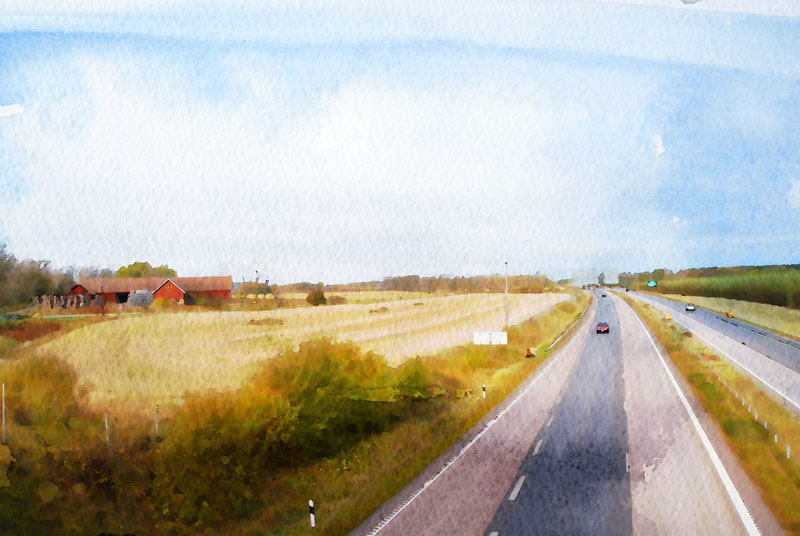

              Photo to watercolor

              1 條回覆 最後回覆 回覆 引用 0
              • R 離線
                Ross Macintosh
                最後由 編輯

                Most Excellent!

                Do you have the paper texture in a format you can share?

                Regards, Ross

                1 條回覆 最後回覆 回覆 引用 0
                • PixeroP 離線
                  Pixero
                  最後由 編輯

                  Its a small jpg. Here you go. Open in PS and Edit define pattern then use the paint bucket with the pattern on a new layer and set blend mode to. Linear burn. Try scaling it up to 200-400% for "bigger bumps".
                  Not always 100% opacity for that layer. Experiment. But dont stop at just using a paper texture. Look at paintings and try different PS brushes. There are some great for spatter and such.
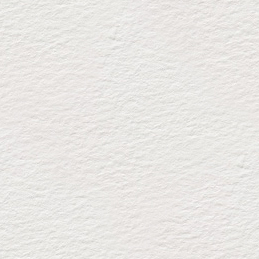

                  papperA.jpg

                  1 條回覆 最後回覆 回覆 引用 0
                  • majidM 離線
                    majid
                    最後由 編輯

                    here r other .hope u njoy


                    CLASSICW copy.jpg


                    COLDROLL copy.jpg

                    My inspiring A, B, Sketches book: https://sketchucation.com/shop/books/intermediate/2612-alphabet-inspired-sketches--inspiring-drills-for-architects--3d-artists-and-designers-

                    1 條回覆 最後回覆 回覆 引用 0
                    • C 離線
                      canoek
                      最後由 編輯

                      Pixero - wow! that is really impressive. could you post your method please 😄

                      Ross - i like your work. i followed your thread awhile back, when you were experimenting with different techniques with the vespa. looks really good.

                      regards,

                      jb

                      1 條回覆 最後回覆 回覆 引用 0
                      • P 離線
                        PKast
                        最後由 編輯

                        Pixero,
                        Very good. You're watercolor and Ross' earlier one in the post are very impressive results from just plain jpegs. If you would be so kind as to share your technique that would be great.

                        Best,
                        PKast

                        1 條回覆 最後回覆 回覆 引用 0
                        • M 離線
                          mirjman
                          最後由 編輯

                          here's my shot at it, with line overlay and a "find edges" layer on the poster layer. its not coming out as soft as some of the other posts here, maybe its because of the lines
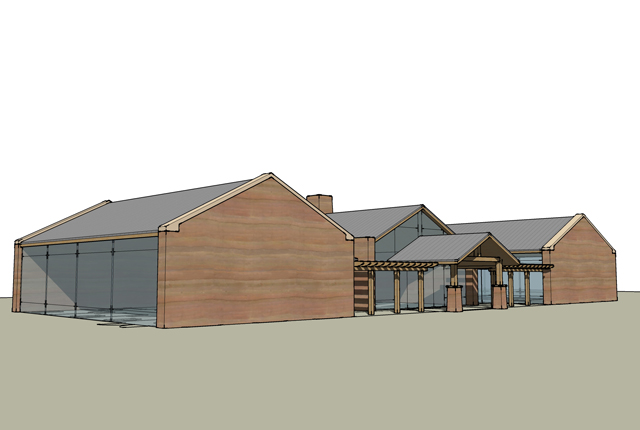
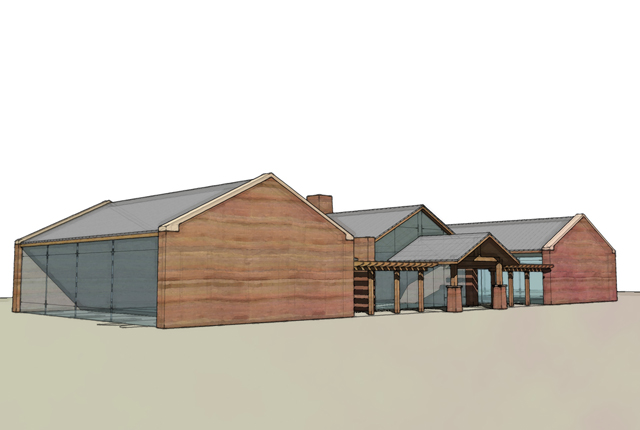
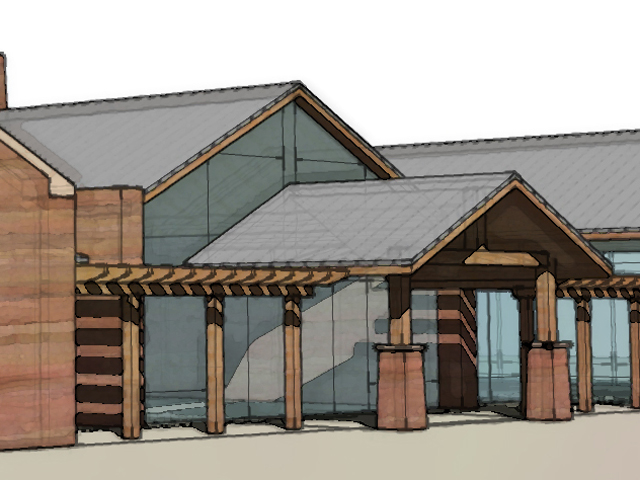
                          su.jpg


                          wc.jpg


                          crop.jpg

                          1 條回覆 最後回覆 回覆 引用 0
                          • M 離線
                            mirjman
                            最後由 編輯

                            here's another try with lightened up linework
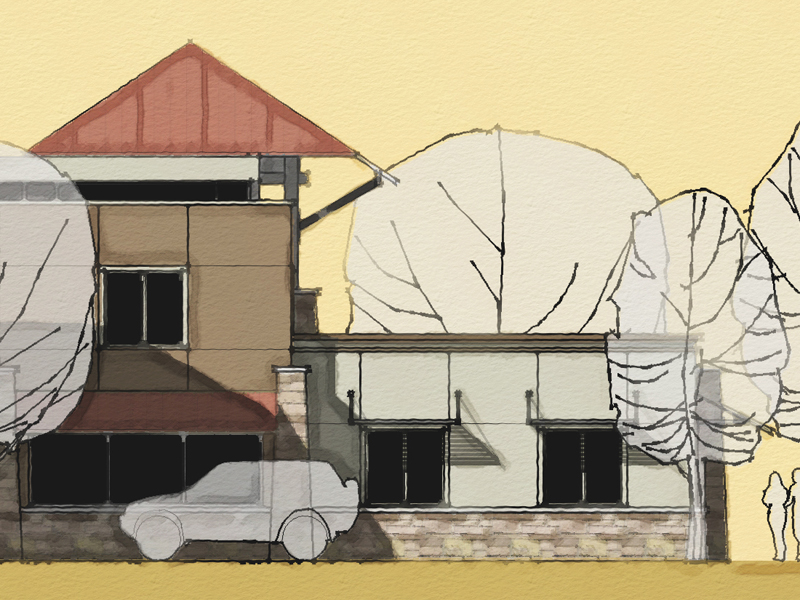

                            gbcrop.jpg

                            1 條回覆 最後回覆 回覆 引用 0
                            • R 離線
                              Ross Macintosh
                              最後由 編輯

                              Cool! 😎

                              I really like that last one! Looks great!

                              Regards, Ross

                              1 條回覆 最後回覆 回覆 引用 0
                              • C 離線
                                canoek
                                最後由 編輯

                                mirjman - i really like the last one too. really cool look. post more.

                                jb

                                1 條回覆 最後回覆 回覆 引用 0
                                • boofredlayB 離線
                                  boofredlay
                                  最後由 編輯

                                  Very nice... as was said, the last one 👍

                                  http://www.coroflot.com/boofredlay

                                  1 條回覆 最後回覆 回覆 引用 0
                                  • PixeroP 離線
                                    Pixero
                                    最後由 編輯

                                    @unknownuser said:

                                    Pixero - wow! that is really impressive. could you post your method please

                                    My method isn't a "one click" solution. I use very different settings depending on the image but the basics is:
                                    First color correct the image to brighten and saturate it a bit to make it look more like a painting colorwise. Then I usually use surface blur filter to get rid of some detail. (I Make most changes on a copy of the latest layer to be able to paint back detail with a layermask if needed.)
                                    Then I apply some filters on the surface blurred layer. It can be water color, drybrush or paint daubs or poster edges depending on image. I then mix between different effects with layer masks and also applies the paper texture above. Usually scaled up 200-300%. I Also use bits and pieces from real watercolor painings to get the typical watercolor looks like blooms. Then I Use some photoshop brushes for some spatter effects to get those tiny human mistakes that help selling it as a painting.
                                    Collageing and filtering in Photoshop is the best we can do until Moxi is ready: http://visgraph.cse.ust.hk/MoXi/ 😲

                                    1 條回覆 最後回覆 回覆 引用 0
                                    • sk.lionS 離線
                                      sk.lion
                                      最後由 編輯

                                      @majid said:

                                      and here is the PR render of the first subject . i did it not too tight , the floor bump is too heavy , and the TV & vase & plants R not good at all ... btw here it is

                                      Nice, i like the lighting in this picture, it looks so realistic. Thanks for uploading these pictures.

                                      1 條回覆 最後回覆 回覆 引用 0
                                      • majidM 離線
                                        majid
                                        最後由 編輯

                                        thanks SK LION

                                        My inspiring A, B, Sketches book: https://sketchucation.com/shop/books/intermediate/2612-alphabet-inspired-sketches--inspiring-drills-for-architects--3d-artists-and-designers-

                                        1 條回覆 最後回覆 回覆 引用 0
                                        • M 離線
                                          mirjman
                                          最後由 編輯

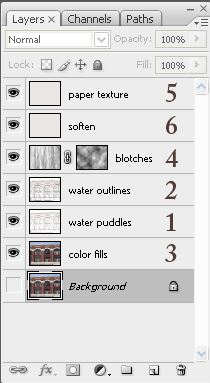
                                          another post per request, this time on a photo i found online. i also included the layer stack at the end. remember majid's rules- this is a "one touch" solution with no human judgements in the process.

                                          one note is that photoshop filters act according to absolute pixels in an image, that means you will get different results with bigger or smaller base photos, so try to resize them at the beginning to get consistent results. this image was originally 1800x before i cropped it so you could see the detail

                                          for this I used photoshop cs3 and a free plugin called carravaggio by xero

                                          1. copy background layer, apply filters in this order: surface blur to get rid of brick texture detail, gaussian blur, colored pencil set layer to "multiply" mode 90% opacity

                                          2. copy the water puddles layer, apply find edges filter, set to "multiply" mode 50% opacity

                                          3. copy the background, apply suface blur and caravaggio filters

                                          4. make a new layer, apply render>clouds filter, apply render>fibers filter and scale in the horizontal direction ~200%, add a layer mask and apply render>clouds filter to the layer mask. set to "overlay" 25% opacity

                                          5. create paper layer per pixero's directions above (thanks!!!) set layer to "multiply" mode

                                          6. copy paper layer, set to "soft light" mode 75% opacity

                                          after that you can adjust contrast/saturation to fit your taste, but the previous steps get to you to a good point in about 10 seconds. I'd be interested to see if anyone else has success with this method...
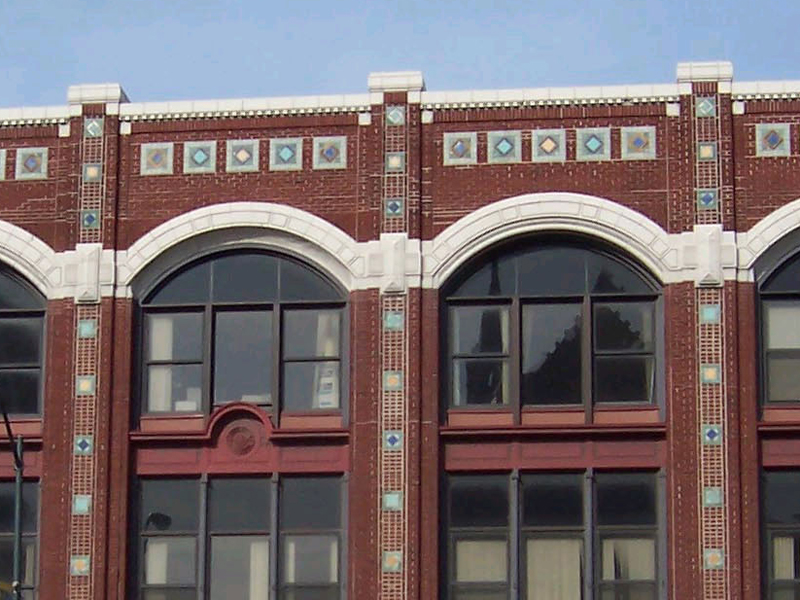
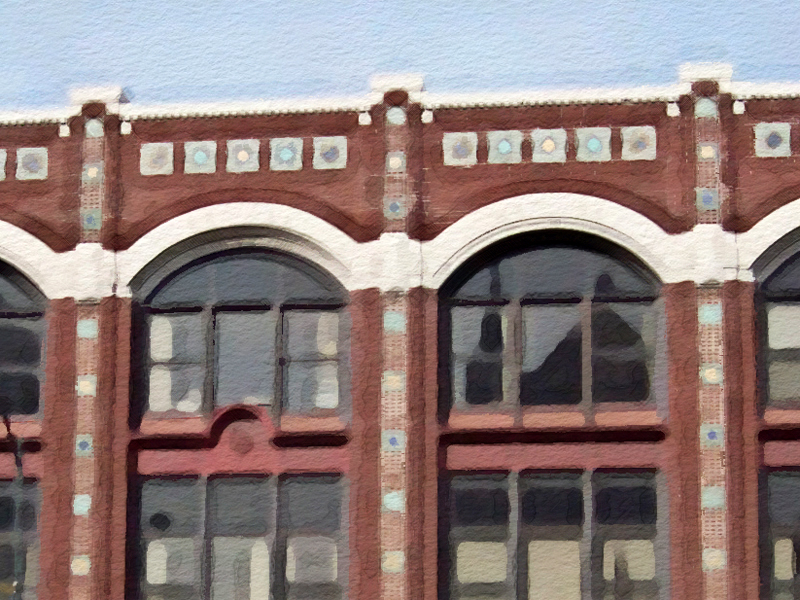
                                          version_photo.jpg


                                          version_wc copy copy.jpg


                                          layerstack.jpg

                                          1 條回覆 最後回覆 回覆 引用 0
                                          • majidM 離線
                                            majid
                                            最後由 編輯

                                            thanx so much , i'll try it , BTW i have ps 8 !! .

                                            My inspiring A, B, Sketches book: https://sketchucation.com/shop/books/intermediate/2612-alphabet-inspired-sketches--inspiring-drills-for-architects--3d-artists-and-designers-

                                            1 條回覆 最後回覆 回覆 引用 0
                                            • 1
                                            • 2
                                            • 3
                                            • 4
                                            • 5
                                            • 3 / 5
                                            • 第一個貼文
                                              最後的貼文
                                            Buy SketchPlus
                                            Buy SUbD
                                            Buy WrapR
                                            Buy eBook
                                            Buy Modelur
                                            Buy Vertex Tools
                                            Buy SketchCuisine
                                            Buy FormFonts

                                            Advertisement