sketchucation logo sketchucation
    • Login
    Oops, your profile's looking a bit empty! To help us tailor your experience, please fill in key details like your SketchUp version, skill level, operating system, and more. Update and save your info on your profile page today!
    ⚠️ Important | Libfredo 15.6b introduces important bugfixes for Fredo's Extensions Update

    Sandbox problems.

    Scheduled Pinned Locked Moved SketchUp Bug Reporting
    sketchup
    14 Posts 4 Posters 2.7k Views 4 Watching
    Loading More Posts
    • Oldest to Newest
    • Newest to Oldest
    • Most Votes
    Reply
    • Reply as topic
    Log in to reply
    This topic has been deleted. Only users with topic management privileges can see it.
    • Alan FraserA Offline
      Alan Fraser
      last edited by

      Certain Google rubies, such as langhandler.rb are known to cause this if they are present in the Plugins folder (as they used to be in V5...they are now in Tools)

      3D Figures
      Were you required to walk 500 miles? Were you advised to walk 500 more?
      You could be entitled to compensation. Call the Pro Claimers now!

      1 Reply Last reply Reply Quote 0
      • GaieusG Offline
        Gaieus
        last edited by

        Yeah, when I upgraded from v5 and was stupid enough to simply copy all my Plugin folder to the new version, I got the same error messages until I got rid of langhandler.rb. That must be the culprit as Alan says.

        Gai...

        1 Reply Last reply Reply Quote 0
        • david_hD Offline
          david_h
          last edited by

          Thank you my SU amigos. I will look at that.

          D

          If I make it look easy...It is probably easy

          1 Reply Last reply Reply Quote 0
          • david_hD Offline
            david_h
            last edited by

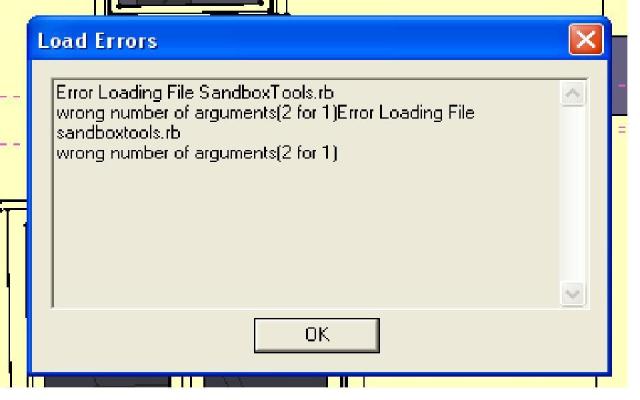
            Still having the problems. Langhandler is in Tools, not plugins. I htink that is where it is supposed to by, cuz when I disable it, Nothing works. this is the error message I am getting.

            Error Loading File SandboxTools.rb
            wrong number of arguments(2 for 1)Error Loading File sandboxtools.rb
            wrong number of arguments(2 for 1)

            If I make it look easy...It is probably easy

            1 Reply Last reply Reply Quote 0
            • david_hD Offline
              david_h
              last edited by

              this is where I have my Sandbox folders on my OFfice version. IT works fine.

              Sandbox Folder : C:\Program Files@Last Software\sketchup 6\Tools
              Sandboxtools.rb C:\Program Files@Last Software\sketchup 6\Tools
              sandbox.strings C:\Program Files@Last Software\sketchup 6\Resources\en-US
              sandboxdefaults.ini C:\Program Files@Last Software\sketchup 6\Resources\en-US
              sandboxmenus.rb C:\Program Files@Last Software\sketchup 6\Tools\Sandbox

              If I make it look easy...It is probably easy

              1 Reply Last reply Reply Quote 0
              • david_hD Offline
                david_h
                last edited by

                Helloooo! Anyone out there? Icould really use some help on this.

                Thx,

                David

                If I make it look easy...It is probably easy

                1 Reply Last reply Reply Quote 0
                • jujuJ Offline
                  juju
                  last edited by

                  David_H, are you sure you have the installation directory path correct?

                  @unknownuser said:

                  C:\Program Files**@Last Software\sketchup 6**\

                  Shouldn't that rather be "C:\Program Files*Google\Google SketchUp 6*" installation path?

                  Save the Earth, it's the only planet with chocolate.

                  1 Reply Last reply Reply Quote 0
                  • david_hD Offline
                    david_h
                    last edited by

                    Well, I like to install SU to the old @Last directory. It's kinda my way of being anti-google. But the pathing to all of the Subfolders and such is correct. Maybe I need to rethink this. But I think I have that covered. Thanks for the thought tho'.

                    D
                    πŸ˜„

                    If I make it look easy...It is probably easy

                    1 Reply Last reply Reply Quote 0
                    • david_hD Offline
                      david_h
                      last edited by

                      you're probably right tho. I should reinstall. . .and Just load it to Google/google etc. Bite the bullet as it were. Then just copy all of the comps and plugins over.

                      😒 πŸ˜’

                      If I make it look easy...It is probably easy

                      1 Reply Last reply Reply Quote 0
                      • jujuJ Offline
                        juju
                        last edited by

                        There are some scripts from SU5 that have moved out of the plugins folder to elsewhere (these are default things that gets installed when you install SU6) so don't fret about that too much.

                        Be sure to copy ruby scripts over one at a time and check workability (i.e. load SU6).

                        Let us know how it went.

                        Save the Earth, it's the only planet with chocolate.

                        1 Reply Last reply Reply Quote 0
                        • david_hD Offline
                          david_h
                          last edited by

                          SUCCESS!!! Thanks for the help! 😍

                          If I make it look easy...It is probably easy

                          1 Reply Last reply Reply Quote 0
                          • jujuJ Offline
                            juju
                            last edited by

                            Good to know, thanks for reporting back.

                            Save the Earth, it's the only planet with chocolate.

                            1 Reply Last reply Reply Quote 0
                            • david_hD Offline
                              david_h
                              last edited by

                              Well. . .It's happening again. Anyone know why I am getting this error message on startup?Sandbox Problems.JPG

                              help!!!

                              If I make it look easy...It is probably easy

                              1 Reply Last reply Reply Quote 0
                              • 1 / 1
                              • First post
                                Last post
                              Buy SketchPlus
                              Buy SUbD
                              Buy WrapR
                              Buy eBook
                              Buy Modelur
                              Buy Vertex Tools
                              Buy SketchCuisine
                              Buy FormFonts

                              Advertisement