Left Click Hide Ruby
-
better still, after you assign H as your shorcut for hide, go around with the move tool, when the object is highlighted (read selected) press the key - that way you do not have to click select etc etc.
-
Dear Todd,
I have set Shift+1 to be the short-cut for Hide as I use Shift+2 and Shift+3 for hiding/revealing rest of model when editing a group or component. It is still not as sweet as your scrtool.rb for reversing faces, and I still have to select all instances using Rick Wilson's instances.rb to do a multiple copy hide, but what the heck, it's a solution.
Gaieus, the Ferrari was just the ticket although a little two dimensional for my liking. I know, beggars cannot be choosers.
Regards,
Bob -
If you REALLY REALLY want it, I'll write it.
As an aside, I'm writing a script now that "fixes things" (what it "fixes" is still top secret
 ), and when something that you think might need fixing gets the mouse moved across it, and it doesn't need fixing, it is hidden instantly - no clicking required. It's pretty slick.
My analogy is having a to-do list and checking things off. Once all the things are "checked off" (or with this script - gone from view!), you're done. (Or, you can be lazy have the script run on auto-pilot and just watch the coolio progress bar.)
Maybe another few days before this next great CAD cleanup script is released.
Todd
-
@unknownuser said:
...As an aside, I'm writing a script now that "fixes things" (what it "fixes" is still topsecret
)...Ah, Todd, that's how those "top" words appear in your models! I now understand!
(BTW - I have the solution for your problem; go and have a look, these are public spaces here )
) -
Dear Todd,
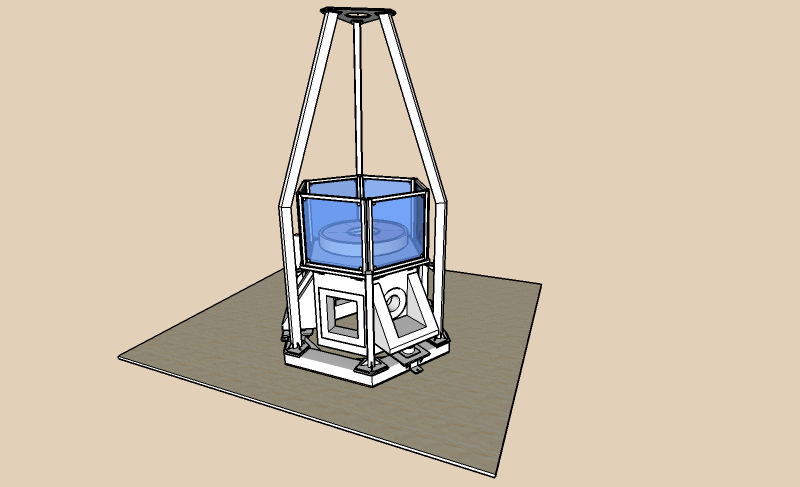
I really, really want it as I work with assemblies of components and the ability to do what I suggest would be of great help.
I have attached a skippy of something I am working on at the moment (a test facility for my lab). It has lots of components and instances of components, such as the brackets for the enclosure. Use hide with the short-cut key and you will see what I mean.
Kind regards,
Bob
-
Thanks Todd, but no hurry. Do it when you can.
Kind regards,
Bob -
Ok, I'll write it. I'll model it after scrtool.rb and post it in the free section of Smustard. Might take a day or two. It will take longer to package this script and write the tutorial than it will to write it.

-
I've got it written and tested. Now, I just need to package, document and upload it. (Fun stuff is done - now the paperwork!)
Todd
-
Dear Todd,
Many thanks for all your hard work. I look forward to using the new script.
Regards,
Bob -
Thar she blows.
Enjoy! Tested on a Mac and on Windows. Made on a Mac!
Todd
-
Works like a charm, cheers todd.
-
Dear Todd,
Many, many thanks. It is a very useful tool.
Kind regards,
Bob -
You are welcome guys. I didn't realize how non-easy it was to hide stuff prior to this. All those clicks really add up.
I thought about the Eraser Tool too, you can hide with it by holding down the Shift key - but it only works on edges! (Unless of course the edge is part of a Group or Component, then the whole Group or Component is hidden.)
Anyway, enjoy!
Todd
-
Thanks Todd. BTW, why didn't this show up on the Smustard News RSS feed?
-
It should have. The feeds are supposed to be automagic - I load a new script - and the feeds feed. That's my understanding of it.
Stay tuned for "Unhide Manager"
Todd



Hello! It looks like you're interested in this conversation, but you don't have an account yet.
Getting fed up of having to scroll through the same posts each visit? When you register for an account, you'll always come back to exactly where you were before, and choose to be notified of new replies (either via email, or push notification). You'll also be able to save bookmarks and upvote posts to show your appreciation to other community members.
With your input, this post could be even better 💗
Register Login


Advertisement